
GeoBuilder
Central
GeoCities
GeoBuilder Help
GeoCities
Help Chat
GeoCities
Feedback
| MOVE FILE TO SUBDIRECTORY |

| Move the file 1lady_1.gif to the subdirectory Image |



..Yahoo!
|
||||||||||||||||||||||||||||||||
| Sweet Tech's GeoBuilder Home > Index > Section I > Section Ib > Move Files to Subdirectory | ||||||||||||||||||||||||||||||||
| Index GeoBuilder Central GeoCities GeoBuilder Help GeoCities Help Chat GeoCities Feedback |
||||||||||||||||||||||||||||||||
|
||||||||||||||||||||||||||||||||
| 1. Select the file you want to move to the subdirectory | ||||||||||||||||||||||||||||||||
|
|
|||||||||||||||||||||||||||||||
| 2. Click on the "Move files to Subdirectory" button | ||||||||||||||||||||||||||||||||
|
||||||||||||||||||||||||||||||||
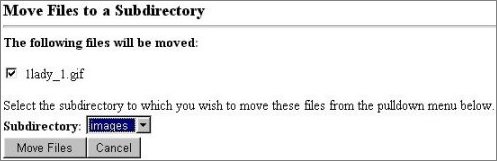
| A page will open with this displayed: | ||||||||||||||||||||||||||||||||
|
||||||||||||||||||||||||||||||||
|
||||||||||||||||||||||||||||||||
| 3. Select the subdirectory you want to open | ||||||||||||||||||||||||||||||||
| 4. Click on the "Move Files" button | ||||||||||||||||||||||||||||||||
| A transaction verification will display after each file move | ||||||||||||||||||||||||||||||||
|
||||||||||||||||||||||||||||||||
|
||||||||||||||||||||||||||||||||
| 5. Refresh your directory when you are finished moving files | ||||||||||||||||||||||||||||||||
| © 1999 | ||||||||||||||||||||||||||||||||
| GeoCities ..Yahoo! |
||||||||||||||||||||||||||||||||
| Judi Mills | ||||||||||||||||||||||||||||||||