Project Ghost Client Demo
Controls
(Mouse):
* Left-Click on Zombie decrease HP.
* Right-Click on Zombie increase HP.
Controls
(Keyboard):
* Arrows move the gray man sprite.
* F1 toggles FPS count display.
* F2 to display annoying message.
* F3 to quickly clear the text.
* F4 to clear the annoying message.
Please make sure the Applet is focused and not your Browser
when you press use the
Function keys.
The applet now uses the Ghost scripting language to describe the scene and react to player movements. Click here to view the script the applet is using now.
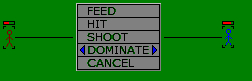
Eventually, the user-interface when performing actions on items/NPC's should look something like this:
|
|
The blue stick figure is the PC, the stick figure in brown is an NPC which the PC can perform actions on. All actions are displayed in the pop-up menu in the middle of the line between the two figures. Feed is self-explanatory (for Vampires at least) while HIT/SHOOT mean brawl/melee and ranged attacks respectively. Activating a Discipline is a matter of choosing the desired Discipline from the option above CANCEL, e.g. DOMINATE. Currently the TALK option isn't displayed because the two characters are alredy enemies (well, not really, I just forgot to put the TALK option in there... oops!) |