To configure your Netscape browser for "proxy-fied" anonymous browsing: 1. Use a Netscape menu path of: Edit -> Preferences -> Advanced -> Proxies.
2. Click the "Manual Proxy Configuration" radio-button. Then click the "View" button next to it. The "Manual Proxy Configuration" Dialog box displays:
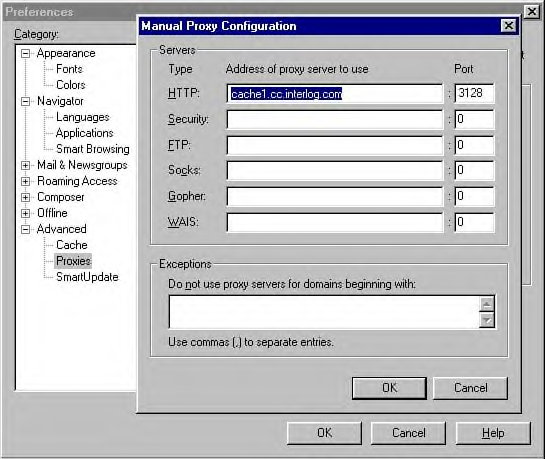
3. In the "HTTP:" row, under "Address of proxy server to use", paste or type in the proxy server name (or exact IP address). Then, in the "Port" field, enter the correct Port # for that proxy server. Typically, port numbers are "8080" or "3128", but not always.
The proxy shown in the above example is a good one, and pretty fast. I've tested it. As far as I know, it passes on absolutely NO INFORMATION about you or your real IP number to the web sites you visit...
ADDRESS: cache1.cc.interlog.com
PORT: 3128
4. Click "OK" in the Manual Proxy Configuration dialog, and click "OK" again in the Preferences window.
5. That's it. You're done. If you ever want stop using that proxy in the future, just de-select that "Manual Proxy Configuration" radio-button, and select "Direct Connection to the Internet" instead. To put in a new one, paste a new name/port number combo into that "HTTP" row.
GENERAL INFO RE: PROXIES:
Usually they slow down your browsing experience. Some are so slow they're practically useless. Some are so fast you won't even notice them. You'll have to do your own testing to find the fast ones.
Usually they mask your IP number, but not always. Again, you'll have to do your own testing to find the ones that leave you truly anonymous. Note: Using a bad/transparent proxy provides NO PROTECTION WHATSOEVER, so unless you do some testing to find the good/non-transparent ones, you're just wasting your time!
PROXY TESTING:
Here are some sites that tell you how much information is being passed
on about you. Use them to test the speed and anonymity of potential
proxy servers:
http://cavency.virtualave.net/proxy/
(press the Env1, Env1, JEnv, and S-Env buttons to perform various kinds
of tests)
http://www.cyberarmy.com/cgi/whoami.pl
http://privacy.net/analyze/
(I like the first one the best... )
PROXY NAME/NUMBER SOURCES:
Find hundreds of potential proxy/port number combinations (you must test them using the URLs given above!). Your goal should be to find several that are both FAST and ANONYMOUS (keep them in a text file or something for reference), and rotate among them every few days, or use ONE for this nickname, ONE for that nickname, ONE for flaming, one for stirring the pot, etc., etc. heheheh... Got your IP # banned? Proxy in and continue on with your agenda! Just kidding! I really don't condone that kind of behavior...
http://www.cyberarmy.com/lists/proxy/
http://proxys4all.cgi.net/
This should be enough info to get you started if you're interested. Any specific questions, ask them here or email me, I guess... I'll answer them if I can.
To configure for proxy browsing with Internet Explorer:
1. Use a menu path of: Tools -> Internet Options. The "Internet Options" dialog box displays:
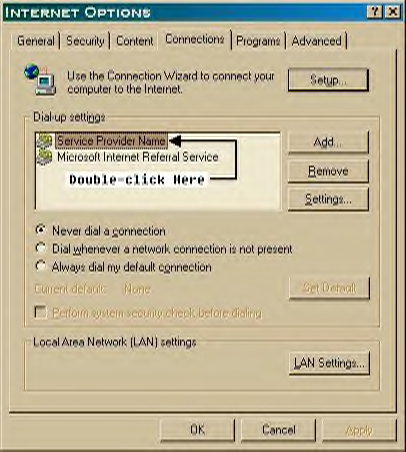
2. Select the "Connections" Tab. In the "Dial-up Settings" box, double-click on the name of your internet connection (if there's more than one listed, you probably want the one that carries the name of your Service Provider). The "Settings" dialog box displays:
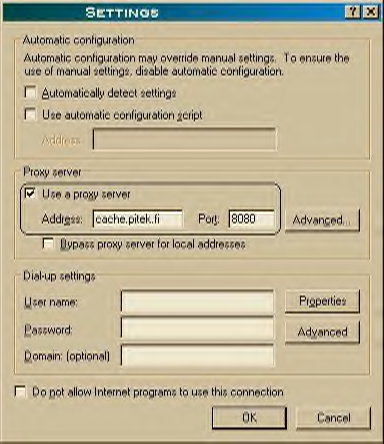
3. In the "Proxy Server" section, select the "Use a proxy Server" checkbox. In the address field, type or paste the name of the proxy server, and in the "Port" field enter the port number (all explained in my last post).
4. Click the OK button, and you're done (in the future, if you want to browse WITHOUT going through that proxy server, just de-select the "Use a Proxy Server" checkbox).
ADDITIONAL INFO:
Looks like the proxy I recommended earlier (cache1.cc.interlog.com) has been down for the last few days. If you tried to use it and it didn't work, now you know why. Maybe it's gone for good? These things happen. Proxies come and go, and you must keep finding and testing new ones as this happens...
The one I show above (cache.pitek.fi, Port 8080) is currently good. It's even faster than the first one I recommended. It's also totally anonymous.
Bottom line about proxies: If you've tested and picked a good one, your ACTUAL IP NUMBER will never be visible to anyone, or to any of the websites you visit. All they will see is the IP number of the proxy server...
Also, if you use a proxy and do something stupid and get the cops on your ass, they will need a warrant to get the logs from the owners of the proxy server, IN ADDITION to needing ANOTHER WARRANT to get the logs from your service provider. Think about that: if you use a proxy server that's located in a foreign country, you have exponentially increased the difficulty that U.S. law agencies will have in trying to track you down if you say or do something on the Net that attracts their attention or their wrath...
If I have time this weekend I'm going to do some testing on a shitload of potential proxy numbers, and list the best ones here... I've been meaning to do this for a long time. It's always good to have a bunch of back-ups ready for instant use.
Buster_Hymen
(Newbee)
03-22-01 22:49
No 179982
Re: wanna see your real IP? Reply
Hey Sam, I'm highly flattered that you saved that. Makes me feel good that you found it useful...
The proxies I mentioned in that post are both toast now, I think. Here are another couple of fast ones that I've tested and currently use:
proxy.gvsu.edu 8080
proxy1.byu.edu 8000
http://poisk.hypermart.net/proxy.htm
http://www.cyberarmy.com/lists/proxy/
http://proxys4all.cgi.net/
"http://tools.rosinstrument.com/proxy/
http://tools.rosinstrument.com/cgi-bin/fp.pl/showlog?
http://www.all-nettools.com
http://www.cyberarmy.com/cgi/whoami.pl
http://privacy.net/analyze/
*I've had the most success finding proxies which don't show my IP address and which show "proxy not detected" at www.all-nettools.com using http://poisk.hypermart.net/proxy.htm and picking the proxies with port 8080
Update (10/14/01): http://poisk.hypermart.net/proxy.htm doesn't seem to be a free service anymore.