Warning: If you are here then you agree that I cannot be held at fault
should you damage your hardware as this is untested/unprove content.
Please note that if you have tired to contact me in the
past using the address below and got no reply chances
are you were filtered out as spam. So please join the
eMachines Upgraders forum and post me a message
there in the overclocking section.
Ok...... Now on with the info! This orignally was designed for overclocking on a
Trigem Imperial motherboard which uses the ICST 950201 PLL-IC (Clock Generator)
for use with Intel P4 and Celeron CPU's. This project was started after a person
going by the name of Jeremy Clark posted a question as to how he could overclock
his CPU in his eMachines T1742 computer with a 1.7GHz/100MHz CPU at the
eMachines Upgraders group. After finding out no software overclocking
programs supported his ICST 950201 PLL-IC (understandable as to why after
looking at the papers and how the FSB is set...) I took it apon myself to look at the
offical ICST papers and come up with the following theorys in how he can overclock
his CPU. So now onto the theory....
Tools Needed:
1x Soldering Iron
1x New very small/fine tiped solder tip
1x Some solder lead
1x Something small enough to pull on the small pin of a SMD chip.
1x Small wire or something to connect 2 pins.
2x 10K Resistors
Some free time.
Before doing this you should remove the motherboard from the case and
remove everything from the motherboard (such as cpu and ram and such)
just to be safe and for extra free space. Make sure youre discharged
of any static electricity and wear an anti-static wrist strap.
It should be noted I havent tested this and its only theory as I havent
a motherboard with the ICS 950201 Clock Generator. If you test this
and find it to work please please email me at:
-e-n-i-g-m-a--d-e-a-d-s-o-u-l-s- -a-t- -y-a-h-o-o- -d-o-t- -c-o-m-
(remove all dashes, replace "-a-t-" with "@" and "-d-o-t-" with "."
I do that so the spam bots do not pick up my email address)
Its recomended you do some cpu benchmarks before and after to see what kind
of performance gain you might have gained! You might use SiSoft's Sandra or
some other popular benchmarking test to get a good idea. When emailing me
send me your test results and screenshots as long as they are under 640x480
and 50kb in size.. also send me pictures of your moded ICST 950201 PLL,
and give me your website info if you wish for me to post it at the bottom of
this page.
Here is an Image of the supported front side buses of the ICST 950201.
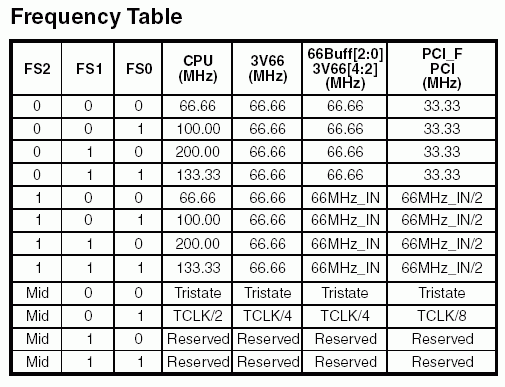
As you can see it supports a 66MHz, 100MHz, 133MHz, and 200MHz FSB!
Due to the fact that it would be imposible to hit a 200MHz FSB I will
not be covering it... however after looking at the following you should
be able to work out a way to do it if you so wish to try it. For those
questioning about why Im saying a p4/celeron has a 100/133MHz FSB and
not a 400/533MHz FSB is because the p4/celeron operate on a Quad Data Rate
bus so thats why they say it has a 400/533MHz FSB. Its the same with the
200/266/333MHz FSB of the Athlons/Durons but they operate on a Double
Data Rate bus. Whats QDR/DDR mean is that the ram is access 4 or 2 times
per a clock cycle which means in theory its running as if it were a faster
bus than it is.
As you can see the FSB can be set three ways.. I will only be covering the
first two as I dont think the third option is what trigem used.. however if
you are reading this for another motherboard I cannot say for fact which
option was used. In truth the only differnce in option 1 and option 2 is
in option 1 FS2 is set to logic 0 (false/off) and in option 2 FS2 is set
to logic 1 (true/on).
Here is an image of the ICST 950201 PLL-IC Pin out
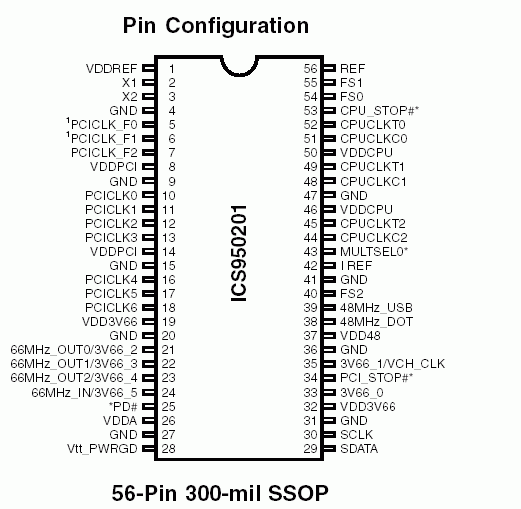
Ok I now have a new jumpering setup that doesnt use the old traces and will
make it a lot easyer to set the various FSB's. Heres a picture of what a
jumpering system for this might look like.
(I drew this one extra big to make it easy to read.)
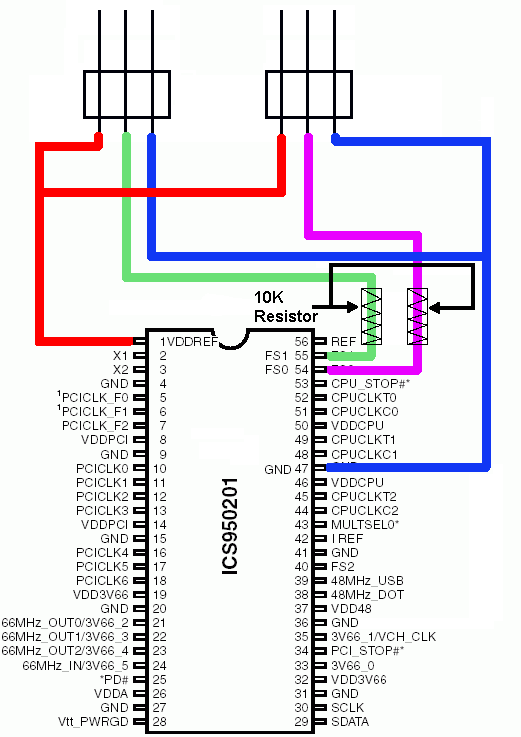
Blue = 0, Red = 1, Green = FS1, Purple/Pink = FS0
For this you will need 2 10K resistors. What you do is disconnect FS1 and FS0
from the motherboard as in the last one and then to the center pins of some
jumper blocks. However this time inbetween the pins and the jumper blocks you
will use 10K resistors as shown in the picture. This time we will be using
GND (ground) to set logic 0, so LEAVE the ground connected to the motherboard
but connect a wire to it and then to one end of the jumper block. I used GND
on Pin 47.. but any GND will do. To set logic 1 we will be using the VDDREF
on Pin 1.. this outputs 3.3v. LEAVE VDDREF connected to the motherboard but
connect a wire to it and then the last pin on the jumper block. Now all you
need to do is set the jumper to set the FSB... this even makes it very easy
to try for a 200MHz/800MHz FSB.. if you so wish to think you can get your
machine to even boot at that.
Wrote up at:15:16 PM EST, Saturday, April 26, 2003 - Revision 2.0 - Got rid of old content and moved to one single mod.
07:30 AM EST, Monday, December 09, 2002 - Revision 1.0 - Added new Jumpering design.
04:15 AM EST, Sunday, December 01, 2002 - Revision 0.2 - Added jumper diagram.
05:50 AM EST, Wednesday, November 20, 2002 - Revision 0.1 - Minor layout changes.
06:30 AM EST, Friday, November 15, 2002 - Revision 0
Wrote by: Enigma Deadsouls
Website: http://www.oocities.org/enigmadeadsouls
Names/Info from people who have emailed me their test results:
Josh Koontz - 9 June 2005
successful ics950201 mod on intel d845hv
I'm hopeful you still had interest in the ics950201 success reports, but i apologize in
advance if i was wrong on that assumption. So if it's only nice spam then it's just nice
to say something positive to someone who actually took the time to actually think
intelligibly about a problem, look up the PLL chip whitepapers and make a hypothesis
with guide. Especially in this day and age where thinking has gone out of fashon.
Anyhow, bla bla. Here is an overclock the intel d845hv and d845wn motherboard.
Yes they are old and they are rather lackluster in any respect (SDRAM on a P4?
enough said) but there are a TONS of these in service, mostly OEM remarks like
gateway and such.
The ghetto way I did this is to just to take the corner of a razor blade, cut PIN55
close to the motherboard and bend the lead to short with PIN54. This is a nasty
nasty hardware hack that i'm sure is violating the voltage/signal tolerances on the
PLL. But so is bridging athlon bridges with a graphite pencil.
Also beware that intel being the overclocking friendly folks they are didn't include
a mechinism for the bios to figure out the memory clock divider, so you get the
(hard coded?) 4/3 ratio. Hope your SDRAM likes 166mhz. Might be best to set
the bios jumper to the funky "config mode" intel has and retard all of the memory
timings before doing this.
Also i'm not sure if you can fill all 3 slots since you're owning the 845 memory
controller - at least not without a volt mod. I've been running well with 2 sticks
of generic hynix OEM pc133 cas3 - It runs prime95 for a few hours, that's
enough for the office apps i use all day. So I consider myself lucky - hynix must
have been getting some sweet yields at the time.
In all for a simple cut and bend of a pin, I have no complaints. I'm still giddy it
runs at all ;P
enjoy.
Notes: Maybe soon to come a mod for the dc/dc converter used on
the Trigem Imperial if stock voltage isnt enough for overclocking.
You are free to mirror this page as long as you give me credit and do not change
any of the info unless you ask me first... however youre free to change text
font,size,color background color/image to match youre site. Youre also free to
remove my navigation bar at the bottom of this page as Im sure it would be
pointless on your site... in other words Im ok with changes as long as its not
to the info unless otherwise aproved by me. Also if you mirror it email me and
give me a link and Ill link to it here.