
Remote Access Service (RAS) provides remote networking for telecommuters, mobile workers, and system administrators who monitor and manage servers at multiple branch offices. Users with RAS on a Windows NT computer can dial in to remotely access their networks for services such as file and printer sharing, electronic mail, scheduling, and SQL database access.
Windows NT RAS works with IP routing for RAS servers so that RAS clients
can use TCP/IP networks. (RAS can also work with IPX routing for clients
that use NetWare networks.) Windows NT also uses the industry-standard
Point to Point Protocol (PPP) and Serial Line IP (SLIP) standards. These
standards ensure that Windows NT is interoperable with third-party remote-access
server and client software. RAS clients can use DNS and WINS for name resolution
services, and it can create TCP sessions with systems on the local network.
The RAS server provides a pool of IP addresses that are reserved for static configuration during RAS installation. They use proxy ARP to respond to ARP requests for their clients. The IP addresses are automatically assigned to RAS clients using PPP when they dial in. If the administrator sets up the RAS server to use a static pool of addresses, all clients dialing into a particular RAS server are assigned the same network ID as the RAS server plus unique host IDs. (Of course, the network administrator must also reserve that range of static addresses on the DHCP server, if present, to make sure that those addresses are not assigned.)
RAS clients can connect to multiple TCP/IP networks
that are logically joined (but physically separate) networks sharing the
same address space. When using multiple connections, the RAS client can
still use DNS and WINS for name resolution.
Using DHCP Versus Static Pool Addresses on a RAS Server
If a RAS server is connected to a LAN with multiple network numbers on the same physical wire, do not use DHCP to assign addresses to clients. Instead, use a static address pool to assign the addresses. If you use DHCP to assign addresses to RAS clients, some clients might not be able to reach other computers on the LAN that are on the same subnet.
For example, say a RAS Server uses DHCP to assign addresses. For its LAN interface, it gets the address a.a.a.11 from the range a.a.a.0, with a mask of 255.255.255.0. The RAS Server also uses the DHCP server to assign addresses for its RAS address pool. It gets the addresses b.b.b.10, b.b.b.11, and b.b.b.12 from the range b.b.b.0, with a mask of 255.255.255.0.
Because the DHCP server gives addresses from both ranges to computers on the LAN, other computers on the LAN will have addresses on the b.b.b.0 subnet.
Although the RAS Server uses only a few addresses from the b.b.b.0 subnet, it adds a route for the whole subnet through the RAS Server interface. Therefore, RAS dial-in clients cannot reach other computers on the b.b.b.0 subnet because of this bad route.
To work around this, either use a static
pool on the RAS Server, or add a static route to the RAS Server for all
logical subnets on your local segment.
RAS Clients
RAS clients using TCP/IP may be configured to use the default gateway on the remote network while they are connected to a PPP server. If so, then this default gateway overrides any default gateway that is configured for local networks while the RAS connection is established. The override is accomplished by manipulating the IP route table. Any local routes, including the default gateway, get their metric (hop count) incremented by one, and a default route with a metric of 1 hop is dynamically added for the duration of the connection. One-hop routes are also added for the IP multicast address (224.0.0.0), for the local WAN interface, and for the network that the PPP server is attached to. This can present a problem with connecting to resources via the local network default gateway, unless static routes are added at the client. Sample route tables for a Windows NT workstation before and after connecting to a remote network using PPP are shown below:
Route table before dialing a PPP Internet provider:
Network Address Netmask
Gateway Address Interface Metric
0.0.0.0 0.0.0.0
199.199.40.1 199.199.40.11 1
127.0.0.0 255.0.0.0
127.0.0.1 127.0.0.1
1
199.199.40.0 255.255.255.0 199.199.40.11
199.199.40.11 1
199.199.40.11 255.255.255.255 127.0.0.1
127.0.0.1 1
199.199.40.255 255.255.255.255 199.199.40.11
199.199.40.11 1
224.0.0.0 224.0.0.0
199.199.40.11 199.199.40.11 1
255.255.255.255 255.255.255.255 199.199.40.11
199.199.40.11 1
Route table after dialing a PPP Internet provider:
Network Address Netmask
Gateway Address Interface Metric
0.0.0.0 0.0.0.0
199.199.40.1 199.199.40.11 2
0.0.0.0 0.0.0.0
204.182.66.83 204.182.66.83 1
127.0.0.0 255.0.0.0
127.0.0.1 127.0.0.1
1
199.199.40.0 255.255.255.0
199.199.40.11 199.199.40.11 2
199.199.40.11 255.255.255.255 127.0.0.1
127.0.0.1 1
199.199.40.255 255.255.255.255 199.199.40.11
199.199.40.11 1
204.182.66.0 255.255.255.0
204.182.66.83 204.182.66.83 1
204.182.66.83 255.255.255.255 127.0.0.1
127.0.0.1 1
224.0.0.0 224.0.0.0
204.182.66.83 204.182.66.83 1
224.0.0.0 224.0.0.0
199.199.40.11 199.199.40.11 1
255.255.255.255 255.255.255.255 199.199.40.11
199.199.40.11 1
Inmediatamente después de conectar con el ordenador remoto, puede ejecutarse un archivo de comandos que gestione automáticamente el intercambio de comandos entre los dos ordenadores. Hay dos tipos de comandos: los propios de NT y los creados para Windows 95 que también pueden utilizarse aquí. Ambos vienen en los documentos SWITCH.INF y SCRIPT.DOC situados en %systemroot%\system32\ras.
La activación de la ejecución del archivo
de comandos a ejecutar se realiza en el Acceso telefónico a redes,eligiendo
la conexión y seleccionando Editar entrada y propiedades de modem.
Dentro de esta ventana, la pestaña Archivo de comandos nos
permite activar el fichero.
A component that resides above TDI and through which one computer gain
access to another computer. Is implemented as a NT file system driver.
The Administrative Tasks you can perform include:
| dumpel.exe | Dump Event Log | ResKit |
| rmtshare.exe | Remote Share Administration | NT |
| netsvc.exe | Remote Service Administration | ResKit |
| shutcmd.exe | Remote Shutdown Utility | ResKit |
| addusers.exe | Add users from file | ResKit |
| net.exe | Network Administration | NT |
| inet.exe | Internet Administration | ResKit |
| eventvwr.exe | Event viewer | NT |
| winfile.exe | File manager | NT |
| netwatch.exe | Net watch | ResKit |
| srvmgr.exe | Server Manager for Domains, Files and Services | NT |
| ptviewer.exe | Process viewer | ResKit |
| rasadmin.exe | RAS Administration | NT |
| regedit.exe | Editor de registro | NT |
| winat.exe | Schedule Manager | ResKit |
| shutgui.exe | Remote shutdown utility | ResKit |
| usrmgr.exe | Global User Manager | NT Server |
One requirement for performing administrative tasks on a remote system using these programs is that you have administrative privileges on the remote system. One way to accomplish this is to log in on your local machine as a user with the same ID and Password as an administrative user on the remote system.
For example, you are in Los Angeles on a computer named OJ and need to administer an NT system in London named BUCKINGHAM. As an administrator for BUCKINGHAM, you know that it has a user ID of CHARLES with a Password of WALES which has Administrative Privileges on that machine. If you add a user to OJ that has the name CHARLES and the Password WALES and log onto OJ with that ID and Password, when you connect to BUCKINGHAM across the Internet you will have Administrative Privileges on that machine.
If you are planning on administering a large number of systems across the Internet, it might be a good idea to establish a single User ID and Password on all of the systems and give this ID the privileges you need for administration. This way you will be able to log onto your personal workstation with a single ID and manage all of the systems remotely without maintaining multiple IDs and User Profiles on your workstation. The downside of this method is that if a hacker gets the ID and Password for your remote administration, they would have access to all of the systems you administer.
Another requirement for administration of a remote system across the Internet with these programs is that your local system must be able to find the remote system and connect to it. This can be done by adding an entry to the LMHOSTS file on your local system.
Once a system is defined in the LMHOSTS file and the database is loaded, you refer to it by the form \\name (e.g. \\BUCKINGHAM). The programs which permit remote administration often default to administering the local system on which you are currently logged in. They will have a selection, usually under the first entry of the Menu Bar, that allows you to "Select Computer..." or "Select Domain...". This will connect you to the remote system for remote administration.
Más more: http://www.ezine.com/
A RIP router maintains a routing table and periodically sends announcements to inform other RIP routers on the network of the networks it can reach. RIP also announces when it can no longer reach networks. RIP version 1 uses IP broadcast packets for its announcements. A later enhancement, RIP version 2, uses IP multicast packets for its announcements.
Each entry in a RIP routing table provides information about the entry, including the ultimate destination address, the next hop on the way to the destination, and a metric which indicates the distance in number of hops to the destination, its "cost" to the router. Other information can also be present in the routing table, including various timers associated with the route.
Initially, each router's table includes only the links to which it is physically connected. A router depends on periodic updates from other routers to keep current information on what routes are reachable through them. RIP maintains only the best route to a destination through broadcast messages at 30-second intervals, or triggered updates. Triggered updates occur when the network topology changes and routing update messages are sent which reflect those changes. For example, when a router detects a link failure or a router failure, it recalculates its routes and sends routing update messages (triggered updates). Each router receiving a routing update message that includes a change updates its tables and propagates the change.
The biggest advantage of RIP is that it is extremely simple to configure
and deploy. The biggest disadvantage of RIP is that as networks grow larger
in size, the periodic announcements by each RIP router cause excessive
traffic on the network. RIP is widely deployed in networks with up to 50
servers or so, but most larger organizations use other routing protocols.
Windows NT cannot act as an IPX router, but IPX provides full inter
network routing support. NWLink uses Routing Information Protocol over
IPX (RIPX) to implement route and router discovery services used by SPX
and NBIPX. When NWLink loads, it sends out a RIPX request for a network
number to be used for addressing at the IPX level. NetWare servers respond
with a RIP packet containing the network number of the local network. If
there is no RIPX response, NWLink uses 0 for the network number and indicates
that the IPX packet is for the local subnet.
When a datagram is sent to a node on another network, the network portions of the originating IP address and the destination IP address are different. The sending node recognizes this difference and sends the packet to the router that connects the originating network with other networks, as shown in the figure below. Two networks can be connected only if one router is attached to both networks and can pass data in a form that is compatible with both networks.
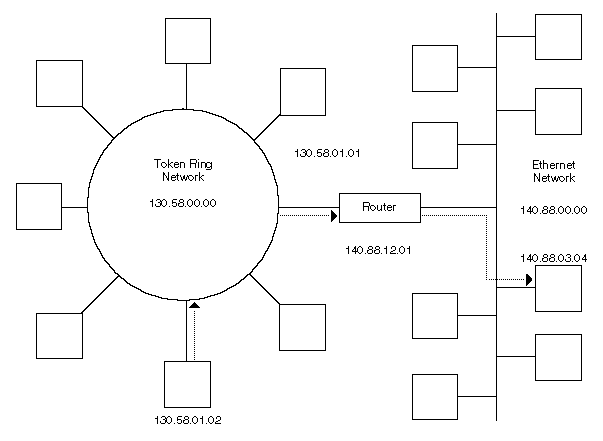
The term routing refers to the transmission of a datagram from one node to another on the same or a different network. The route refers to the paths that are chosen to transmit an IP datagram from its origin to its destination, based on the IP addresses contained in the datagram.
Datagrams are handed to the IP protocol from UDP and TCP above, and from the NIC(s) below. Each datagram is labeled with a source and destination IP address. The IP protocol examines the destination address on each datagram, compares it to a locally maintained route table, and decides what action to take. There are three possibilities for each datagram:
C:\>route print
| Network Address | Netmask | Gateway Address | Interface | Metric |
| Destino de la ruta | Debe coincidir para aplicar esta ruta:
direc AND másc = net |
Dirección del punto en la red donde se alcanzará el destino | Punto de salida del paquete | Tramos de paso hasta llegar a destino |
| 0.0.0.0 | 0.0.0.0 | 157.57.8.1 | 157.57.8.169 | 1 |
| 127.0.0.0 | 255.0.0.0 | 127.0.0.1 | 127.0.0.1 | 1 |
| 157.57.8.0 | 255.255.255.0 | 157.57.8.169 | 157.57.8.169 | 1 |
| 157.57.8.169 | 255.255.255.255 | 127.0.0.1 | 127.0.0.1 | 1 |
| 157.57.8.255 | 255.255.255.255 | 157.57.8.169 | 157.57.8.169 | 1 |
| 224.0.0.0 | 224.0.0.0 | 157.57.8.169 | 157.57.8.169 | 1 |
| 255.255.255.255 | 255.255.255.255 | 157.57.8.169 | 157.57.8.169 | 1 |
The route table above is for a computer with the IP address 157.57.8.169. It contains 7 entries, described below:
It broadcasts an ARP request to the Gateway for the physical address of the router. It then sends the packet containing the IP datagram to the router's physical address. When the router receives the IP datagram, it uses the IP address in the datagram to send the packet to its final destination in a similar manner. If needed, the router sends the packet to the address of another router that can route the packet to its destination.
On this host, if a packet is sent to 157.57.8.168, the table is:
Permanent routes are stored in the registry under:
HKEY_LOCAL_MACHINE\SYSTEM\CurrentControlSet\Services\Tcpip\Parameters\PersistentRoutes
Most routers use a protocol such as RIP (Routing Information Protocol) or OSPF (Open Shortest Path First) to exchange routing tables with each other. However, Windows NT does not include RIP. This means that if Windows NT computers are used as routers, they do not exchange routing tables, so manual configuration of static routes may be necessary. Information on how to set up static routes is available in the Windows NT TCP/IP manuals, and from the Microsoft KnowledgeBase. Another alternative is to obtain the publicly available Multiple Provider Router beta from Microsoft.
By default, Windows NT systems do not behave as routers. Internal routing may be enabled from the TCP/IP Advanced Configuration screen in the network control panel.
When running multiple logical subnets on the same physical network,
the following command can be used to tell IP to treat all subnets as local
and to use ARP directly for the destination:
route add 0.0.0.0 MASK 0.0.0.0 <my local ip address>
Thus, packets destined for "non-local" subnets will be transmitted directly
onto the local media instead of being sent to a router. In essence, the
local interface card can be designated as the default gateway. This might
be useful where several class "C" networks are being used on one physical
network with no router to the outside world.
Multi-homing
When a computer is configured with more than one IP address it is referred to as a multi-homed system. Multi-homing is supported in three different manners:
Maintaining Route Tables
When a Windows NT computer is initialized, the route table normally
contains only a few entries. One of those specifies a default gateway.
Datagrams that have a destination IP address with no match in the route
table are sent to the default gateway. However, since routers share information
about network topology with each other, the default gateway may know of
a better route to a given address. When this is the case, upon receiving
a datagram that could be taking the better path, the router forwards the
datagram normally, then advises the sender of the better route using an
ICMP redirect message. These messages can specify redirection for one host,
a subnet, or for an entire network. When a Windows NT computer receives
an ICMP redirect, a check is performed to be sure that it came from the
first-hop gateway in the current route, and that the gateway is on a directly
connected network. If so, the route table is adjusted accordingly. If the
ICMP redirect did not come from the first-hop gateway in the current route,
or if that gateway is not on a directly connected network, then the ICMP
redirect is ignored.
Static and Autostatic Routes
Typically, routes to remote networks are obtained dynamically through routing protocols. However, the administrator can also "seed" the routing table by providing routes manually. These routes are referred to as static. A static route is associated with an interface that represents the remote network. Unlike dynamic routes, static routes are retained even if the router is restarted or the interface is disabled.
An autostatic route is obtained through a routing protocol, but once obtained behaves like a static route. The process for obtaining autostatic routes is as follows: The IP or IPX router manager issues a request that a routing protocol update the routing information for a specific interface. The results of the update are then converted into static routes. Note that only certain routing protocols support requests for autostatic route updates.
Adding a static route
Desde una ventana DOS: ROUTE ADD network MASK netmask staticIP
Replace network with the Class C or IP sub-net address, replace netmask with the net mask, and replace staticIP with the static IP address, for example:
ROUTE ADD 205.217.146.0 MASK 255.255.255.0 206.21.111.2
Problem using static routes
To set a static route in NT, you simply enter a persistant route (one
that remains active through reboots) to send a sub-net of IP to a specific
static IP address. The client must use that static IP address when they
connect to the system. This works fine as long as the system is not re-booted.
When the system reboots, however, NT processes the routing table persistant
entries before the RAS services are up and running. When the route processor
gets to the persistant route, it does not find an existing interface for
the static IP address. Finding no interface, it sends the persistant route
out the interface for the default route on the system, usually the NIC
interface to the LAN. After this all happens, RAS comes up and the client
logs in, but the static routing is already set up and is going through
the wrong gateway.
Más more:
http://premium.microsoft.com/msdn/library/conf/pdc97/rras.htm
http://www.microsoft.com/ntserver/info/Routing&RAS.htm
To download the RRAS Software Developer Kit, please see the Windows
NT 5.0 Professional Developer Conference CD or Web-based materials.
In addition to the programs which allow you to remotely administer a server, there is a Remote Shell service available for NT which functions in the same fashion as a standard Unix Style RSH daemon. It can be accessed from any standard RSH client on an NT or Unix system. Like the Unix RSH service, security is controlled via a .RHOSTS file on the system to be remotely accessed. This file is in the %SystemRoot%\system32\drivers\etc directory and contains the Fully Qualified Domain Name (e.g. MySys.Microsoft.Com) of client systems and the ID or IDs on those systems that are allowed RSH access.
By using the RSH service you can execute any Command Prompt (DOS style) program that does not use GUI or full screen interfaces. This allows you to do additional administrative functions using commands like ROUTE to manage routing, and INSTSRV to install and remove services.
One drawback of the Remote Shell service, or an additional security feature depending on your point of view, is that you must know ahead of time what client systems and users will be granted access to the remote server. Other remote programs simply require you to know an ID and Password with administrative privileges on the remote machine.
The Remote Shell server and NT client software are available in the Windows NT Resource Kit.
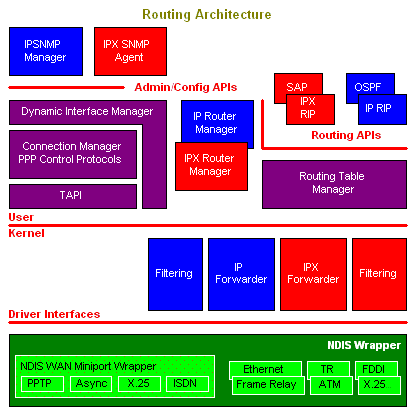
The RTM maintains distinct route tables for each protocol family. Currently explicit support is provided for the Internet protocol (IP) and Internet Packet Exchange (IPX) routing protocol families. Regardless of the protocol family, each route entry contains the following information: