
NOTE: This page will take a moment to load due to heavy content. Inconvenience caused regretted.
This page presents you with:
Advance
Vehicle Security System Software Library:
|
No. |
Modules |
Reason
for not testing |
|
1.
|
Address.java |
Data Structure |
|
2.
|
X |
|
|
3.
|
X |
|
|
4.
|
X |
|
|
5.
|
X |
|
|
6.
|
X |
|
|
7.
|
X |
|
|
8.
|
X |
|
|
9.
|
DoorController.java |
Stub |
|
10.
|
GPSSystem.java |
Stub |
|
11.
|
X |
|
|
12.
|
X |
|
|
13.
|
X |
|
|
14.
|
X |
|
|
15.
|
X |
|
|
16.
|
X |
|
|
17.
|
X |
|
|
18.
|
PasswordValidateException.java |
Inherited Exception
handler |
|
19.
|
PoliceAlerter.java |
Stub |
|
20.
|
SecurityCam.java |
Stub |
|
21.
|
X |
|
|
22.
|
Thumbprint.java |
Data Structure |
|
23.
|
X |
|
|
24.
|
ThumbprintValidateException.java |
Inherited Exception
handler |
|
25.
|
X |
|
|
26.
|
X |
|
|
27.
|
VehicleDataRec.java |
Data Structure |
Testing:
Our primary method of Unit Testing is by making use of Flow Graphs and performing Basis Path testing. This ensures a good coverage of the possible test cases and allows us to present the results in a logical an orderly manner. The other method that we had applied to one case (Mode Panel) was Scenario Based testing. This is a conventional GUI testing method. It effectively identifies the test cases required and allows us to test analyse the GUI from the user's perspective as well.
Our chosen method for Integration Testing is to use Random and Scenario Based Testing, coupled with Regression Testing, so that we can be assured that any incremental development in integration has not affected the previous level of integration. We started off with the least dependent modules and worked our way towards the complete system. Hence, we adopted the Sandwich Approach towards integration. As we placed much more emphasis on unit testing, we are aiming for the integration tests to be somewhat of a subset of the unit tests.
As for Validation Testing, we needed to check if our system had met the users requirements and specifications. Hence we employed the use of Black Box techniques such as boundary analysis tests and alpha testing. This therefore checked if the software built is traceable to our client's requirements.
System Testing will only be applicable when we integrate our Advance Vehicle Security System with current vehicle security systems already available in the market. Should this occur, the issues we at FastForward Consultants will have to address are:
Sensitivity testing
Stress testing
Security testing
Since this is not directly applicable to us, we shall KIV this phase.
| Unit Testing | Integration Testing | Validation Testing |
| Module | Click here for the results of the Integration Testing | Click here for the results of the Validation Testing |
| AdvancedVehicleSecuritySystem |
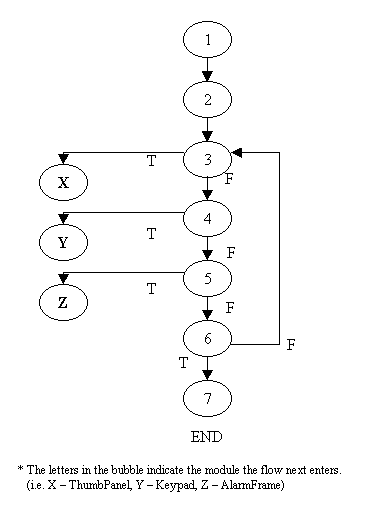
Cyclomatic complexity = 4 + 1 = 5
Basis Paths to test:
Path 1: 1, 2, 3, [13].
Path 2: 1, 2, 3, 4, [21].
Path 3: 1, 2, 3, 4, 5, [5].
Path 4: 1, 2, 3, 4, 5, 6, 7.
Path 5: 1, 2, 3, 4, 5, 6, [3, ….].
TEST LOG :
Project
: Advanced
Vehicle Security System
Program/Module
:
AdvancedVehicleSecuritySystem
Test
Type
: Unit
|
Test
ID |
Test
Conditions |
Test
Results (Pass/Fail) |
Result |
Comments |
Defect
Report ID |
| Main Menu test | |||||
|
|
“Keypad” button is pressed |
Pass |
KeypadPanel displayed with the “Thumbprint” button disabled |
- |
|
|
|
“Thumbprint” button is pressed |
Pass |
ThumbPanel displayed with the “Keypad” button disabled |
- |
|
|
|
“Options” button is pressed |
Pass |
The OptionsMenuPanel is displayed and IdlePanel is displayed |
- |
|
|
Options
Menu test |
|||||
|
|
“Change PIN” button is pressed |
Pass |
KeypadPanel displayed with the “Change Thumbprint” and “Change Max. Attempts” buttons disabled |
- |
|
|
|
“Change Thumbprint” button is pressed |
Pass |
ThumbPanel displayed with the “Change PIN” and “Change Max. Attempts” buttons disabled |
- |
|
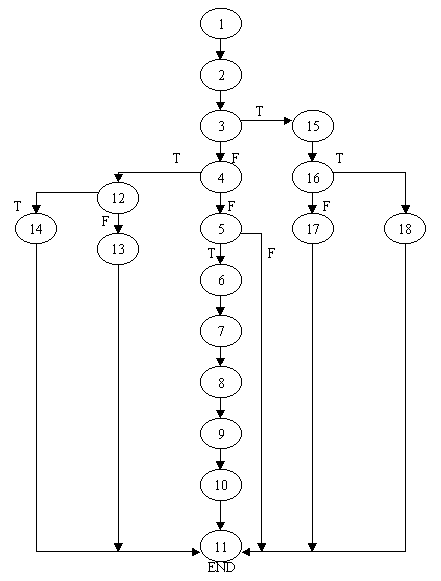
Cyclomatic complexity = 5 + 1 = 6
Basis Paths to test:
Path 1: 1, 2, 3, 15, 16, 18, 11.
Path 2: 1, 2, 3, 15, 16, 17, 11.
Path 3: 1, 2, 3, 4, 12, 14, 11.
Path 4: 1, 2, 3, 4, 12, 13, 11.
Path 5: 1, 2, 3, 4, 5, 11.
Path 6: 1, 2, 3, 4, 5, 6, 7, 8, 9, 10, 11.
TEST LOG:
Project :
Advanced Vehicle Security System
Program/Module
:
Alarm Module
Test Type
:
Unit
|
Test
ID |
Test
Conditions |
Test
Results (Pass/Fail) |
Result |
Comments |
Defect
Report ID |
|
Validate
maximum number of Attempts within range(1-5) ( ValidateMaxAttempts() ) |
|||||
|
|
Values 1-5 were used |
Pass |
MaxAttempts successfully Validated Function returned true |
|
|
|
|
Negative values -1,-50,-100 entered Positive values 6, 50, 100 entered |
Pass |
Function returned false |
|
|
|
Change
maximum number of Attempts ( setMaxAttempts() ) |
|||||
|
|
Values 1-5 were used |
Pass |
MaxAttempts successfully stored in file |
However, ValidateMaxAttempts() must be called before making any changes to MaxAttempts |
|
|
Activate
Alarm ( ActivateAlarmProcedure () ) |
|||||
|
|
Function Called from AVSS |
Pass |
Alarm successfully activated |
|
|
|
Get
Value for maximum number of attempts ( getMaxAttempts() ) |
|||||
|
|
Function Called from AVSS |
Pass |
MaxAttempts returned for each value from 1 to 5 |
|
|
|
Get
Value for maximum number of attempts ( getMaxAttempts() ) |
|||||
|
|
Function Called from AVSS |
Pass |
MaxAttempts returned for each value from 1 to 5 |
|
|
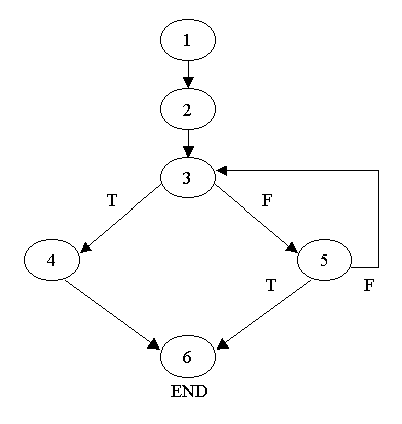
Cyclomatic complexity = 2 + 1 = 3
Basis Paths to test:
Path 1: 1, 2, 3, 5, 6.
Path 2: 1, 2, 3, 5, [3, ….].
Path 3: 1, 2, 3, 4, 6.
TEST LOG :
Project :
Advanced Vehicle Security System
Program/Module :
AlarmDeactivatedPanel
Test Type :
Unit
|
Test
ID |
Test
Conditions |
Test
Results (Pass/Fail) |
Result |
Comments |
Defect
Report ID |
|
3.1 |
Deactivate the alarm within the time limit |
Pass |
AlarmDeactivatedPanel is displayed once the alarm system is deactivated |
- |
|
|
3.2 |
Close the window |
Pass |
AlarmDeactivatedPanel is not shown after the window is close |
- |
|
|
3.3 |
Activate the alarm |
Pass |
AlarmDeactivatedPanel is not shown |
- |
|
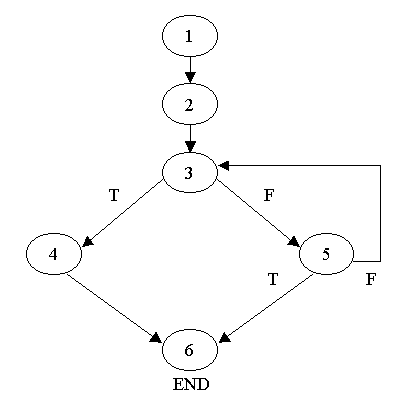
Cyclomatic complexity = 2 + 1 = 3
Basis Paths to test:
Path 1: 1, 2, 3, 5, 6.
Path 2: 1, 2, 3, 5, [3, … ].
Path 3: 1, 2, 3, 4, 6.
TEST LOG :
Project :
Advanced Vehicle Security System
Program/Module :
AlarmFrame
Test Type :
Unit
|
Test
ID |
Test
Conditions |
Test
Results (Pass/Fail) |
Result |
Comments |
Defect
Report ID |
|
4.1 |
Deactivate the alarm within the time limit |
Pass |
AlarmFrame is not shown once the alarm system is activated |
- |
|
|
4.2 |
Deactivate the alarm within the time limit and then close the window |
Pass |
AlarmFrame is not shown after the window is close |
- |
|
|
4.3 |
Alarm is not deactivated within time limit |
Pass |
AlarmFrame is displayed once the alarm system is activated |
- |
|
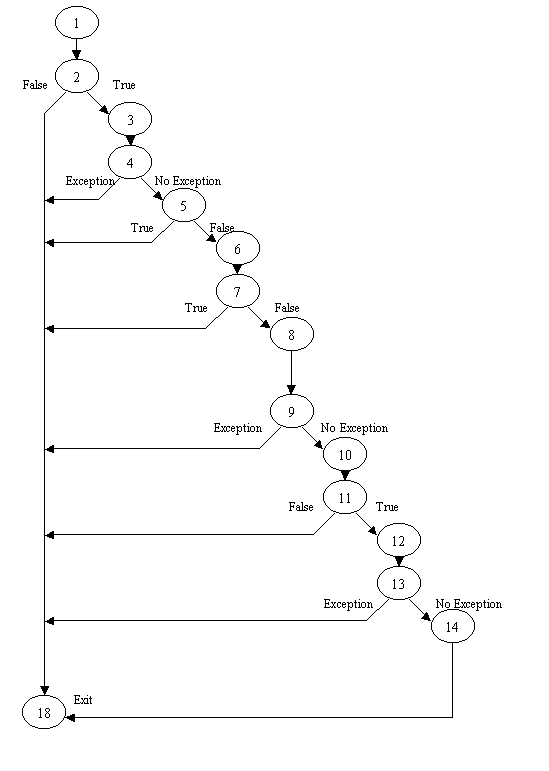
Cyclomatic complexity = 7 + 1 = 8
Basis Paths to test:
Path 1: 1, 2, 18.
Path 2: 1, 2, 3, 4, 18.
Path 3: 1, 2, 3, 4, 5, 18.
Path 4: 1, 2, 3, 4, 5, 6, 7, 18.
Path 5: 1, 2, 3, 4, 5, 6, 7, 8, 9, 18.
Path 6: 1, 2, 3, 4, 5, 6, 7, 8, 9, 10, 11, 18.
Path 7: 1, 2, 3, 4, 5, 6, 7, 8, 9, 10, 11, 12, 13, 18.
Path 8: 1, 2, 3, 4, 5, 6, 7, 8, 9, 10, 11, 12, 13, 14, 18.
TEST LOG :
Project :
Advanced Vehicle Security System
Program/Module : BlackBox
Test Type :
Unit
|
Test ID |
Test Conditions |
Test Results(Pass/Fail) |
Result |
Comments |
Defect Report ID |
|
5.1 |
Check if deviceList is
not empty |
Pass |
Exits Properly |
- |
- |
|
5.2 |
Create
Processor object P |
Pass |
Exits Properly |
- |
- |
|
5.3 |
Configure
Processor P unsuccessful? |
Pass |
Exits Properly |
- |
- |
|
5.4 |
Realize
Processor P unsuccessful? |
Pass |
Exits Properly |
- |
- |
|
5.5 |
Create
DataSink object filewriter |
Pass |
Exits Properly |
- |
- |
|
5.6 |
Check
if swc is not equal to null |
Pass |
Exits Properly |
- |
- |
|
5.7 |
Start
filewriter |
Pass |
Exits Properly |
- |
- |
|
5.8 |
Terminate program |
Pass |
Exited Properly |
- |
- |
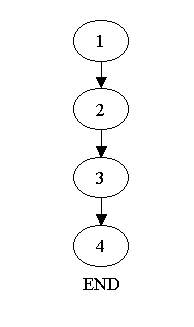
Cyclomatic complexity = 0 + 1 = 1
Basis Paths to test:
Path 1: 1, 2, 3, 4.
TEST LOG :
Project :
Advanced Vehicle Security System
Program/Module : Car
Test Type :
Unit
|
Test ID |
Test Conditions |
Test Results(Pass/Fail) |
Result |
Comments |
Defect Report ID |
|
|
1. Create an instance of the OpenDoor class
|
Pass |
Succeed to create the instance. (i.e.
Shows “OpenDoor”) |
|
- |
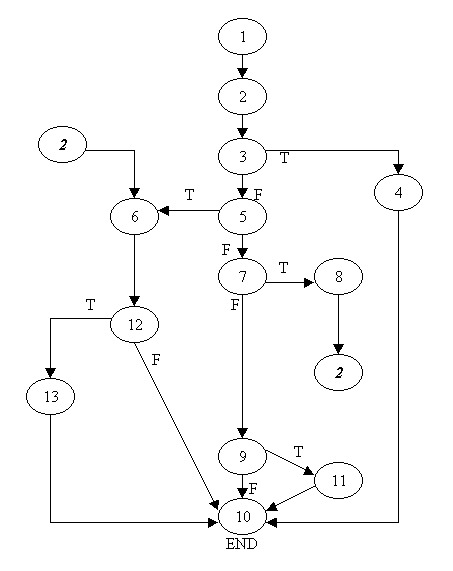
Cyclomatic complexity = 5 + 1 = 6
Basis Paths to test:
Path 1: 1, 2, 3, 5, 7, 9, 11, 10.
Path 2: 1, 2, 3, 5, 7, 9, 10.
Path 3: 1, 2, 3, 5, 7, 8, [2].
Path 4: 1, 2, 3, 5, 6, 12, 13, 10.
Path 5: 1, 2, 3, 5, 6, 12, 10.
Path 6: 1, 2, 3, 4, 10.
TEST LOG :
Project :
Advanced Vehicle Security System
Program/Module
:
ConfigurationFile
Test Type
:
Unit
|
Test
ID |
Test
Conditions |
Test
Results (Pass/Fail) |
Result |
Comments |
Defect
Report ID |
|
Load
Data from file( LoadFile() ) |
|||||
|
|
Invalid filename entered |
Pass |
File not loaded… IOException thrown Error reported to AVSS with instructions to contact Tech. Support |
|
|
|
|
Valid File Entered |
Pass |
File Loaded All Data stored in data structure of class |
|
|
|
|
Invalid File Entered |
Fail |
Depending on nature and extent of this error, the data loaded would be invalid. Error should only arise due to a hardware fault |
The user will be informed to contact Tech. Support if such an error should arise, through the documentation |
|
|
Save
data to file ( SaveFile() ) |
|||||
|
|
Function called from AVSS |
Pass |
File successfully saved |
|
|
|
Retrieve
Data ( getThumbprint()/getAddress()/getVehicleDataRecord()/gePassword()/getMaxAttempts()
) |
|||||
|
|
Functions Called from AVSS |
Pass |
Data successfully retrieved |
|
|
|
Save
Data ( setThumbprint()/setAddress()/setVehicleDataRecord()/sePassword()/setMaxAttempts()
) |
|||||
|
|
Functions Called from AVSS |
Pass |
Data successfully saved |
|
|
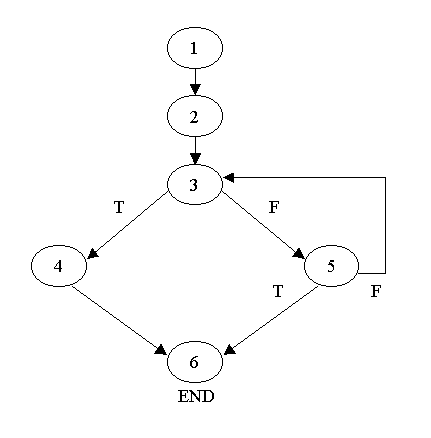
Cyclomatic complexity = 2 + 1 = 3
Basis Paths to test:
Path 1: 1, 2, 3, 5, 6.
Path 2: 1, 2, 3, 5, [3, ….].
Path 3: 1, 2, 3, 4, 6.
TEST LOG :
Project :
Advanced Vehicle Security System
Program/Module :
IdlePanel
Test Type :
Unit
|
Test
ID |
Test
Conditions |
Test
Results (Pass/Fail) |
Result |
Comments |
Defect
Report ID |
|
8.1 |
Press the “Options” button |
Pass |
IdlePanel is shown once the button is pressed |
- |
|
|
8.2 |
Press the “Options” button then close the window |
Pass |
IdlePanel is not shown after the window is close |
- |
|
|
8.3 |
Press the “Options” button and without closing the window |
Pass |
IdlePanel is shown |
- |
|
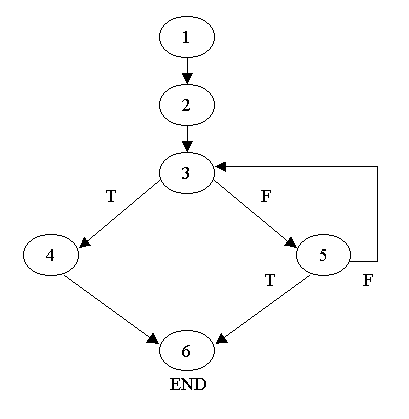
Cyclomatic complexity = 2 + 1 = 3
Basis Paths to test:
Path 1: 1, 2, 3, 5, 6.
Path 2: 1, 2, 3, 5, [3, ….].
Path 3: 1, 2, 3, 4, 6.
TEST LOG :
Project :
Advanced Vehicle Security System
Program/Module :
ImagePanel
Test Type :
Unit
|
Test
ID |
Test
Conditions |
Test
Results (Pass/Fail) |
Result |
Comments |
Defect
Report ID |
|
9.1 |
Display the OpenDoor module frame i.e. in stand-by mode |
Pass |
Correct image is displayed |
- |
|
|
9.2 |
Display the OpenDoor module frame i.e. in stand-by mode. Then after a while window is closed. |
Pass |
ImagePanel is not shown after the window is close |
- |
|
|
9.3 |
Display any frame other then the OpenDoor module. |
Pass |
ImagePanel is not shown |
- |
|
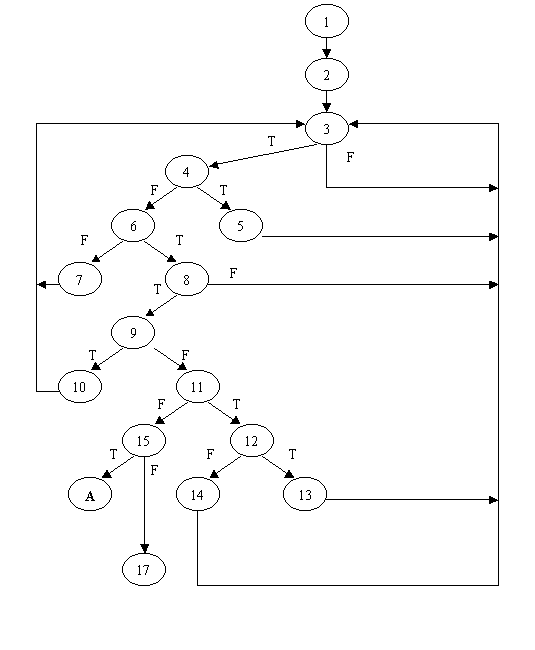
Cyclomatic complexity = 8 + 1 = 9
Basis Paths to test:
Path 1: 1, 2, 3, 4, 6, 8, 9, 11, 15, 17.
Path 2: 1, 2, 3, 4, 6, 8, 9, 11, 15, 16.
Path 3: 1, 2, 3, 4, 6, 8, 9, 11, 12, 14, [3, …..].
Path 4: 1, 2, 3, 4, 6, 8, 9, 11, 12, 13, [3, …..].
Path 5: 1, 2, 3, 4, 6, 8, 9, 10, [3, …..].
Path 6: 1, 2, 3, 4, 6, 8, [3, …..].
Path 7: 1, 2, 3, 4, 6, 7, [3, …..].
Path 8: 1, 2, 3, 4, 5 [3, …..].
Path 9: 1, 2, 3, [3, …..].
TEST LOG :
Date:
Project :
Advanced Vehicle Security System
Program/Module :
Keypad
Test Type :
Unit
|
Test
ID |
Test
Conditions |
Test
Results (Pass/Fail) |
Result |
Comments |
Defect
Report ID |
|
10.1 |
Load module |
Pass |
All attributes initialized |
|
|
|
10.2 |
Show Keypad |
Pass |
Module is visible |
|
|
|
10.3 |
Change Mode to Password Change Mode |
Pass |
Module accepts two password inputs for changing password |
|
|
|
10.4 |
Change Mode to Password Change Mode |
Pass |
Module accepts one password input for authorizing user access |
|
|
|
10.5 |
Press a button |
Pass |
The actionperformed event handler is activated |
|
|
|
10.6 |
Press a numeric button |
Pass |
The respective numeral is appended to the password buffer |
|
|
|
10.7 |
Press enter button |
Pass |
Program control transferred to event handler for enter button |
|
|
|
10.8 |
Cancel button pressed in change password mode |
Pass |
Options menu shown |
|
|
|
10.9 |
Cancel button pressed in validate password mode |
Pass |
Main Menu shown |
|
|
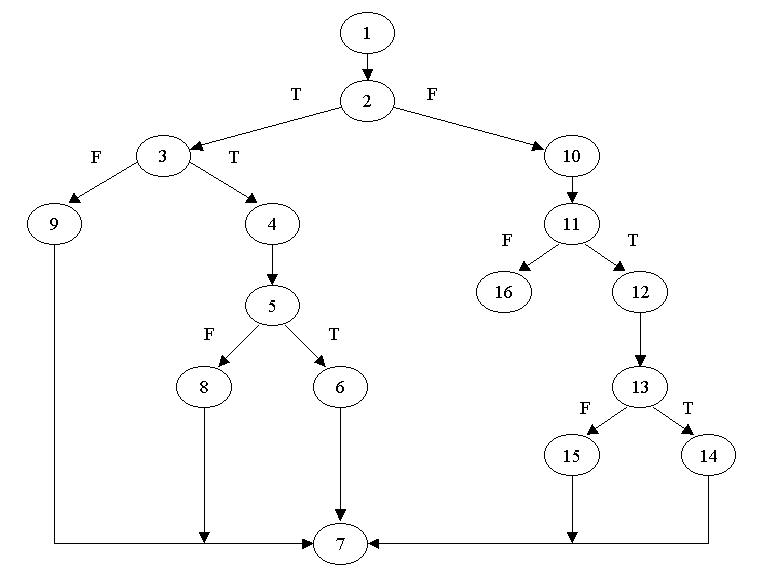
Cyclomatic complexity = 5 + 1 = 6
Basis Paths to test:
Path 1: 1, 2, 10, 11, 16.
Path 2: 1, 2, 10, 11, 12, 13, 15, 7.
Path 3: 1, 2, 10, 11, 12, 13, 14, 7.
Path 4: 1, 2, 3, 9, 7.
Path 5: 1, 2, 3, 4, 5, 8, 7.
Path 6: 1, 2, 3, 4, 5, 6, 7.
TEST LOG :
Date:
Project :
Advanced Vehicle Security System
Program/Module :
Keypad - Enter
Test Type :
Unit
|
Test
ID |
Test
Conditions |
Test
Results (Pass/Fail) |
Result |
Comments |
Defect
Report ID |
|
11.1 |
Pressed in validate password mode |
Pass |
ValidatePassword called |
|
|
|
11.2 |
Pressed when maxattempts is not exceeded and password is invalid |
Pass |
Alarm not activated |
|
|
|
11.3 |
Pressed when maxattempts is exceeded and password is invalid |
Pass |
Alarm activated |
|
|
|
11.4 |
Pressed in change password mode |
Pass |
Prompts user to enter password a second time |
|
|
|
11.5 |
Pressed in change password mode with two matching passwords |
Pass |
Password is changed |
|
|
|
11.6 |
Pressed in change password mode with two mis matched passwords |
Pass |
Password is not changed |
|
|
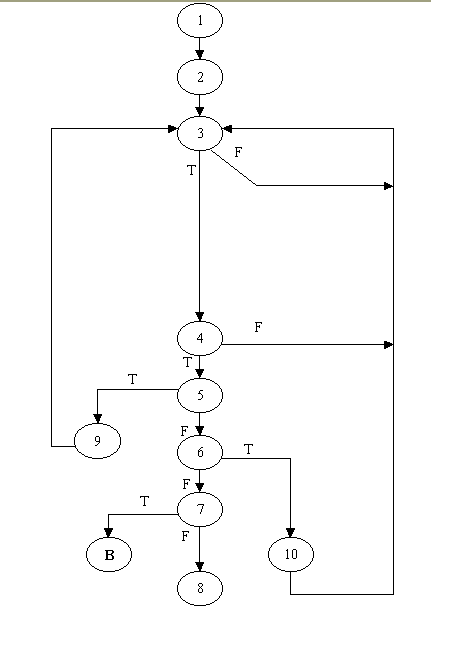
Cyclomatic complexity = 5 + 1 = 6
Basis Paths to test:
Path 1: 1, 2, 3, 4, 5, 9, [3, ….].
Path 2: 1, 2, 3, 4, 5, 6, 10, [3, ….].
Path 3: 1, 2, 3, 4, 5, 6, 7, 8.
Path 4: 1, 2, 3, 4, 5, 6, 7, [3].
Path 5: 1, 2, 3, 4, [3, ….].
Path 6: 1, 2, 3, [3, ….].
TEST LOG :
Project :
Advanced Vehicle Security System
Program/Module :
MaxAttemptsPanel
Project :
Advanced Vehicle Security System
Program/Module :
MaxAttemptsPanel
Test Type :
Unit
|
Test
ID |
Test
Conditions |
Test
Results (Pass/Fail) |
Result |
Comments |
Defect
Report ID |
|
MaxAttempts Module – Panel |
|||||
|
12.1 |
“Change Max. Attempts” button of Options Menu is pressed. |
Pass |
MaxAttemptsPanel is shown once the button is pressed |
- |
|
|
12.2 |
“Change Max. Attempts” button of Options Menu is pressed. Then a button is pressed followed by the “Cancel” button |
Pass |
“Change
Max Attempts cancelled” message is displayed and all options buttons are
enable and IdlePanel is displayed. |
- |
|
|
12.3 |
“Change Max. Attempts” button of Options Menu is pressed. Then the “Cancel” button is pressed |
Pass |
“Change
Max Attempts cancelled” message is displayed and all options buttons are
enable and IdlePanel is displayed. |
- |
|
|
12.4 |
Change Max. Attempts” button of Options Menu is pressed. No button is pressed for a while. |
Pass |
MaxAttemptsPanel is shown as long as not “Enter” button or “Cancel” button is pressed. |
|
|
|
12.5 |
Change Max. Attempts” button of Options Menu is pressed. Numeric buttons is pressed. |
Pass |
The numbers are append successfully. |
|
|
|
12.6 |
“Change Max. Attempts” button of Options Menu is pressed. Then the “Enter” button is pressed |
Pass |
Successful
change message is Displayed,
all options buttons is enabled
and Idle panel is displayed. |
|
|
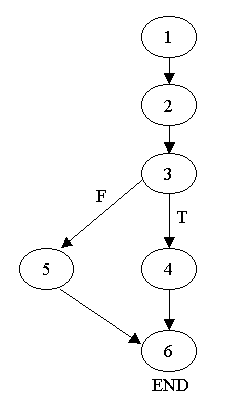
Cyclomatic complexity = 1 + 1 = 2
Basis Paths to test:
Path 1: 1, 2, 3, 5, 6.
Path 2: 1, 2, 3, 4, 6.
TEST LOG :
Project :
Advanced Vehicle Security System
Program/Module :
MaxAttemptsPanel - Enter
Test Type : Unit
|
Test
ID |
Test
Conditions |
Test
Results (Pass/Fail) |
Result |
Comments |
Defect
Report ID |
|
13.1 |
“Change Max. Attempts” button
of Options Menu is pressed. Then a button (between 1 to 5) is pressed
followed by the “Enter” button |
Pass |
Successful
change message is Displayed,
all options buttons is enabled
and Idle panel is displayed. |
- |
|
|
13.2 |
“Change Max. Attempts” button
of Options Menu is pressed. Then a button (that is not in between 1 to 5)
is pressed followed by the “Enter” button |
Pass |
Failure
to change message is displayed
and Max Attempts re- enter
message is displayed. |
- |
|
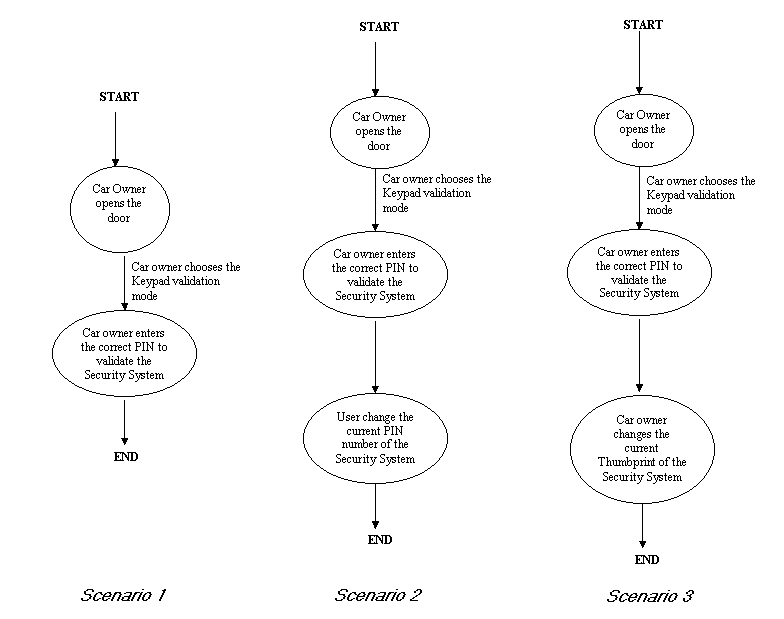
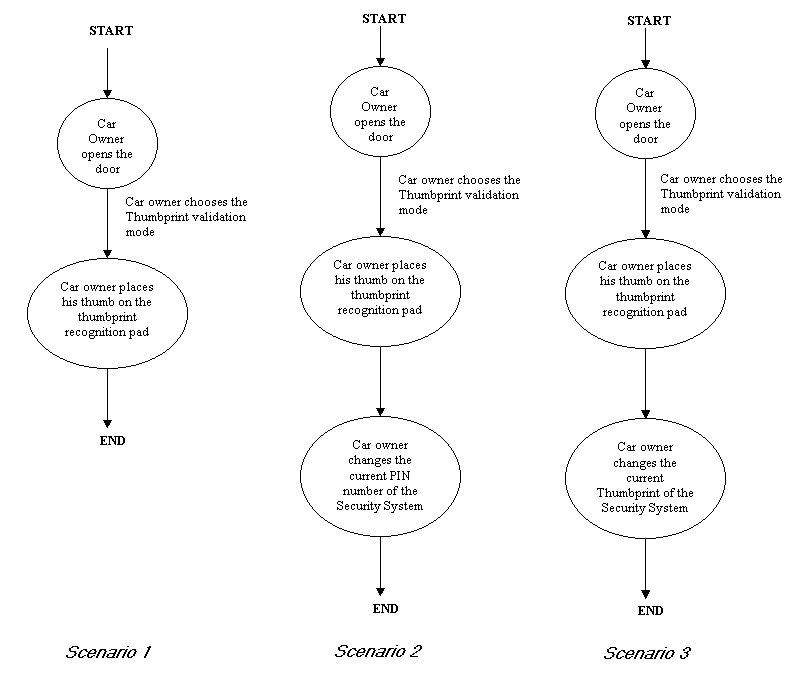
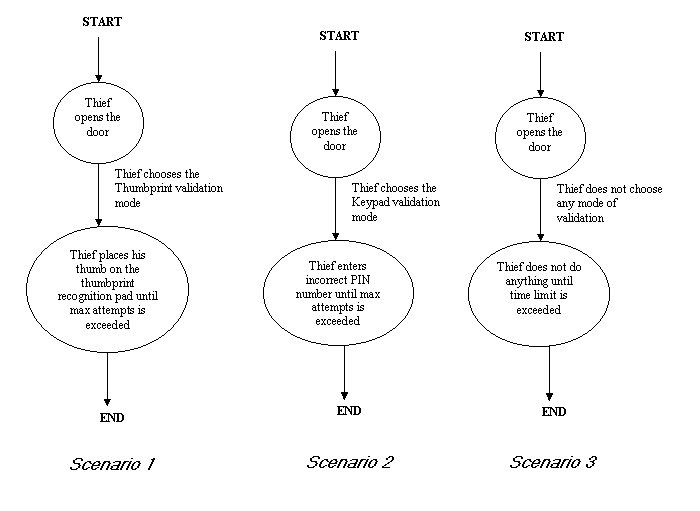
Since the ModePanel is essentially the GUI, we have employed a GUI testing method called Scenario Based Testing. We present here the various scenarios that are applicable to the GUI and test if the desired outcome is achieved.
The three primary scenarios are based on the following:
TEST LOG :
Project :
Advanced Vehicle Security System
Program/Module : Mode Panel
Test Type :
Unit
|
Test
ID |
Test
Conditions |
Test
Results (Pass/Fail) |
Result |
Comments |
Defect
Report ID |
| Car owner using the Keypad validation mode | |||||
|
14.1 |
Scenario 1 |
Pass |
PIN validated |
|
|
|
14.2 |
Scenario 2 |
Pass |
PIN changed |
|
|
|
14.3 |
Scenario 3 |
Pass |
Thumbprint changed |
|
|
| Car owner using the Thumbprint validation mode | |||||
|
14.4 |
Scenario 1 |
Pass |
Thumbprint validated |
|
|
|
14.5 |
Scenario 2 |
Pass |
PIN changed |
|
|
|
14.6 |
Scenario 3 |
Pass |
Thumbprint changed |
|
|
|
Potential thief entering the car |
|||||
|
14.7 |
Scenario 1 |
Pass |
Attempts Thumb validation until timeout expires |
|
|
|
14.8 |
Scenario 2 |
Pass |
Attempts Keypad validation until timeout expires |
|
|
|
14.9 |
Scenario 3 |
Pass |
No action taken until timeout expires |
|
|

Cyclomatic Complexity : 3 + 1 = 4
Basis Paths to test:
Path 1: 1, 2, 3, 6, 7, [6, ….].
Path 2: 1, 2, 3, 6, 7, 8
Path 3: 1, 2, 3, 4, 5.
Path 4: 1, 2, 3, 4, [3, ….].TEST LOG:
Project :
Advanced Vehicle Security System
Program/Module :
OpenDoor
Test Type :
Unit
|
Test
ID |
Test
Conditions |
Test
Results (Pass/Fail) |
Result |
Comments |
Defect
Report ID |
|
15.1 |
“Open Door” button is pressed |
Pass |
AdvancedVehicleSecuritySystem frame is displayed |
- |
|
|
15.2 |
“Open Door” button is not pressed |
Pass |
OpenDoor frame is still displayed and waiting for user input |
- |
|
|
15.3 |
Window is closed |
Pass |
OpenDoor frame is not shown and user cannot press button |
- |
|
|
15.4 |
Not in stand-by mode and the window is not closed |
Pass |
OpenDoor frame is not shown |
- |
|
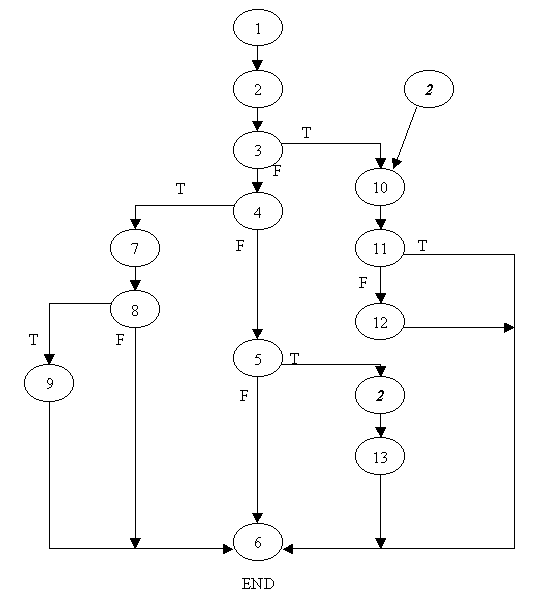
Cyclomatic Complexity = 6 + 1 = 7
Basis Paths to test:
Path 1: 1, 2, 3, 10, 11, 12, 6.
Path 2: 1, 2, 3, 10, 11, 6.
Path 3: 1, 2, 3, 4, 7, 8, 9, 6.
Path 4: 1, 2, 3, 4, 7, 8, 6.
Path 5: 1, 2, 3, 4, 5, 6.
Path 6: 1, 2, 3, 4, 5, [2], 13, 6.Test Log :
Project :
Advanced Vehicle Security System
Program/Module
:
PasswordSystem
Test Type
:
Unit
|
Test
ID |
Test
Conditions |
Test
Results (Pass/Fail) |
Result |
Comments |
Defect
Report ID |
|
|
0 – Any number as input for the password |
Pass |
Password successfully Validated/Changed |
Better than expected results as user can enter as long a password needed |
- |
|
|
No password Entered |
Fail |
No password entry accepted by system |
Unexpected result was desirable as it added an option for the user to bypass the password system if needed |
|
|
Password
Change Tests ( ChangePassword () ) |
|||||
|
|
Pairs of passwords entered at random |
Pass |
Password changed |
|
|
|
|
Mismatched pairs of passwords entered at random |
Pass |
Password Validation Exception thrown |
|
|
|
Password
Validate Tests ( Validate Password () ) |
|||||
|
|
Authorized Password entered |
Pass |
Password s validated |
|
|
|
|
Unauthorized Password entered |
Pass |
Password Validation Exception thrown |
|
|
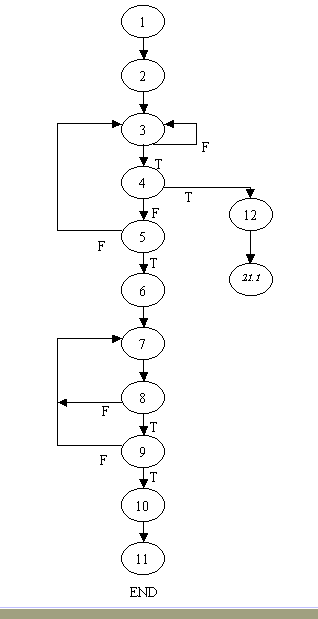
Cyclomatic complexity = 5 + 1 = 6
Basis Paths to test:
Path 1: 1, 2, 3, 4, 12, [21.1].
Path 2: 1, 2, 3, 4, 5, 6, 7, 8, 9, 10, 11.
Path 3: 1, 2, 3, 4, 5, 6, 7, 8, 9, [7, ….].
Path 4: 1, 2, 3, 4, 5, 6, 7, 8, [7, ….].
Path 5: 1, 2, 3, 4, 5, [3, ….].
Path 6: 1, 2, 3, [3, ….].
TEST LOG :
Project :
Advanced Vehicle Security System
Program/Module :
Thumbprint
Test Type :
Unit
|
Test
ID |
Test
Conditions |
Test
Results (Pass/Fail) |
Result |
Comments |
Defect
Report ID |
|
Thumprint
in validation mode |
|||||
|
17.1 |
Show ThumbPanel in the validation mode, then press the correct key |
Pass |
The “Options” button is enabled and the AlarmDeactivatedPanel is displayed. |
- |
|
|
17.2 |
Show ThumbPanel in the validation mode, then press the incorrect keyboard |
Pass |
The ThumbPanel is still being shown and display message “Please place your thumb on the thumb recognition pad again” |
- |
|
| 17.3 | Press the “ChangeThumbprint” button on Options menu |
Pass |
The ThumbPanel in Change Thumbprint mode is shown and display message “Please place your thumb on the thumb recognition pad” | ||
| Thumbprint in “Change Thumbprint” mode | |||||
|
17.4 |
Show ThumbPanel in the Change Thumbprint mode. Press the keyboard and then press keyboard again. First keyboard is the same as the second one. |
Pass |
“Change PIN” and “Change Max Attempts” buttons are enabled. Display IdlePanel and display message “Thumbprint is successfully changed” |
- |
|
|
17.5 |
Show ThumbPanel in the Change Thumbprint mode. Press the keyboard and then press keyboard again. First keyboard is not the same as the second one. |
Pass |
The ThumbPanel is still being shown and display message “Please place your thumb on the thumb recognition pad again” |
- |
|
|
17.6 |
Show ThumbPanel in the Change Thumbprint mode. Press the keyboard only once. |
Pass |
The ThumbPanel is still being shown and display message “Please place your thumb on the thumb recognition pad again” |
- |
|
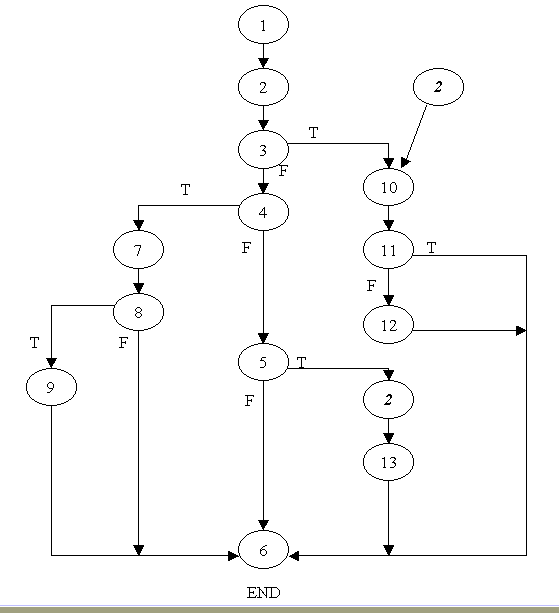
Cyclomatic Complexity = 5 + 1 = 6
Basis Paths to test:
Path 1: 1, 2, 3, 10, 11, 12, 6.
Path 2: 1, 2, 3, 10, 11, 6.
Path 3: 1, 2, 3, 4, 7, 8, 9, 6.
Path 4: 1, 2, 3, 4, 7, 8, 6.
Path 5: 1, 2, 3, 4, 5, 6.
Path 6: 1, 2, 3, 4, 5, [2], 13, 6.TEST LOG :
Project :
Advanced Vehicle Security System
Program/Module
:
Thumbprint System
Test Type
:
Unit
|
Test
ID |
Test
Conditions |
Test
Results (Pass/Fail) |
Result |
Comments |
Defect
Report ID |
|
Thumbprint
Match Tests ( MatchThumbprint() ) |
|||||
|
|
Pairs of all Accepted Keys as Thumprints |
Pass |
Thumprints match |
|
|
|
|
Mismatched pairs of Keys |
Pass |
ThumprintValidation Exception thrown |
|
|
|
Thumbprint
Change Tests ( ChangeThumbprint() ) |
|||||
|
|
Pairs of all Accepted Keys as Thumprints |
Pass |
Thumprint changed |
|
|
|
|
Mismatched pairs of Keys |
Pass |
ThumprintValidation Exception thrown |
|
|
|
Thumbprint
Validate Tests ( ValidateThumbprint() ) |
|||||
|
|
Authorized thumbprint entered (Corresponding matching key press) |
Pass |
Thumprints validated |
|
|
|
|
Unauthorized thumbprint entered (Unmatching key press) |
Pass |
ThumprintValidation Exception thrown |
|
|
In addition, the following Keyboard input tests were conducted to supplement the Basis Path testing
|
Keyboard Input Tests |
|||||
|
|
Print Screen |
Fail |
Keyboard input not detectable by Java |
1.Problem rectifiable by pressing Change Thumbprint again. 2.User will have to be notified on not using these keys in the documentation |
|
|
|
Windows Key |
Fail |
1. Start Menu pops up 2. Unknown keyCode: 0x0 |
|
|
|
|
Right Mouse |
Fail |
Unknown keyCode: 0x0 |
|
|
|
|
Tab Key |
Fail |
ThumbPanel Lost Focus |
|
|
|
|
All other Keys |
Pass |
Thumbprint Changed / Validated |
- |
- |
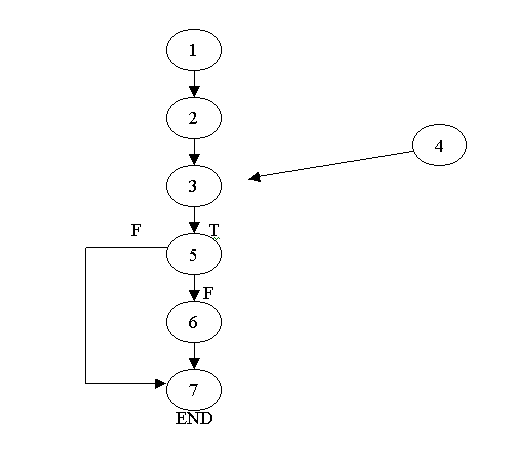
Cyclomatic Complexity = 1 + 1 =2
Basis Paths to test :
Path 1: 1, 2, 3, 4, 5, 6, 7
Path 2: 1, 2, 3, 4, 5, 7
TEST LOG :
Project :
Advanced Vehicle Security System
Program/Module :
TimeOut
Test Type :
Unit
|
Test
ID |
Test
Conditions |
Test
Results (Pass/Fail) |
Result |
Comments |
Defect
Report ID |
|
19.1 |
Validate the system within 3 minutes |
Pass |
AlarmFrame is not displayed after approximately 3 minutes |
- |
|
|
19.2 |
System is not validated within 3 minutes |
Pass |
AlarmFrame is displayed after approximately 3 minutes |
- |
|
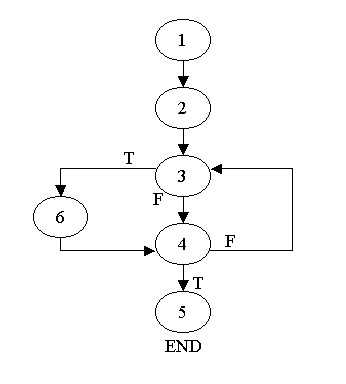
Cyclomatic complexity = 2 + 1 = 3
Basis Paths to test:
Path 1: 1, 2, 3, 6, 4, 5.
Path 2: 1, 2, 3, 6, 4, [3, ….].
Path 3: 1, 2, 3, 4, 5.
TEST LOG :
Project :
Advanced Vehicle Security System
Program/Module :
TitlePanel
Test Type :
Unit
|
Test
ID |
Test
Conditions |
Test
Results (Pass/Fail) |
Result |
Comments |
Defect
Report ID |
|
20.1 |
Press the “Open Door” button of the OpenDoor module |
Pass |
TitlePanel is shown once the button is pressed |
- |
|
|
20.2 |
Press the “Open Door” button of the OpenDoor module then close the window |
Pass |
TitlePanel is not shown after the window is close |
- |
|
|
20.3 |
Press the “Open Door” button of the OpenDoor modulle and without closing the window |
Pass |
TitlePanel is shown. |
- |
|
As mentioned above, we have used the Sandwich-based approach towards Integration testing. Our Test cases were Scenario-based and we coupled these tests with Regression Testing.
TEST LOG :
Project : Advanced Vehicle Security System
Test Type : Integration
|
Test ID |
Test Conditions |
Test Results(Pass/Fail) |
Result |
Comments |
Defect Report ID |
|
1.1 |
Combine configuration file and
Alarm.java |
Pass |
Runs Properly |
Run Regression Test |
- |
|
1.2 |
Combine 1.1 with Thumbprint System |
Pass |
Runs Properly |
Run Regression Test |
- |
|
1.3 |
Combine 1.2 with Password system |
Pass |
Runs Properly |
Regression Test OK |
- |
|
1.4 |
Combine Car.java
with Open.java |
Pass |
Runs Properly |
Regression Test OK |
- |
|
1.5 |
Combine 1.4 with Advance Vehicle
Security System |
Pass |
Runs Properly |
Regression Test OK |
- |
|
1.6 |
Combine 1.5 with Timeout.java and
AlarmFrame |
Pass |
Runs Properly |
Regression Test OK |
- |
|
1.7 |
Combine 1.3 with 1.6 |
Pass |
Runs Properly |
Regression Test Ok |
- |
|
1.8 |
Combine 1.7 with maxAttempts
Panel, keypad and ThumbPanel |
Pass |
Runs Properly |
Regression Test OK |
- |
|
1.9 |
Combine 1.8 with BlackBox.java |
Pass |
Runs Properly |
Regression Test OK |
- |
We derived test cases based on Equivalence Partitioning and performed Alpha Testing:
Equivalence Partitioning
Our product involves 2 kinds of user inputs for validation and 2 kinds of inputs that act as a password to the system. We now present the equivalence classes of the inputs pertaining to these 4 inputs.
Test Cases
|
Password validation |
Thumbprint validation |
Change Password | Change Thumbprint |
|
Equivalence classes:
|
Equivalence classes:
|
Equivalence class:
|
Equivalence class:
|
TEST LOG :
Project : Advanced Vehicle Security System
Test Type : Validation
|
Test ID |
Test Conditions |
Test Results(Pass/Fail) |
Result |
Comments |
Defect Report ID |
| Password validation | |||||
|
1.1 |
Valid input |
Pass |
Alarm deactivated |
- |
- |
|
1.2 |
Invalid inputs |
Pass |
Alarm activated |
- |
- |
|
Thumbprint validation |
|||||
|
1.3 |
Valid input |
Pass |
Alarm deactivated |
- |
- |
|
1.4 |
Invalid inputs |
Pass |
Alarm activated |
- |
- |
|
Change Password |
|||||
|
1.5 |
Any input |
Pass |
New password reflected properly upon next login | - |
- |
| Change Thumbprint | |||||
|
1.6 |
Any input |
Pass |
New pattern reflected properly upon next login | - |
- |
Alpha Testing
At this stage of our development, we invited our client to test the software in our presence. Their behavior when interacting with our system was noted. We analysed the ease with which they used our product. This also helped us analyse the design of our GUI. From our tests and feedback, we concluded that the user requirements were met and that our software had passed the testing phase using White Box and Black Box techniques.