 Screen 1
This is for a user name of "Sample43212000"
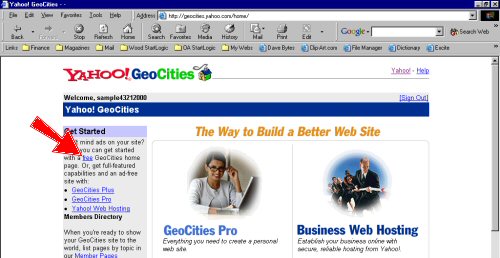
When you get a yahoo e-mail account, you go to the main Yahoo screen and click on "Geocities"
Screen 1When this screen comes up, click on "Free"
 Screen
2
Screen
2When this screen comes up, click on "Sign Up"
 Screen
3
Screen
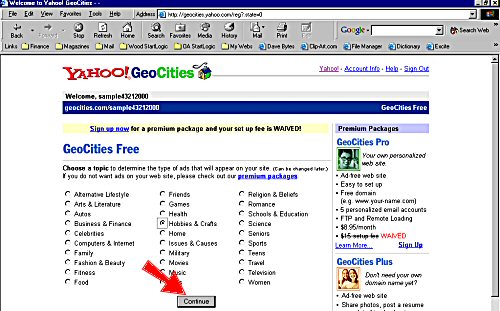
3When this screen comes up, select at least one item and click on "Continue"
 Screen
4
Screen
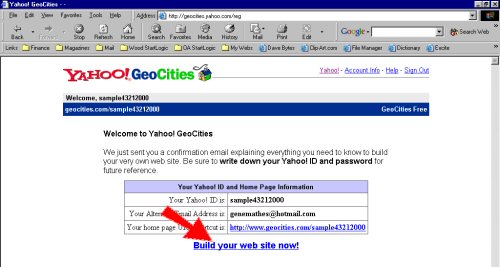
4On this screen, click on "Build your own web site now"
 Screen
5
Screen
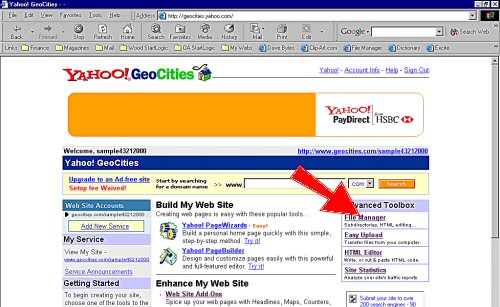
5On this screen, click on "File Manager"
 Screen
6
Screen
6On this one click on "Open File Manager"
 Screen
7
Screen
7And now you are in the file manager. You use the "Upload Now" to upload your files.
 Screen
8
Screen
8The next time you go in, if you are not signed in it will ask you to sign in and then go to Screen 6, 7 and 8