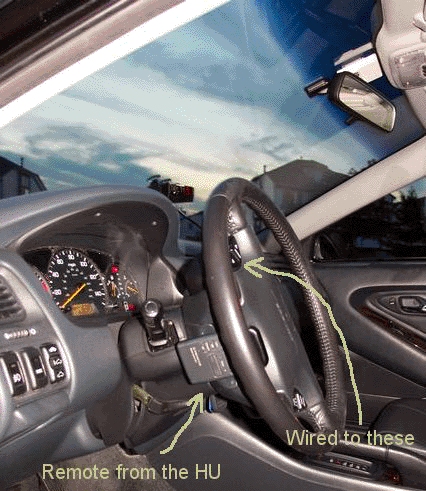
| First thing you want to do is take off the steering wheel remote control buttons on the left side. (2 screws on the side :) and a wire harness to disconnect.. pretty straight forward) | |
| Now let's look at the little remote that came with your stereo. If you take it apart (or if you've ever taken apart a remote), you'll see that the buttons are usually these little rubber pads and where they touch, there's something like this --> |
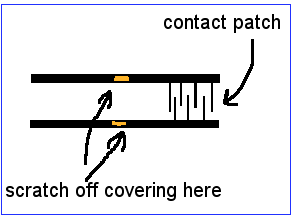 Fig. 1 |
| Basically, that little grid is where the rubber pad makes a contact. What we want to do is make our steering wheel button do that same function. You will see that from this grid, there runs a path of a slightly thicker "wire" .. usually this will be a black path .. this is insulation. Take a knife or a screwdriver and CAREFULLY scratch off some of the insulation off of both traces (as in Fig.1). these traces is where we want to solder the wires to. You'll want to use thin wires (like the ones in ribon cable). Basically solder a pair for the Volume up, Volume down and channel up buttons. these wires can then be run out of the remote. I used a 6 pin connector on the remote side so it's easy to disconnect. (i'll try to get some pictures soon). | |
|
Now take apart the piece you took off the wheel. Again, pretty easy. The problem here is while the piece does have a pair of traces for each of the buttons, by default the signals are resistance encoded. This means that for every button you press, the remote generates a certain resistance and that's how the stock head unit "knows" what function is selected. In order for us to accomplish our goal, we need to cut these resistors so all the buttons are independent. Also, you need to cut one of the traces that connects 2 of the buttons. When I get the pictures up you'll see exactly what I mean, but if you're electronically savvy, you'll see that 2 of the buttons are joined by a trace. Just cut this trace. After all these things are cut, solder a pair of wires to each of the button traces (easier than inside the remote) - Fig. 2 I assume everyone is now thoroughly confused :D | 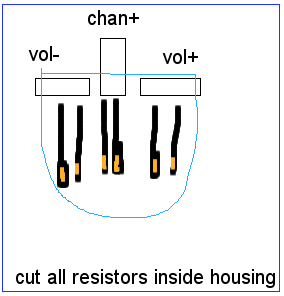 Fig. 2 |
|
Well, once u have all these things cut and your wires soldered, you need to connect the wires.. make sure you pair them up correctly (2 wires from Vol+ on remote go to the vol+ button on the steering wheel control and such).
The last part is attaching everything. This is fairly easy since there is a panel on the bottom of the steering wheel that just pops off and you can run your wires through that, put it back and then attach the remote on the underside of the wheel with double stick tape or something more creative. |