

Information - NES "Blinking Syndrome"



Chances are, if you have an NES system like this one, you probably have a flashing problem with most of your NES games. This is known as "Blinking Syndrome". This happens because the Edge Connectors in NES systems get worn and dirty more rapidly than other systems. Let me explain why.
Unlike most systems where you just pop a game in and play, the NES system requires you to insert a game and then press down on the cartridge, which allows the edge connectors of your game to lock in with the edge connectors in your system. Keeping this in mind, it is easy to wear out the edge connectors because while your pushing down, any dirt or dust that is in your edge connectors are forced into the connectors, and they can also get scuffed up this way. Eventually, the edge connectors get so dirty that they are unable to make a solid connection.
To fix the problem, Nintendo recommends that you use a cleaning kit (which you can purchase thru their website) and clean your system and games periodically. In some cases, however, that may not solve the problem. If it dosent, let me recommend the following.
Ok now, you will need to take your NES System apart to do this. Youll only need a standard philips screwdriver to do so. You will also need a toothbrush and a liquid mixture of 1/2 Alcohol and 1/2 Water. You can get Alcohol at any department or drug store.
Take your system apart and locate the edge connectors. They will look like this:
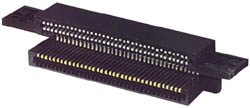
Take a good look at how they are attached to the motherboard, because you will be taking them out to clean them and you will need to re-attach them correctly. Once you get a good look, go ahead and slide them off of the motherboard, It is one piece and it will slide right off.
Soak a toothbrush in a mixture of 1/2 alcohol and 1/2 water. Use the toothbrush and scrub the edge connectors real good. be sure you scrub the gold plated connectors that your games go into and not the silver plated connectors which go into your system, doing this could damage the edge connectors.
Once you have done this, allow the edge connectors to dry. Then slide them back into the motherboard and put your system back together.
Next, you will want to clean the edge connectors in all of your game paks. For each game pak, take a Q-Tip and soak one end into your liquid mixture of 1/2 alcohol and 1/2 water. Wipe this end on both sides of the edge connectors. If you see alot of dirt on the Q-Tip, get another one and do the same thing again until you see almost no dirt. Next, wipe your edge connectors with the dry end of your Q-Tip. Make sure none of the white fibers of your Q-Tip are on the edge connectors. Your games are now cleaned and should be ready to play.
If you still have the same problem, I recommend replacing the edge connectors. You can order these edge connectors from gturnabout by clicking here. He also sells Security Screw Bits used for taking apart other systems, which youll find mentioned in the next page.
If you want to get fancy, I recommend searching on eBay for a "Top Loading" NES System (NES-101). However, these systems are a rare find and will cost you a pretty penny, and you will still need to clean your games regardless. They are a collectors item though, so believe me, if you want to spend the money, its worth it.


Home - Auctions - Latest News - Information - Links - Files