
| Navigation missing?? |
Buses
The question is how does the memory, processor and other devices transfer data
within the computer. There is an electronic path (bus) within a computer system
which is used to transfer data from one location (hardware component) to another
location. Buses make the connections within the CPU and the peripheral devices
and between memory and the CPU.
There are 3 major types of buses
The number of bytes per second carried by a data bus are critical in determining
the processing power of a computer. This number of bytes per second is called
the data rate and can be found from the width and clock
rate (or clock speed) of a data bus. Most current processor designs use
128 bit buses that means a bus can transfer 128 bits at once. Furthermore communication
speeds can be increased by careful internal design of circuit boards so as to
reduce bus lengths, and use of materials with lower electrical resistance.
The Universal Serial Bus (USB) is an external bus which has a slow transfer rate of data at 12 million bits per second. USB is very useful in the sense that a single USB port can be used to connect to 127 peripheral devices . These can be connected to a USB port at the PC via one long chain
Buses may be fabricated in many ways, those external to the machine are typically insulated wires, whilst those printed on circuitboards are thin lines of copper etched onto a silicon background.
Input/Output Devices
Input / output refers to any operation, program or device whose purpose is to
enter data into a computer or to extract data from a computer. Peripherals can
be class in one of three ways, :
This is illustrated below:
Most of the computers nowadays perform operations very much faster than most peripherals can generate or accept data. Interface modules are used to synchronize between the CPU and peripheral devices.
There are different types of interface modules but their main characteristic is whether they support a serial data transfer or a parallel data transfer.
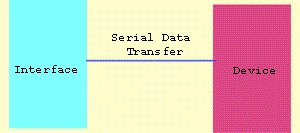
Serial interface ( as illustrated above) can be used for serial communications,
in which only one bit is transmitted at a time. It is used in a single processor
and it is a general purpose interface that can be used for almost any type of
device including modems, mice and printers (although most printers are connected
to parallel port). Serial data transfer is cheap and reliable. A serial port
is a physical connector and is connected to an integrated circuit called UART
which handles the transfer of data conversion between parallel and serial data.
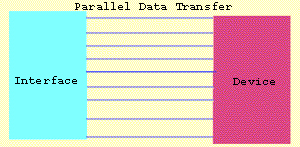
In contrast a parallel interface can transmit 8 bits (1 byte) plus a parity
bit in one go. They require more expensive cables and cannot reliably send data
across distances greater than 50 feet. Parallel ports are connectors used to
connect to nearby printers. Most PC's have both a parallel port and at least
one serial port. Generally parallel ports are used when high bandwidth
is required.
Full Duplex
Full duplex is data transferred in both directions at the same time. An example
of a full duplex is a telephone communication where both parties can talk simultaneously.
Half Duplex
Half duplex is data transferred in one direction only at a particularly time.
A walkie-talkie is an example of one way. However half duplex is two way communication
but at a particular time it can only transfer data in one direction. Modern
modems have a switch which lets you select between half duplex or full duplex
communication.
Simplex
This is data transferred in only one direction:- An example is radio communication.
Note that the difference between half duplex and simplex is that half duplex
is a two-way communication and simplex is a one-way communication.
Interrupts
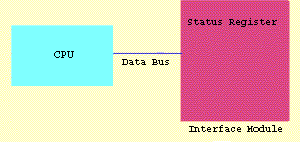
The input / output data transfer is started by the program executed by the CPU.
The program can be interrupted by the input / output device. For example if
the printer is switched off then the CPU is informed by the status register
that the printer is switched off. The status register is located in the interface
module
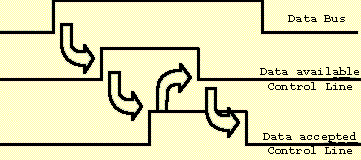
Handshaking
Handshaking is a communications protocol between two devices
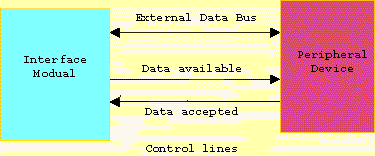
The interface module places data on the external data bus to the peripheral
device. The control line is asserted that data is available and when peripheral
device detects this signal it reads the data from the bus and transmits an acknowledgement
signal that data has been accepted. After an acknowledgement has been received
by the interface module the data available control line goes back to normal.
In return the data available control line says there is no more data thus asserting
that the data accepted control line goes to normal. This process completes the
handshaking.
DMA (Direct Memory Access)
The peripheral devices usually transfer data and store it with the help of the
CPU. But some peripherals (controllers) communicate information directly between
themselves and memory, bypassing the CPU. That system called direct memory access.
In this way it increased the time speed and decreased work of the CPU. In other
words DMA is quite useful in a multitasking computer system.