MsgBox msg, type, title
For example:
MsgBox "Hello there world", vbInformation , "Greetings"
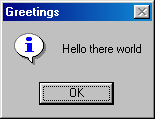
MsgBox( ) is a function which displays a dialog box to the user that contains a short message that you specify. MsgBox can be used as a procedure or a function.
As a procedure,
The syntax is:
MsgBox msg, type, title
For example: MsgBox "Hello there world", vbInformation , "Greetings"
As a function
The syntax is:
Answer = MsgBox(msg, type, title)
If you need to know whether the user has clicked on the OK button or the Cancel button then you should use Msg as a function. Sample:
Returnvalue = MsgBox ("Name entered is" & Name, vbYesNoCancel, "Name check")
if returnvalue = 2 then exit
The MsgBox( ) "type" parameter
Value Meaning Symbolic Constant 0 Display OK button vbOKOnly 1 Displays OK and Cancel buttons vbOKCancel 2 Displays Abort, Retry, and Ignore buttons vbAbortRetryCancel 3 Displays Yes, No and Cancel buttons vbYesNoCancel 4 Displays Yes and No vbYesNo 5 Displays Retry and Cancel vbRetryCancel 16 Display Critical Icon vbCritical 32 Displays Question Mark vbQuestion 48 Displays Exclamation Point vbExclamation 64 Displays Information Icon vbInformation
MsgBox( ) function Return Values
Value Meaning 1 Ok button selected 2 Cancel button selected 3 Abort button selected 4 Retry button selected 5 Ignore button selected 6 Yes button selected 7 No button selected
Using the MsgBox Function
Consider a message box that asks if you really want to clear a combo box. You need to display Yes and No buttons and then be able to determine which button the user clicked.
|
MsgBox (Prompt [ , Buttons] [ , Title] |
Example,
Dim iResponse As Integer
iResponse = MsgBox ("Do you wish to continue?", vbYesNo + vbQuestion,
"Title")
If iResponse = vbYes Then '
...Continue processing
If MsgBox (stMsg, vbOKCancel) = vbOK Then
ClearList
Else
CancelOperation
End If