I've developed this tiny virtual device driver(VxD) for my own use, but
I think it may be useful for somebody else. Feel free to download it.
Any feedback would be greatly appreciated.
About the driver
This driver allows an user to enter Russian text by using any windows application,
that has a feature to select font (WRITE, WORDPAD, MS WORD, MS ACCESS, PAINT,
NETSCAPE MAIL etc.). The driver works either with Windows 3.x or Windows95/98/NT (but does not work with Windows 2000)
and requires Windows font of KOI-8 format. A lot of such fonts are available
through the Internet(Some Russian fonts).
All you need to install the driver is to download this VxD to your
'windows\system' directory, to insert the following line in [386Enh] section
of system.ini file
DEVICE=VKRUSD.EXE
and to restart Windows.
After this you are ready to enter Russian text. Just start a Windows application
of your choice, select an appropriate font and go ahead to type.
Use SCROLL LOCK key to toggle Russian and English modes of keyboard (SCROLL LOCK
is On for Russian mode).
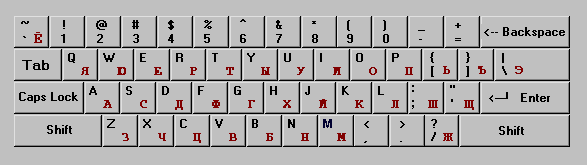
Layout of Russian keys(see the figure below) is not a standard layout of Russian keyboard.
It was more convenient for me to assign the Russian letters to English keys with the
similar (where possible) sound. For example, and so on. It should be
also convenient for people who usually used English letters for Russian messages.
Please remember: if current font has other than KOI-8 format and SCROLL LOCK is ON, you will
see on screen characters different from those you enter. Don't forget
to turn SCROLL LOCK key OFF after you've finished entering Russian text.
It is no harm otherwise, but you will be surprised seeing characters other than
you are entering.
Known problems:
This VxD does not work properly with MS WORD and some other programs:
I do not have time to redevelop this driver and
still use it. In spite of these problems, the driver has the following merits:
Download VxD(KOI-8) Download VxD(1251)
Note: Actually this driver is not an executable file, its extension should be '386', but I've put
'exe' to simplify downloading. The driver works anyway, but for the sake of naming
convention you can change 'exe' to '386'.
 and so on. It should be
also convenient for people who usually used English letters for Russian messages.
and so on. It should be
also convenient for people who usually used English letters for Russian messages.
