JDBC
by Bill Venners
This lecture gives an introductory overview of JDBC.
Agenda
- Introduce JDBC
- Show how JDBC deals with variations in SQL support
- Discuss JDBC drivers
- Look at
DriverManager, JDBC URLs,Connection,Statement - Discuss transaction support
- Walk you through a JDBC example
JDBC
- Standardized SQL lets you talk to databases from different vendors in a uniform way.
- ODBC defined a standard C interface for talking to databases with SQL.
- The JDBC (Java Database Connectivity) library
(
java.sql) allows you to use SQL to talk to databases from a Java program. - The
java.sqlcalls go through a JDBC driver. - JDK comes with a JDBC to ODBC bridge.
- DB vendors are creating native JDBC drivers; JDBC drivers that talk over a network also exist.
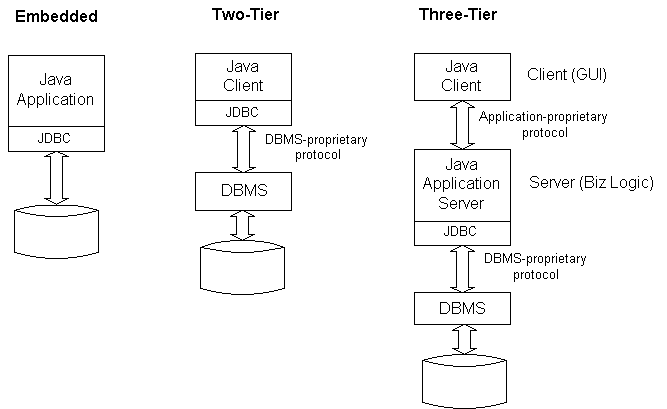
JDBC Tier Models
SQL Variety
- Although SQL is a standard, only basic functionality is broadly and uniformly supported
- For example, not all DB vendors support stored procedures or outer joins
- JDBC passes any query string through to the DBMS
- JDBC "escape syntax" provides a standard way to access common non-standard functionality (for example, date literals)
- Can use
DatabaseMetaDatato adapt to particular underlying database
Registering JDBC Drivers
DriverManagerclass:- keeps track of available drivers
- connects a user with a driver
Driverclasses have a static initializer that creates an instance and callsDriverManager.registerDriver()DriverManagerattempts to load any drivers specified in thejava.lang.Systempropertyjdbc.driversjdbc.drivers=sun.jdbc.odbc.JdbcOdbcDriver;
Making a Connection
- You call
DriverManager.getConnection(), passing in:- A URL that specifies a driver
- A user name
- A password
- The
DriverManagertests passes the URL to each registered driver (in order of registration) - The first driver that can handle the URL gets to service the connection
- Only drivers loaded via the boot class loader or the class loader that loaded the requesting code are checked
JDBC URLs
- JDBC URLs have the form
jdbc:<subprotocol>:<subname> <subprotocol>- name of a driver or a database connectivity mechanism<subname>- a way to identify the database- URL decided upon by driver vendor
- Some examples:
jdbc:odbc:mydb
jdbc:dcenaming:accounts-receivable
jdbc:netdb://vladimir:1066/conquer
jdbc:odbc:mydb;UID=wtc;PWD=hastings
Using the Connection
DriverManager.getConnection()returns a reference to aConnectionobject- A
Connectionobject represents one connection to a database - An application can have:
- One connection to one database
- Multiple connections to the same database
- Or multiple connections to different databases
- A "connection session" refers to the SQL statements executed and results returned over a connection
Statements
- Use the connection object to send SQL statements to the database
- If underlying database doesn't understand the statement, you'll get an exception
- Three kinds of statements:
Class Connection method About StatementcreateStatement()Use for simple SQL statements with no input parameters PreparedStatementprepareStatement()Pre-compiled; Can take input parameters
Use for simple SQL statements executed often, statements with input parametersCallableStatementprepareCall()Use to execute stored procedures Statementis the superclass ofPreparedStatement, which is the superclass ofCallableStatement
A Basic Query
- Register a driver with the
DriverManager:Class.forName( "sun.jdbc.odbc.JdbcOdbcDriver"); - Get a
Connectionfrom theDriverManager:Connection conn = DriverManager.getConnection( "jdbc:odbc:mydb", "", ""); - Get a
Statementobject from theConnection:Statement stmt = conn.createStatement();
- Execute a query on the
Statementobject, get back aResultSetobject:ResultSet rs = stmt.executeQuery( "SELECT LAST, FIRST, TOTAL " + "FROM students.csv mydb " + "ORDER BY TOTAL DESC"); - Process the results by extracting fields from the
ResultSet:while (rs.next()) { String s = rs.getString("FIRST") + " " + rs.getString("LAST") + ": " + rs.getString("TOTAL"); System.out.println(s); }
Transactions
- A transaction is a series of one or more statements followed by
either a
commit()orrollback()on theConnection - When
commit()orrollback()is invoked, the current transaction ends and a new one begins on thatConnection - Default mode is auto-commit:
commit()automatically called after each statement - If you disable auto-commit, you must explicitly call
commit()orrollback()to complete the transaction - All statements of a transaction will be committed or rolled back as a group
Transaction Isolation Levels
Connections operate at a "transaction isolation level" that defines how conflicts between concurrent transactions will be resolved- The
Connectionobject starts out at a level that is most likely the default for the underlying database - Can change it by calling
setIsolationLevel()on theConnection - JDBC has five isolation levels:
- lowest - no transaction support
- highest - no changes allowed to any data read by a transaction before commit
- The higher the isolation level, the slower the application will likely execute
JDBC Steps
- On your system or network:
- First you need a database.
- Set up the system so that you can access the database via a JDBC driver.
- In your Java program:
- Load the JDBC driver class, which will register itself.
- Connect to the datasource through a "database URL" of the form
jdbc.subprotocol.name - Execute SQL statements.
- Close the connection.
The Student Database
- In the upcoming example, I use:
- The ODBC text driver that comes with Microsoft Office
- the JDBC to ODBC bridge that comes with the JDK
- Here's the database, stored in file
students.csv:LAST,FIRST,HW1,HW2,HW3,HW4,TOTAL Busy,Lizzy,50,50,50,50,200 Java,Jane,100,100,100,100,400 Java,Joe,100,100,100,100,400 Slow,Joe,0,0,0,0,0 Smart,Bart,90,90,90,90,360
The Student Sorter Application
// In file jdbc/ex1/StudentSorter.java
import java.sql.*;
public class StudentSorter {
public static void main(String[] args) {
try {
            Class.forName(
                "sun.jdbc.odbc.JdbcOdbcDriver");
            Connection conn = DriverManager.getConnection(
                "jdbc:odbc:mydb", "", "");
Statement stmt = conn.createStatement();
            ResultSet rs = stmt.executeQuery(
                "SELECT LAST, FIRST, TOTAL " +
                "FROM students.csv mydb " +
                "ORDER BY TOTAL DESC");
            while (rs.next()) {
                String s = rs.getString("FIRST") + " "
                    + rs.getString("LAST") + ": "
                    + rs.getString("TOTAL");
                System.out.println(s);
            }
stmt.close();
}
catch(Exception e) {
e.printStackTrace();
}
}
}
Here's the the output of StudentSorter: Joe Java: 400 Jane Java: 400 Bart Smart: 360 Lizzy Busy: 200 Joe Slow: 0