Agenda
- The Original Sandbox (JDK 1.0)
- Class loaders
- Verification
- Security Manager
- Language (including, type safety)
- Code Signing (JDK 1.1)
- Fine-Grained Access Control (JDK 1.2)
Evolution of Java Security
- JDK 1.02:
- Applications = Trusted
- Applet = Untrusted
- JDK 1.1
- Applications, Signed Applets = Trusted
- Unsigned Applets = Untrusted
- JDK1.2 Spectrum
- Fully - Partially - Untrusted Code
Sandbox
- Class loaders
- Verification
- Security Manager
- Language (including, type safety)
Class Loaders
- Two flavors -- bootstrap and user-defined:
- Boostrap Class Loader -- part of JVM
- User-Defined Class Loaders -- part of application
Name Spaces
- Each class loader has a namespace.
- Namespace: the set of type names already loaded.
- Each name unique within a namespace...
- ...but not necessarily unique across namespaces.
Duplicate Names
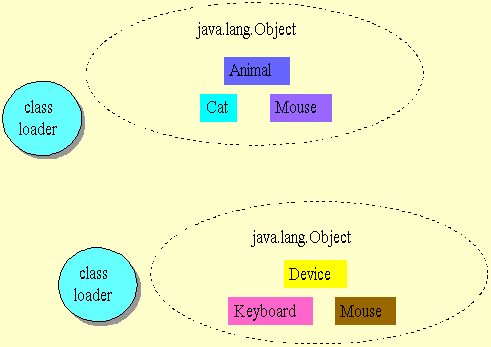
Names And Definitions
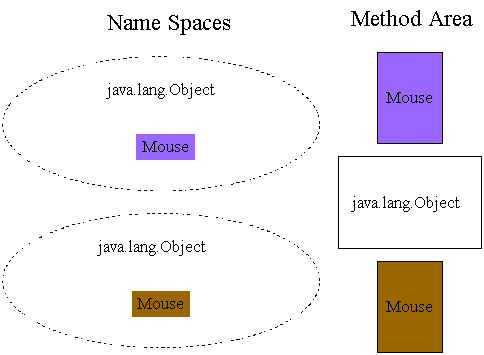
Why Name Spaces?
- Deal with name conflicts.
- Spoil plans of malicious code.
How Do Name Spaces Work?
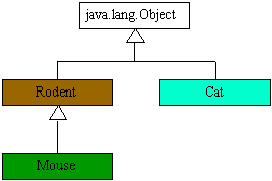
The Rule in Action
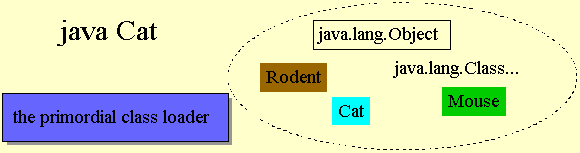
// In file dynaext/ex1/Cat.java
public class Cat {
    public static void main(String[] args) {
        Rodent myToy = new Mouse();
        myToy.scurry();
    }
}


// In file dynaext/ex1/Rodent.java
public class Rodent {
    public void scurry() {
        System.out.println("Rodent scurrying");
    }
}

// In file dynaext/ex1/Mouse.java
public class Mouse extends Rodent {
    public void scurry() {
        System.out.println("Mouse scurrying");
    }
}
java.lang.Class
- Used in dynamic extension
- Represents types (front end to method area)
- Can get information about a type
- Can create a new instance of a class
forName() Follows the Rule
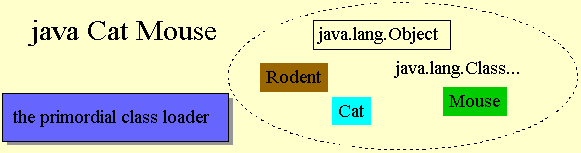
// In file dynaext/ex2/Cat.java
public class Cat {
    public static void main(String[] args)
        throws ClassNotFoundException, IllegalAccessException,
               InstantiationException {
        Class c = Class.forName(args[0]);
        Rodent myToy = (Rodent) c.newInstance();
        myToy.scurry();
    }
}

// In file dynaext/ex2/Rodent.java
public class Rodent {
    public void scurry() {
        System.out.println("Rodent scurrying");
    }
}

// In file dynaext/ex2/Mouse.java
public class Mouse extends Rodent {
    public void scurry() {
        System.out.println("Mouse scurrying");
    }
}
loadClass() Breaks the Rule
- To load a type into a different name space, invoke
loadClass() on a user-defined class loader.
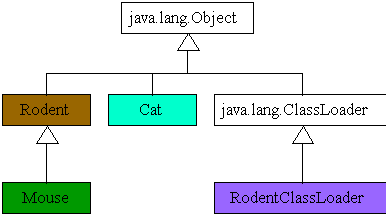 // In file dynaext/ex3/Cat.java
public class Cat {
public static void main(String[] args)
throws ClassNotFoundException, IllegalAccessException,
InstantiationException {
RodentClassLoader rcl = new RodentClassLoader();
Class c = rcl.loadClass(args[0]);
Rodent myToy = (Rodent) c.newInstance();
myToy.scurry();
}
}
// In file dynaext/ex2/Rodent.java
public class Rodent {
public void scurry() {
System.out.println("Rodent scurrying");
}
}
// In file dynaext/ex2/Mouse.java
public class Mouse extends Rodent {
public void scurry() {
System.out.println("Mouse scurrying");
}
}
// In file RodentClassLoader.java
import java.io.*;
import java.util.Hashtable;
public class RodentClassLoader extends ClassLoader {
public synchronized Class loadClass(String typeName,
boolean resolveIt) throws ClassNotFoundException {
// See if type as already been loaded by
// this class loader
Class result = findLoadedClass(typeName);
if (result != null) {
// Return an already-loaded class
return result;
}
// Check with the primordial class loader
try {
result = super.findSystemClass(typeName);
// Return a system class
return result;
}
catch (ClassNotFoundException e) {
}
// Don't attempt to load a system file except
// through the primordial class loader
if (typeName.startsWith("java.")) {
throw new ClassNotFoundException();
}
// Try to load it from subdirectory hole.
byte typeData[] = getTypeFromHole(typeName);
if (typeData == null) {
throw new ClassNotFoundException();
}
// Parse it
result = defineClass(typeName, typeData, 0,
typeData.length);
if (result == null) {
throw new ClassFormatError();
}
if (resolveIt) {
resolveClass(result);
}
// Return class from hole
return result;
}
private byte[] getTypeFromHole(String typeName) {
FileInputStream fis;
String fileName = "hole" + File.separatorChar +
typeName.replace('.', File.separatorChar)
+ ".class";
try {
fis = new FileInputStream(fileName);
}
catch (FileNotFoundException e) {
return null;
}
BufferedInputStream bis =
new BufferedInputStream(fis);
ByteArrayOutputStream out =
new ByteArrayOutputStream();
try {
int c = bis.read();
while (c != -1) {
out.write(c);
c = bis.read();
}
}
catch (IOException e) {
return null;
}
return out.toByteArray();
}
}
How the Name Spaces Look
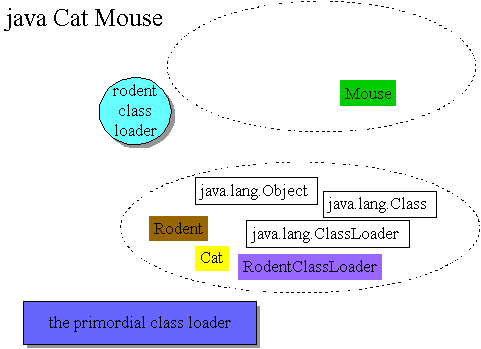
// In file dynaext/ex3/Cat.java
public class Cat {
    public static void main(String[] args)
        throws ClassNotFoundException, IllegalAccessException,
               InstantiationException {
        RodentClassLoader rcl = new RodentClassLoader();
        Class c = rcl.loadClass(args[0]);
        Rodent myToy = (Rodent) c.newInstance();
        myToy.scurry();
    }
}
Verifier
- JVM must verify the class files are properly formed
- Compiler bugs, malicious class files, ...
- Binary incompatibilities
- Most verification done at linking time
Four Verifier Passes
- Pass 1: When loading, verify basic class file format
- magic number
- attributes of proper length
- file not too long or too short, but just right
- Pass 2: When linking, check everything that doesn't require looking
at bytecodes
- final classes not subclassed
- final methods not overridden
- every class (except
Object) has a subclass
- constant pool satisfies constraints, such as each
CONSTANT_Class_info has in its name_index a
valid index to a CONSTANT_Utf8.
- Checking that field and method references in the constant pool are
well-formed
- Pass 3: Also at linking, perform bytecode verification
At any
given point in the program, no matter what path is taken to reach that
point:
- The operand stack is the same size and contains the same types of
values
- No local variable is accessed unless it is known to contain a
value of an appropriate type
- Methods are invoked with the appropriate arguments
- Fields are assigned only using values of appropriate types
- All opcodes have appropriate argument types on the operand stack
and in the local variables
- Pass 4: Verification of symbolic references
- Usually delayed until the symbolic reference is first used to
delay loading classes
The Security Manager
- Defined the security policy in JDK 1.0 and 1.1
- Could only be created (1.0) or replaced (1.1) once
- Methods of the Java API ask security manager before doing risky
things
check() method returns quietly if OK, throws exception
if not
Check Methods
- 1.0 and 1.1 Java API calls
check() methods before:
- accept a socket connection from a specified host and port number
- modify a thread (change its priority, stop it, etc...)
- open a socket connection to a specified host and port number
- create a new class loader
- delete a specified file
- create a new process
- cause the application to exit
- load a dynamic library that contains native methods
- wait for a connection on a specified local port number
- load a class from a specified package (used by class loaders)
- add a new class to a specified package (used by class loaders)
- access or modify system properties
- access a specified system property
- read from a specified file
- write to a specified file
Calling check() Methods
Language Features
- Checking casts at run-time
- Structured memory access (no pointer arithmetic)
- Garbage collection (can't explicitly free allocated memory)
- Array bounds checking
- Checking references for
null
- Type safety
Type Confusion
- Two Class Loaders:
RedLoader and
BlueLoader class Example {
void f() {
Spoofed x = Delegated.g();
}
}
class Delegated {
Spoofed g() {
//...
}
}
Delegated's g()
method returns an instance of a completely different class than
Example is expecting: class Spoofed {
public int stolen_secret_value;
public int[] forged_pointer;
}
class Spoofed {
private int secret_value;
private int innocent_int;
}
Example1 can now reveal a
private field in Spoofed and forge
a pointer from an int. class Example {
void f() {
Spoofed x = Delegated.g();
System.out.println("secret val = "
+ x.stolen_secret_value);
System.out.println("deref = "
+ x.forged_pointer[0]);
}
}
New Constraints
- In Java language, type = fully qualified name
- In JVM, type = fully qualified name + defining class loader
- In JVM Spec 2nd Edition, added loading constraints
- When types are shared between name spaces, they must have the same
defining loader
Beyond the Sandbox
- Beyond the Sandbox
- Code signing introduced in 1.1
- Cryptography API in
java.security
- Digital signatures make it possible to authenticate who vouched for
a piece of code
- Can relax the sandbox restrictions on code signed by parties you
"trust"
Code Signing
- Generate a public/private key pair
- Keep private key private; Make public key public
- Place classes and other files in a JAR file
- Tool (
jarsigner in 1.2) performs a one-way hash
calculation on contents to generate a "fingerprint"
- Tool signs the hash with your private key
- Adds the signed hash to the JAR file
Checking Signatures
- Tool (also
jarsigner in JDK 1.2) calculates one-way
hash on the JAR's contents
- Signed hash "decrypted" with signer's public key and checked with
calculated hash
- (May use certificate authorities to authenticate public keys)
- If hashes match, you know the signer and that the code didn't change
in transit
Key Distribution
- How do you get signer's (say Fred's) public key?
- If you know Fred, he can give it to you in person
- If you don't know Fred, you can involve a third part called a
Certificate Authority (CA)
- Fred presents credentials and public key to CA
- CA signs an electronic document (a "certificate") that contains
Fred's public key
Using Certificates
- You need Fred's public key or certificate before you can
authenticate his JAR file
- (Fred could include his certificate along with any doc he signs)
- Theory: If the certificate was actually signed by the CA, the public
key is actually Fred's
- How do you get the CA's public key?
- Why should you trust the CA?
Trust
- Given a code signing infrastructure, you can verify who vouches for
Java code
- What do you do with that knowledge?
- JDK1.1 - Black and White Policy
- JDK1.2 - Shades of Grey
- Plus: More flexible
- Minus: More complicated
1.2 Security Parts
- Code Source: URL source + code signers
- Permission: permission for a particular action
- Policy: grants permissions to code sources
- Protection Domain: permissions for one code source
- Access Controller: does stack inspection and says
yes or no
Code Source
- Constructor takes a URL and an array of certificates (signers)
- URL: source of the code
- Certificate[]: array of signers, usually obtained
from a JAR file
Permission Objects
- Permissions have 3 properties:
- type:
FilePermission,
AWTPermission
- name:
"/my/finances.dat",
"showWindowWithoutBannerWarning"
- actions:
"read, write"
- Hierarchy of permissions for Java API
- Can make your own permission classes
implies() Method
Policy
- One
Policy object installed per application
- Unlike
SecurityManager, can replace a
Policy
getPermissions(CodeSource) returns a collection of
Permission objects
- Policy usually defined in a policy file
Policy File
grant [signedBy <signer_names>]
           [, codeBase <code_source_URL>] {

    permission <permission_class_name>
           [<name> [, <action>]]
           [, signedBy <signer_names>];
    ...
};
grant {
    permission java.security.AllPermission;
};
grant signedBy "venners"
        codeBase "http://www.artima.com" {

    permission java.io.FilePermission
        "${user.home}${/}docs{/}-"
};
-
- trailing
/ matches all class files
- trailing
/* matches all class and JAR files
- trailing
/- matches all class and JAR files
recursively
Protection Domains
- Contains all
Permissions granted to a particular
CodeSource
- Corresponds to a
grant clause in a policy file
- Class loaders assign a
ProtectionDomain to every loaded
class
Access Controller
- Can't be instantiated
static void checkPermission(Permission)
- Current permissions = intersection of all permissions on the current
stack
- Algo: Inspect stack from top down.
- As soon as you hit a frame that doesn't have permission, throw
AccessControllerException
doPrivileged()
static Object doPrivileged(PrivilegedAction)
- If
AccessController.checkPermission() encounters a
method that invoked doPrivileged(), and that method has
permission, it returns
Exercises
Problem 1
In the Security/ex2 directory, create two JAR files,
friend.jar and stranger.jar, which will contain
the class files for Friend.java and
Stranger.java. For an explanation of this process, here's an
excerpt from Inside the Java Virtual Machine:
For an example of code signing with the jarsigner tool of
the Java 2 SDK 1.2, consider the following types, Doer,
Friend, and Stranger. The first type,
Doer, defines an interface that the other two types, classes
Friend and Stranger implement: // On CD-ROM in file
// security/ex2/com/artima/security/doer/Doer.java
package com.artima.security.doer;
public interface Doer {
void doYourThing();
}
Doer declares just one method, doYourThing().
Class Friend and class Stranger implement this
method in the exact same way. In fact, besides their names, the two
classes are identical:
// On CD-ROM in file
// security/ex2/com/artima/security/friend/Friend.java
package com.artima.security.friend;
import com.artima.security.doer.Doer;
import java.security.AccessController;
import java.security.PrivilegedAction;

public class Friend implements Doer {

    private Doer next;
    private boolean direct;

    public Friend(Doer next, boolean direct) {
        this.next = next;
        this.direct = direct;
    }

    public void doYourThing() {

        if (direct) {

            next.doYourThing();
        }
        else {
            AccessController.doPrivileged(
                new PrivilegedAction() {
                    public Object run() {
                        next.doYourThing();
                        return null;
                    }
                }
            );
        }
    }
}

// On CD-ROM in file
// security/ex2/com/artima/security/stranger/Stranger.java
package com.artima.security.stranger;
import com.artima.security.doer.Doer;
import java.security.AccessController;
import java.security.PrivilegedAction;

public class Stranger implements Doer {

    private Doer next;
    private boolean direct;

    public Stranger(Doer next, boolean direct) {
        this.next = next;
        this.direct = direct;
    }

    public void doYourThing() {

        if (direct) {

            next.doYourThing();
        }
        else {
            AccessController.doPrivileged(
                new PrivilegedAction() {
                    public Object run() {
                        next.doYourThing();
                        return null;
                    }
                }
            );
        }
    }
}
These types -- Doer, Friend, and
Stranger -- are designed to illustrate the stack inspection
mechanism of the access controller. The motivation behind their design
will be made clear later in this chapter, when several examples of stack
inspection are given. At this point, however, the class files generated by
compiling Friend and Stranger must be signed to
prepare them for the upcoming stack inspection examples. The class files
generated from Friend.java will be signed by a party referred
to fondly as "friend." The class files generated from
Stranger.java will be signed by a party referred to somewhat
suspiciously as "stranger." The class file generated by
Doer will not be signed.
To prepare the class files for signing, they must first be placed into
JAR files. Because the class files for Friend and
Stranger need to be signed by two different parties, they
will be collected into two different JAR files. The two class files
generated by compiling Friend.java, Friend.class
and Friend$1.class, will be placed into a JAR file called
friend.jar. Similarly, the two class files generated by
compiling Stranger.java, Stranger.class and
Stranger$1.class, will be placed into a JAR file called
stranger.jar.
Friend.java's class files are dropped by the
javac compiler in the
security/ex2/com/artima/security/friend directory. Because
class Friend is declared in the
com.artima.security.friend package,
Friend.java's class files must be placed in the JAR file in
the com/artima/security/friend directory. The following
command, executed in the security/ex2 directory, will place
Friend.class and Friend$1.class into a newly
created JAR file called friend.jar, which is placed in the
current directory, security/ex2:
jar cvf friend.jar com/artima/security/friend/*.class
Once the previous command completes, the class files for
Friend.java must be removed so they won't be found by the
Java virtual machine when it runs the access control examples: rm com/artima/security/friend/Friend.class
rm com/artima/security/friend/Friend$1.class
Filling a JAR file with Stranger.java's class files, which
are dropped by javac in the
security/ex2/com/artima/security/stranger directory, requires
a similar process. From the security/ex2 directory, the
following command must be executed: jar cvf stranger.jar com/artima/security/stranger/*.class
rm com/artima/security/stranger/Stranger.class
rm com/artima/security/stranger/Stranger$1.class
Problem 2
Create a public/private key pair for both friend and stranger. For an
explanation of this process, here's another excerpt from Inside the
Java Virtual Machine:
To sign a JAR file with the jarsigner tool from the Java 2
SDK 1.2, a public/private key pair for the signer must already exist in a
keystore file, which is a file for storing named,
password-protected keys. The keytool program of the Java 2
SDK 1.2, can be used to generate a new key pair, associate the key pair
with a name or alias, and protect it with a password. The alias,
which is unique within each keystore file, is used to identify a
particular key pair in a particular keystore file. The password for a key
pair is required to access or change the information contained in the
keystore file for that key pair.
The access control examples expect a keystore file named
ivjmkeys in the security/ex2 directory
containing key pairs for the aliases "friend" and
"stranger." The following command, executed from the
security/ex2 directory, will generate the key pair for the
alias, friend, with the password, friend4life.
In the process, it will create the keystore file named
ijvmkeys: keytool -genkey -alias friend -keypass friend4life -validity 10000 -
keystore ijvmkeys
The -validity 10000 command line argument of the previous
keytool command indicates that the key pair should be valid
for 10000 days, which at over 27 years, is likely enough time to outlive
the product lifecycle of this edition of this book. When the command runs,
it will prompt for a keystore password, which is a general password
required for any kind of access or change of the keystore file. The
keystore password given to ijvmkeys is
"ijvm2ed".
The key pair for stranger can be generated with a similar
command: keytool -genkey -alias stranger -keypass stranger4life -validity 10000 -
keystore ijvmkeys
Problem 3
Sign the JAR files. For an explanation of this process, here's yet
another excerpt from Inside the Java Virtual Machine:
Now that the keystore file ijvmkeys contains key pairs for
friend and stranger, and the JAR files
friend.jar and stranger.jar contain the
appropriate class files, the JAR files can finally be signed. The
following jarsigner command, executed from the
examples/ex2 directory, will sign the class files contained
in friend.jar using friend's private key: jarsigner -keystore ijvmkeys -storepass ijvm2ed -keypass friend4life
friend.jar friend
A similar command will sign the class files contained in
stranger.jar with stranger's private key: jarsigner -keystore ijvmkeys -storepass ijvm2ed -keypass stranger4life
stranger.jar stranger
Whew, that was a lot of work just to sign two JAR files. And keep in
mind that in the real world, you'd have to make sure no one with bad
intent got a hold of your private keys, and that you kept track of them.
That means not losing the keystore file, remembering the passwords, and so
on. In addition, you'll have to get your public keys to anyone who is
going to use your signature to give your code access to their system.
Problem 4
Using the policy file policyfile.txt in the
Security/ex2 directory, perform a stack inspection that says
"Yes," as described in this excerpt from Inside the Java Virtual
Machine:
As the first stack inspection example, consider the
Example2a application: // On CD-ROM in file security/ex2/Example2a.java
import com.artima.security.friend.Friend;
import com.artima.security.stranger.Stranger;
// This succeeds because everyone has permission to
// read answer.txt
class Example2a {
public static void main(String[] args) {
TextFileDisplayer tfd = new TextFileDisplayer("question.txt");
Friend friend = new Friend(tfd, true);
Stranger stranger = new Stranger(friend, true);
stranger.doYourThing();
}
}
The Example2a application creates three Doer
objects: a TextFileDisplayer, a Stranger, and a
Friend. The TextFileDisplayer constructor is
passed the String, "question.txt". When its
doYourThing() method is invoked, it will attempt to open a
file named question.txt in the current directory for reading
and print its contents to the standard output. The Friend
object's constructor is passed a reference to the
TextFileDisplayer object (a Doer) and the
boolean value true. Because the passed boolean value is
true, when Friend's doYourThing()
method is invoked, it will directly invoke doYourThing() on
the TextFileDisplayer object. The Stranger
object's constructor is passed a reference to the Friend
object (also a Doer) and the boolean value true.
Because the passed boolean value is true, when
Stranger's doYourThing() method is invoked, it
will directly invoke doYourThing() on the Friend
object. After creating these three Doer objects, and hooking
them together as described, Example2a's main()
method invokes doYourThing() on the Stranger
object and the fun begins.
When the Example2a program invokes
doYourThing() on the Stranger object referenced
from the stranger variable, the Stranger object
invokes doYourThing() on the Friend object,
which invokes doYourThing() on the
TextFileDisplayer object. TextFileDisplayer's
doYourThing() method attempts to open and read a file named
"question.txt" in the current directory (the directory in
which the Example2a application was started) and print its
contents to the standard output. When TextFileDisplayer's
doYourThing() method creates a new FileReader
object, the FileReader's constructor creates a new
FileInputStream, whose constructor checks to see whether or
not a security manager has been installed. In this case, the concrete
SecurityManager has been installed, so the
FileInputStream's constructor invokes
checkRead() on the concrete SecurityManager. The
checkRead() method instantiates a new
FilePermission object representing permission to read file
question.txt and passes that object to the concrete
SecurityManager's checkPermission() method,
which passes the object on to the checkPermission() method of
the AccessController. The AccessController's
checkPermission() method performs the stack inspection to
determine whether this thread should be allowed to open file
question.txt for reading.
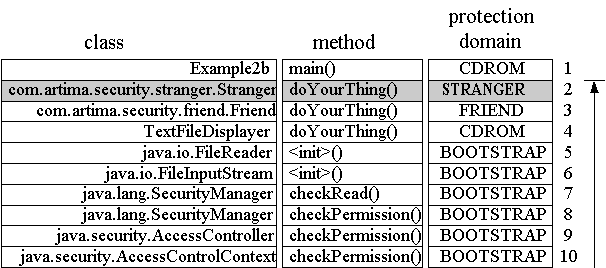
Figure 3-6 shows the call stack when the
AccessController's checkPermission() method is
invoked. In this figure, each frame of the call stack is represented by a
horizontal row that is composed of several elements. The leftmost element
in each stack frame row, which is labeled "class," is the fully qualified
name of the class in which the method represented by that stack frame is
defined. The next element to the right, which is labeled "method," gives
the name of the method. The next element, which is labeled "protection
domain," indicates the protection domain with which each frame is
associated. Farthest to the right is an arrow that shows the progression
of the AccessController's checkPermission()
method as it checks whether each stack frame has permission to perform the
requested action. Just to the left of the arrow is a number for each stack
frame. Like all images of the stack shown in this book, the top of the
stack appears at the bottom of the picture. Thus, in Figure 3-6, the top
of the stack is the frame numbered 10.
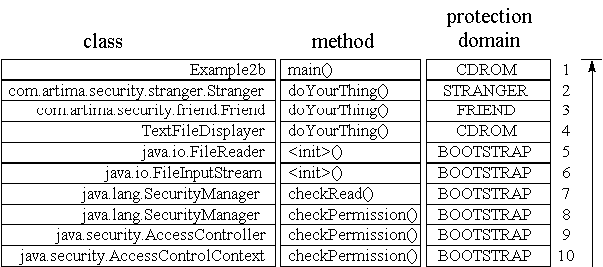
Figure
3-6. Stack inspection for Example2a: all frames have
permission.
The protection domain column of the stack diagram shown in Figure 3-6
shows each frame associated with one of four protection domains, named
"FRIEND," "STRANGER," "CD-ROM," and "BOOTSTRAP." Three of these protection
domains correspond to grant clauses in policyfile.txt. The
FRIEND protection domain corresponds to the grant clause that gives
permission to any code signed by friend to read
question.txt and answer.txt. The STRANGER
protection domain corresponds to the grant clause that gives permission to
any code signed by stranger to read
question.txt. The CD-ROM protection domain corresponds to the
grant clause that gives permission to any code loaded from the
"${com.artima.ijvm.cdrom.home}/security/ex2/" directory to read
question.txt and answer.txt. The fourth and
final protection domain, named BOOTSTRAP, doesn't correspond to any grant
clause in policyfile.txt. Rather, the BOOTSTRAP protection
domain represents the permissions granted to any code loaded by the
bootstrap class loader, which is responsible for loading the class files
of the Java API. Code in the BOOTSTRAP protection domain is granted
java.lang.AllPermission, which gives it permission to do
anything.
To get the Example2a application to demonstrate stack
inspection as intended, you must start the application with an appropriate
command. When using the java program from the Java 2 SDK
version 1.2, the appropriate command takes the form: java -Djava.security.manager -Djava.security.policy=policyfile.txt
-Dcom.artima.ijvm.cdrom.home=d:\books\InsiddeJVM\manuscript\cdrom -cp
.;jars/friend.jar;jars/stranger.jar Example2a
This command, which is contained in the ex2a.bat file in
the security/ex2 directory of the CD-ROM, is an example of
the kind of command you'll need to use to get the example to work. By
defining the java.security.manager property on the command
line, you indicate you want the concrete SecurityManager to
be automatically installed. Because the Example2a application
doesn't install a security manager explicitly, if you neglect to define
the java.security.manager property on the command line, no
security manager will be installed and the code will be able do anything.
The -cp argument sets up the class path, which causes the
virtual machine to look for class files in the current directory and in
the friend.jar and stranger.jar files in the
jars subdirectory. The
com.artima.ijvm.cdrom.home property indicates the directory
in which Doer, Example2a, and
TextFileDisplayer are located. This property is used by the
third grant clause in policyfile.txt, which corresponds to
the protection domain named "CD-ROM." As a result, types
Doer, Example2a, and
TextFileDisplayer will be loaded into the CD-ROM protection
domain and granted permission to read to both question.txt
and answer.txt. To execute Example2a on your own
system, you must set the com.artima.ijvm.cdrom.home property
to the security/ex2 directory of your CD-ROM, or to whatever
directory you may have copied the security/ex2 directory from
the CD-ROM.
When the AccessController performs its stack inspection,
it starts at the top of the stack, frame ten, and heads down to frame one,
which is the frame for the first method invoked by this thread,
main() of class Example2a. In the case of the
Example2a application, every frame on the call stack has
permission to perform the action: to read the file
"question.txt". This is because all four protection domains
represented on the call stack -- FRIEND, STRANGER, CD-ROM, and BOOTSTRAP
-- include or imply a FilePermission for reading
question.txt in the current directory. When the
AccessController's checkPermission() method
reaches the bottom of the stack without having encountered any frames that
don't have permission to read the file, it returns normally, without
throwing an exception. The FileInputStream goes ahead and
opens the file for reading. The Example2a application reads
in the contents of question.txt and prints them to the
standard output, which looks like this: Too what extent does complexity threaten security?
Problem 5
Using the policy file policyfile.txt in the
Security/ex2 directory, perform a stack inspection that says
"No," as described in this excerpt from Inside the Java Virtual
Machine:
As an example of a stack inspection that results in a denied
permission, consider the Example2b application from the
security/ex2 directory of the CD-ROM: // On CD-ROM in file security/ex2/Example2b.java
import com.artima.security.friend.Friend;
import com.artima.security.stranger.Stranger;
// This fails because the Stranger code doesn't have
// permission to read file question.txt
class Example2b {
public static void main(String[] args) {
TextFileDisplayer tfd = new TextFileDisplayer("answer.txt");
Friend friend = new Friend(tfd, true);
Stranger stranger = new Stranger(friend, true);
stranger.doYourThing();
}
}
The only difference between Example2b and the previous
example, Example2a, is that whereas Example2a
passes the file name "question.txt" to the
TextFileDisplayer constructor, Example2b passes
the file name "answer.txt". This small change to the
application makes a big difference to the outcome of the program, however,
because one of the methods on the stack doesn't have permission to access
"answer.txt".
When the Example2b program invokes
doYourThing() on the Stranger object referenced
from the stranger variable, the Stranger object
invokes doYourThing() on the Friend object,
which invokes doYourThing() on the
TextFileDisplayer object. TextFileDisplayer's
doYourThing() method attempts to open and read a file named
"answer.txt" in the current directory (the directory in which
the Example2b application was started) and print its contents
to the standard output. When TextFileDisplayer's
doYourThing() method creates a new FileReader
object, the FileReader constructor creates a new
FileInputStream, whose constructor checks to see whether or
not a security manager has been installed. In this case, the concrete
SecurityManager has been installed, so the
FileInputStream's constructor invokes
checkRead() on the concrete SecurityManager. The
checkRead() method instantiates a new
FilePermission object representing permission to read file
answer.txt and passes that object to the concrete
SecurityManager's checkPermission() method,
which passes the object on to the checkPermission() method of
the AccessController. The AccessController's
checkPermission() method performs the stack inspection to
determine whether this thread should be allowed to open file
answer.txt for reading.
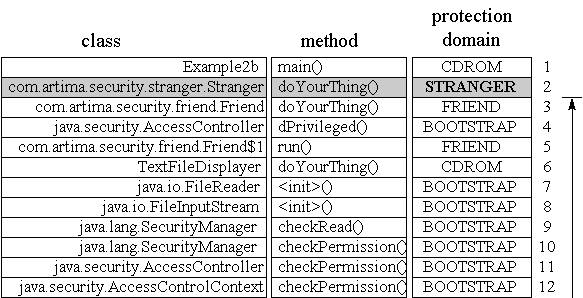
The call stack to be inspected in Example2b, which is
shown in Figure 3-7, looks identical to the call stack that was inspected
in Example2a. The only difference is that this time, rather
than making sure every frame on the stack has permission to read file
question.txt, the AccessController will make
sure every frame on the stack has permission to read
answer.txt. As always, stack inspection starts at the top of
the stack and proceeds on down the stack towards frame one. But this time,
the inspection process never actually reaches frame one. When the
AccessController reaches frame two, it discovers that the
code of the Stranger class, to whom the
doYourThing() method of frame two belongs, doesn't have
permission to read "answer.txt". Because all frames of the
stack must have permission, the stack inspection process need go no
farther than frame two. The AccessController's
checkPermission() method throws an AccessControl
exception.
Figure
3-7. Stack inspection for Example2b: frame two doesn't have
permission.
To get the Example2b application to work as intended, you
must start the application with an appropriate command. When using the
java program from the Java 2 SDK version 1.2, the appropriate
command takes the form: java -Djava.security.manager -Djava.security.policy=policyfile.txt -
Dcom.artima.ijvm.cdrom.home=d:\books\InsideJVM\manuscript\cdrom -cp
.;jars/friend.jar;jars/stranger.jar Example2b
This command, which is contained in the ex2b.bat file in
the security/ex2 directory of the CD-ROM, is an example of
the kind of command you'll need to use to get the example to work. As
before, to execute Example2b on your own system, you must set
the com.artima.ijvm.cdrom.home property to the
security/ex2 directory of your CD-ROM, or to whatever
directory you may have copied the security/ex2 directory from
the CD-ROM. When you run this program, you should see this output: Exception in thread "main" java.security.AccessControlException: access
denied (java.io.FilePermission answer.txt read)
at java.security.AccessControlContext.checkPermission(AccessControlContext.java:195)
at java.security.AccessController.checkPermission(AccessController.java:403)
at java.lang.SecurityManager.checkPermission(SecurityManager.java:549)
at java.lang.SecurityManager.checkRead(SecurityManager.java:873)
at java.io.FileInputStream.(FileInputStream.java:65)
at java.io.FileReader.(FileReader.java:35)
at TextFileDisplayer.doYourThing(TextFileDisplayer.java, Compiled Code)
at com.artima.security.friend.Friend.doYourThing(Friend.java:21)
at com.artima.security.stranger.Stranger.doYourThing(Stranger.java:21)
at Example2b.main(Example2b.java:18)
Problem 6
Using the policy file policyfile.txt in the
Security/ex2 directory, perform a stack inspection that makes
use of the doPrivileged() method, as described in this
excerpt from Inside the Java Virtual Machine:
The basic algorithm illustrated so far in this chapter, in which the
AccessController inspects the stack from top to bottom,
stubbornly requiring that every frame have permission to perform an
action, prevents less trusted code from hiding behind more trusted code.
Because the AccessController looks all the way down the call
stack, it will eventually find any method that isn't trusted to perform
the requested action. For example, even though the untrusted
Stranger object of Example2b places the trusted
code of Friend and TextFileDisplayer between it
and the Java API method that attempts to open file
answer.txt, the untrusted Stranger code is
unable to hide behind that trusted code. As shown in Figure 3-7, although
the AccessController must look through eight frames that have
permission to read answer.txt before it encounters frame two,
it eventually reaches frame two. And once it arrives at frame two, it
discovers the doYourThing() method of class
Stranger, whose associated protection domain doesn't have
permission to read answer.txt. As a result of this discovery,
the AccessController throws an
AccessControllerException, thereby disallowing the read.
The basic AccessController algorithm prevents any code
from performing or causing to be performed any action that the code is not
trusted to do. Methods belonging to a less powerful protection domain,
therefore, are unable to gain privileges by invoking methods belonging to
more powerful protection domains. The basic algorithm also implies that
methods belonging to more powerful protection domains must give up
privileges when calling methods belonging to less powerful protection
domains. Although the basic algorithm provides behavior that is desirable
in general, the AccessController's stubborn insistence that
all frames on the call stack have permission to perform the requested
action can at times be a bit restrictive.
Sometimes code farther up the call stack (closer to the top of the
stack) might wish to perform an action that code farther down the call
stack may not be allowed to do. For example, imagine that an untrusted
applet asks the Java API to render a string of text in bold Helvetica font
on its applet panel. To fulfill this request, the Java API may need to
open a font file on the local disk to load a bold Helvetica font with
which to render the text on behalf of the applet. The class making the
explicit request to open the font file, because it belongs to the Java
API, likely has permission to open the file. However, the code of the
untrusted applet, which is represented by a stack frame farther down the
call stack, likely doesn't have permission to open the file. Given just
the basic algorithm, the AccessController would prevent the
opening of the font file because the code for the untrusted applet,
sitting somewhere on the stack, doesn't have permission to open the file.
To enable trusted code to perform actions for which less trusted code
farther down the call stack may not have permission to do, the
AccessController class offers four overloaded static methods
named doPrivileged(). Each of these methods accepts as a
parameter an object that implements either the
java.security.PrivilegedAction or
java.security.PrivilegedExceptionAction interface. Both of
these interfaces declare one method named run() that takes no
parameters and returns void. The only difference between
these two interfaces is that whereas
PrivilegedExceptionAction's run() method
declares Exception in its throws clause,
PrivilegedAction declares no throws clause. To
perform an action despite the existence of less trusted code farther down
the call stack, you create an object that implements one of the
PrivilegedAction interfaces, whose run() method
performs the action, and pass that object to doPrivileged().
When you invoke doPrivileged(), as when you invoke any
method, a new frame is pushed onto the stack. In the context of a stack
inspection by the AccessController, a frame for a
doPrivileged() method invocation signals an early termination
point for the inspection process. If the protection domain associated with
the method that invoked doPrivileged() has permission to
perform the requested action, the AccessController returns
immediately. It allows the action even if code farther down the stack
doesn't have permission to perform the action.
If an untrusted applet asks the Java API to render a test string on its
applet panel, therefore, the Java API code can open the local font file by
wrapping the file open action in a doPrivileged() call. The
AccessController will allow such a request even though the
untrusted applet code doesn't have permission to open the file. Because
the frame for the untrusted applet code is below the frame for the
doPrivileged() invocation by the Java API code, the
AccessController won't even consider the permissions of the
untrusted applet code.
For an example of a doPrivileged() method invocation,
consider again the doYourThing() method of class
Friend: // On CD-ROM in file
// security/ex2/com/artima/security/friend/Friend.java
package com.artima.security.friend;
import com.artima.security.doer.Doer;
import java.security.AccessController;
import java.security.PrivilegedAction;
public class Friend implements Doer {
private Doer next;
private boolean direct;
public Friend(Doer next, boolean direct) {
this.next = next;
this.direct = direct;
}
public void doYourThing() {
if (direct) {
next.doYourThing();
}
else {
AccessController.doPrivileged(
new PrivilegedAction() {
public Object run() {
next.doYourThing();
return null;
}
}
);
}
}
}
If the direct instance variable is false,
Friend's doYourThing() method will simply invoke
doYourThing() directly on the next reference.
But if direct is true,
doYourThing() will wrap the invocation of
doYourThing() on the next reference in a
doPrivileged() call. To do so, Friend
instantiates an anonymous inner class that implements
PrivilegedAction whose run() method invokes
doYourThing() on next, and passes that object to
doPrivileged().
To see Friend's doPrivileged() invocation in
action, consider the Example2c application from the
security/ex2 directory of the CD-ROM: // On CD-ROM in file security/ex2/Example2c.java
import com.artima.security.friend.Friend;
import com.artima.security.stranger.Stranger;
// This succeeds because Friend code executes a
// doPrivileged() call. (Passing false as
// the second arg to Friend constructor causes
// it to do a doPrivileged().)
class Example2c {
public static void main(String[] args) {
TextFileDisplayer tfd = new TextFileDisplayer("answer.txt");
Friend friend = new Friend(tfd, false);
Stranger stranger = new Stranger(friend, true);
stranger.doYourThing();
}
}
Only one difference exists between the main() method of
the Example2c application and the main() method
of the previous example, Example2b. When the
Example2b application instantiated the Friend
object, it passed true as the second parameter.
Example2c passes false. If you look back at the
code for Friend (and Stranger) shown earlier in
this chapter, you'll see that this parameter is used to decide whether to
invoke doYourThing() directly on the Doer passed
as the first parameter to the constructor. Because Example3c
passes false, the Friend class will not invoke
doYourThing() directly, but will invoke it indirectly via an
AccessController.doPrivileged() invocation.
When the Example2c program invokes
doYourThing() on the Stranger object referenced
from the stranger variable, the Stranger object
invokes doYourThing() on the Friend object,
which (because direct is false) invokes
doPrivileged(), passing in the anonymous inner class instance
that implements PrivilegedAction. The
doPrivileged() method invokes run() on the
passed PrivilegedAction object, which invokes
doYourThing() on the TextFileDisplayer object.
As in the previous example, TextFileDisplayer's
doYourThing() method attempts to open and read a file named
"answer.txt" in the current directory and print its contents
to the standard output. When TextFileDisplayer's
doYourThing() method creates a new FileReader
object, the FileReader constructor creates a new
FileInputStream, whose constructor checks to see whether or
not a security manager has been installed. Once again, the concrete
SecurityManager has been installed, so the
FileInputStream's constructor invokes
checkRead() on the concrete SecurityManager. The
checkRead() method instantiates a new
FilePermission object representing permission to read file
answer.txt and passes that object to the concrete
SecurityManager's checkPermission() method,
which passes the object on to the checkPermission() method of
the AccessController. The AccessController's
checkPermission() method performs the stack inspection to
determine whether this thread should be allowed to open file
answer.txt for reading. The stack appears as shown in Figure
3-8.
Figure
3-8. Stack inspection for Example2c: stops at frame three.
The call stack to be inspected in Example2c looks similar
to the call stacks inspected in Example2a and
Example2b. The difference is that Example2c's
call stack has two extra frames: frame four, which represents the
doPrivileged() invocation, and frame five, which represents
the run() invocation on the PrivilegedAction
object. As always, stack inspection starts at the top of the stack and
proceeds on down the stack towards frame one. But once again, the
inspection process will not actually reach frame one. When the
AccessController reaches frame four, it discovers a
doPrivileged() invocation. As a result of this discovery, the
AccessController makes one more check: it checks that the
code represented by frame three, the code that invoked
doPrivileged(), has permission to read
answer.txt. Because frame three is associated with the FRIEND
protection domain, that does have permission to read
question.txt, the AccessController's
checkPermission() method returns normally. Because the
AccessController stopped its inspection at frame three, it
never considered frame two, which because it is associated with the
STRANGER protection domain, doesn't have permission to read
answer.txt. Thus, by invoking doPrivileged() the
Friend code was able to read file answer.txt,
even though code beneath it on the call stack doesn't have permission to
open the file.
To get the Example2c application to work as intended, you
must, as with the previous examples, start the application with an
appropriate command. When using the java program from the
Java 2 SDK version 1.2, the appropriate command takes the form: java -Djava.security.manager -Djava.security.policy=policyfile.txt
-Dcom.artima.ijvm.cdrom.home=d:\books\InsiddeJVM\manuscript\cdrom -cp
.;jars/friend.jar;jars/stranger.jar Example2c
This command, which is contained in the ex2c.bat file in
the security/ex2 directory of the CD-ROM, is an example of
the kind of command you'll need to use to get the example to work. As
before, to execute Example2c on your own system, you must set
the com.artima.ijvm.cdrom.home property to the
security/ex2 directory of your CD-ROM, or to whatever
directory you may have copied the security/ex2 directory from
the CD-ROM. When you run this program, it should print out the contents of
answer.txt: Complexity threatens security to a significant extent. The more
complicated a security infrastructure becomes, the more likely
parties responsible for configuring security will either make
mistakes that open up security holes or avoid using the
security infrastructure altogether.
Problem 7
Using the policy file policyfile.txt in the
Security/ex2 directory, perform a stack inspection that
demonstrates a futile use of the doPrivileged() method, as
described in this excerpt from Inside the Java Virtual Machine:
It is important to understand that a method can never grant itself more
privileges than it already has with a doPrivileged()
invocation. By calling doPrivileged(), a method is merely
enabling privileges it already has. It is telling the
AccessController that it is taking responsibility for
exercising its own permissions, and that the AccessController
should ignore the permissions of its callers. Thus, the
doPrivileged() call in the previous example,
Example2c enabled answer.txt to be read because
Friend, the class that executed the
doPrivileged(), already had permission to read the file, and
so did all the frames above it on the stack.
For an example of a futile attempt to use doPrivileged(),
consider the Example2d application from the
security/ex2 directory of the CD-ROM: // On CD-ROM in file security/ex2/Example2d.java
import com.artima.security.friend.Friend;
import com.artima.security.stranger.Stranger;
// This fails because even though Stranger does
// a doPrivileged() call, Stranger doesn't have
// permission to read question.txt. (Passing
// false as second arg to Stranger constructor
// causes it to do a doPrivileged().)
class Example2d {
public static void main(String[] args) {
TextFileDisplayer tfd = new TextFileDisplayer("answer.txt");
Stranger stranger = new Stranger(tfd, false);
Friend friend = new Friend(stranger, true);
friend.doYourThing();
}
}
The difference between Example2d and the previous example,
Example2c, is that the Stranger and
Friend objects have swapped positions and roles. The
Stranger object is now farther up the stack, with the
Friend below it on the stack. And this time, it is
Stranger that will make the call to
doPrivileged(), not Friend.
When the Example2d program invokes
doYourThing() on the Friend object referenced
from the friend variable, the Friend object
invokes doYourThing() on the Stranger object,
which (because direct is false) invokes
doPrivileged(), passing in the anonymous inner class instance
that implements PrivilegedAction. The
doPrivileged() method invokes run() on the
passed PrivilegedAction object, which invokes
doYourThing() on the TextFileDisplayer object.
As in the previous two examples, TextFileDisplayer's
doYourThing() method attempts to open and read a file named
"answer.txt" in the current directory and print its contents
to the standard output. When TextFileDisplayer's
doYourThing() method creates a new FileReader
object, the FileReader constructor creates a new
FileInputStream, whose constructor checks to see whether or
not a security manager has been installed. As in all the examples, the
concrete SecurityManager has been installed, so the
FileInputStream's constructor invokes
checkRead() on the concrete SecurityManager. The
checkRead() method instantiates a new
FilePermission object representing permission to read file
answer.txt and passes that object to the concrete
SecurityManager's checkPermission() method,
which passes the object on to the checkPermission() method of
the AccessController. The AccessController's
checkPermission() method performs the stack inspection to
determine whether this thread should be allowed to open file
answer.txt for reading. The stack presented to the
AccessController by Example2d is shown in Figure
3-9.
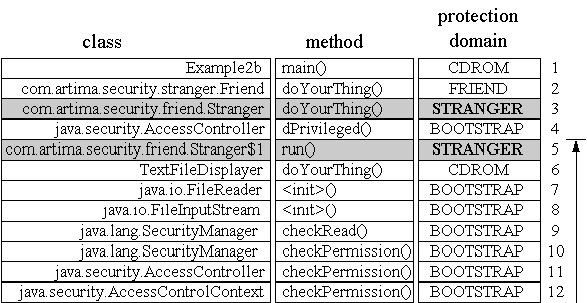
Figure
3-9. Stack inspection for Example2d: frame five doesn't have
permission.
The call stack to be inspected in Example2d looks similar
to the call stack inspected in Example2c. The only difference
is that Friend and Stranger have swapped
positions. As always, stack inspection starts at the top of the stack and
proceeds on down the stack towards frame one. But alas, once again the
inspection process will not actually reach frame one. When the
AccessController reaches frame five, it discovers a stack
frame associated with the STRANGER protection domain, which doesn't have
permission to read answer.txt. As a result of this discovery,
the AccessController throws an
AccessControlException, indicating the requested read of
answer.txt should not be performed.
Had the Stranger class been able to enlist the assistance
of an instance of some class that implemented
PrivilegedAction, performed the desired invocation of the
TextFileDisplayer's doYourThing() method, and
belonged to a protection domain that has permission to read
>answer.txt, Stranger's attempt to open
answer.txt with the help of doPrivileged() would
have still been futile. Imagine, for example, that the code of the
run() method represented by frame five of
Example2d's call stack had been associated with to the CD-ROM
protection domain. In that case, the AccessController would
have determined that frame five had permission to open
answer.txt and continued on to frame four. At frame four, the
AccessController would have discovered the
doPrivileged() invocation. As a result of this discovery, the
AccessController would make one more check: it would make
certain the method that invoked doPrivileged(), which in this
case was Stranger's doYourThing() method
represented by stack frame three, has permission to read file
answer.txt. Because frame three is associated with the
STRANGER protection domain that doesn't have permission to read
answer.txt, the AccessController would still
throw an AccessControlException.
To get the Example2d application to work as intended, you
must start the application with yet another appropriate command. When
using the java program from the Java 2 SDK version 1.2, the
appropriate command takes the form: java -Djava.security.manager -Djava.security.policy=policyfile.txt -
Dcom.artima.ijvm.cdrom.home=d:\books\InsideJVM\manuscript\cdrom -cp
.;jars/friend.jar;jars/stranger.jar Example2d
This command, which is contained in the ex2d.bat file in
the security/ex2 directory of the CD-ROM, is an example of
the kind of command you'll need to use to get the example to work. As
before, to execute Example2d on your own system, you must set
the com.artima.ijvm.cdrom.home property to the
security/ex2 directory of your CD-ROM, or to whatever
directory you may have copied the security/ex2 directory from
the CD-ROM. When you run this program, you should see the kind of output
that crackers everywhere hate to see: Exception in thread "main" java.security.AccessControlException: access
denied (java.io.FilePermission answer.txt read)
at java.security.AccessControlContext.checkPermission(AccessControlContext.java:195)
at java.security.AccessController.checkPermission(AccessController.java:403)
at java.lang.SecurityManager.checkPermission(SecurityManager.java:549)
at java.lang.SecurityManager.checkRead(SecurityManager.java:873)
at java.io.FileInputStream.(FileInputStream.java:65)
at java.io.FileReader.(FileReader.java:35)
at TextFileDisplayer.doYourThing(TextFileDisplayer.java, Compiled Code)
at com.artima.security.stranger.Stranger$1.run(Stranger.java:27)
at java.security.AccessController.doPrivileged(Native Method)
at com.artima.security.stranger.Stranger.doYourThing(Stranger.java:24)
at com.artima.security.friend.Friend.doYourThing(Friend.java:21)
at Example2d.main(Example2d.java:21)
|