|
Your Auto 35/Reflex camera will accept almost any type of flash unit,
either electronic flash or the kinds that accept flashbulbs or flashcubes.
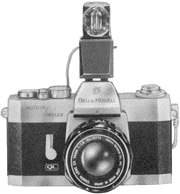
| You'll find the Bell & Howell Flashcube Adapter (NO. 113821) a
very compact unit. It uses 4-shot flashcubes for quick pictures without
changing bulbs every exposure. The Flashcube Adapter can be purchased
from your Bell & Howell dealer. |
 |
To install a flash unit on your camera, just mount it on the accessory
shoe (or on the bottom of the camera if a bracket is used) and plug the
cord into the PC Flash Socket. Be sure your unit has fresh batteries for
dependable results. Your dealer can check batteries for you.
Set the camera's Shutter Speed Dial to 1/15 second (15) for flash
pictures with all types of flashbulbs and flashcubes. The flash duration
of the bulb (usually 1/75 second) will be the effective exposure and will
be sufficient to stop action in many situations. When using an electronic
flash unit, set the Shutter Speed Dial to 1/60, 1/30, or slower speeds. The
flash duration of these units (usually 1/1000 second or less) will stop all
but the fastest action.
Since your camera's electric eye is not used for flash pictures, you
must set the camera's lens opening manually with the Lens Opening Control
Ring. Just turn the ring from EE to the Manual Opening Area. Sight
through the viewfinder and turn the ring until the Exposure Indicator points
to the desired number.
|  Software and eBooks for your Palm-powered PDA.


