Go to http://www.streamload.com an choose Sign Up
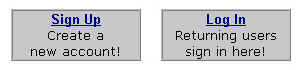
You have to complete all fields (of course not with your real data, especially if you make a free test account)
The principle of streamload - how does the
whole thing work
Streamload is a legal internet service which allows you to save
personal data (for example mp3-files *g*) online with an
unlimited storage space. The whole principle is very easy: Once
somebody has stored his files online at streamload, he can "streambeam"
these files to other streamload users. This procedure works
within seconds, because (to say it technical) not the "real
files" are sent but only some links to specific storage
places on the streanload servers. So you can get an album within
seconds on your streamload account and then download it on your
local computer.
You can pay for this service (as a so called "streamloader"
you have a lot of advantages) or test it for free as a so called
"freeloader". In this second case you have a few
restrictions:
1. You can use your free account
only for one month.
2. You can only download 100MB or 25 files during this period
3. It's impossible to download files with a size more than 10MB
4. In some cases datas of free accounts are deleted without any
warning
With a pay account you don't have any restrictions, but of course
it's also possible to handle the whole thing with a free account
- to say it clearly: With a number *g* oof free accounts. So if
you want to have more than one album per month you have to have
more than one account ;-) The following hints will help you doing
it in this way.
ATTENTION: For the Stones-Section
and the Albencharts-Section you have to be a streamloader (please
take a look at here),
because all files are larger than 10MB!
For making a free streamload test account you need a working
email-adress. With every email-adress you can only make ONE
account, because all adresses are saved in a database at
streamload. Also after an account has expired after one month you
are not allowed to use this email adress again for another
account.
So if you want to manage the whole thing as a freeloader of
course you need to have a number of email adresses. For example
at gmx.de, you can also use two aliases per email adress, at
freenet.de even five aliases. If you make new email adresses at
gmx or freenet, please use a zip code, street and area code which
fit to the city you choose, but of course don't use any real data.
Streamload has some longlife cookies and also saves your ip-adress.
So streamload can check it out in some cases, whether you use
multiple accounts and will kick all your accounts. The following
procedure will definitely work and than you'll not have this
problem: For every streamload-account you also define a user
account within your Windows operating system on your PC. So after
this for streamload account "A" you use user name
"A" on your PC, for streamload account "B"
you use user name "B" and so on. Another possibility is
to delete all streamload cookies on your PC after each session,
but be careful: You also have to make a new connect to your
internet provider for a new session because of your saved ip-adress.
So try to be carefull and than it should work.
1.
Make a new account
2.
How to use your account
3. From freeloading to streamloading: Sure and
anonymous payment
1. Make a new account
Go to http://www.streamload.com an choose Sign Up
You have to complete all fields (of course not with your real
data, especially if you make a free test account)
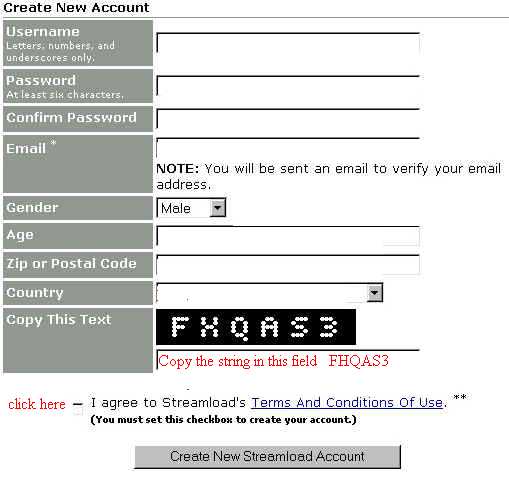
Click on "Create New Streamload Account"
There could appear the following error messages:
- Sorry, but that Username is already taken.
Please choose another
or
- Sorry, but another user has already
registered using that email adress.
Please specify a different one.
or
- Sorry, but the letters and numbers youu entered were not correct.
Please have a close look at the image below and enter the letters
and
numbers you see there.
So do this and then it's ok. You'll get an email from streamload
on your given email adress and you have to verify it by clicking
on a specific link. That's it - your new streamload account is
ready to use.
2.
How to use your account
After you make your log-in on streamload with username and
password you will be automatically transferred in the folder
named "Files". All albums you'll get by us will arrive
in your "Inbox", so go to it by clicking on the named
button.

All new albums you see in those rows with the checked mark like
on the picture below.
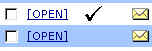
To see what's in click on "Open" and you'll see the
message plus the attachement. You now have to check the small box

and then you go on to the "Download"-Button on top of
the side (with the little red arrow)

After this you'll get the following opportunities to choose:

If you use a downloadmanager software like Getright you'll
probably use "Bulk Download". You'll get a file, save
this and open this file in Getright to download all tracks. On
the other hand you also can download all tracks seperately by
clicking on the filename with your RIGHT mousebutton and choose
"save target as".
In some cases probably some kind of the following "Temporarily
unavailable"-text will appear:

In this case some files are - yes, "Temporarily unavailable"
*g*. That means, that you can go on "Continue anyway"
to download the other ones and try it again a little later,
because in most cases everything should work again after a few
hours. If also after two days those files are still unavailable,
please send an email to that person who had sent you the album
and tell him which files are concerned, he'll fix the corrupted
files.
We have one request: Please don't delete those files you've got
after your download! Simply move them in another folder on your
account. You've an unlimited storage space and they won't bother
you but it will help us and the other users, because the more
these files are widespread, the less they will be kicked by
streamload.
It's very easy to do: Go on "check all"

than you choose "Move/Copy"

and if you want to make an new folder within your "Files"
you go on "New Folder"

and in the liitle window after that you can name your new folder

So now you can move/copy your files and that's it.
Please don't forget to log out after everything is done.
3. From freeloader to
streamloader: Sure and anonymous payment
As said before, all restrictions (especially the 10MB per file
download restriction) are gone for those users who pay for the
streamload service. Streamload has in our mind a good value for
money, so take a look on the pricelist:

As you can see the longer the contract, the lower the price of
the albums *g* To make a short example:
One album normally has the size of about 70MB. If you make a half-year-subscription
for 1GB/month, you have a total amount of 6GB for about 24 Euro.
That means, that every album costs you about 30 cent "download
fee" plus the CD-R plus print costs for the cover ... so
all together about 1 Euro per album. I think that's not so
bad *g*
There are three opportunities to pay for streamload:
1. With credit card (of course not anonymous)
2. With paypal (anonymous)
3. Send money per post (anonymous)
So make your decision
If you're logged in at streamload you have to go first on "Subscribe"
on the right top of the side. Now you choose your download amount
and contract time and then go on with "Next step".
1. With credit card
Now make your choice at Credit card and the rest is a self
explaining procedure. Your account will be activated within a few
seconds, but of course it's not anonymous.
.
2. With paypal
Paypal is an secure online payment service which works with all
currencies. You'll find all questions and answers to this service
on http://www.paypal.com. A small english demo you will find at
paypal directly here.
3. Sending cash
After over one year I didn't hear only from one particular case,
where this option has failed - I think we all can trust those
people at streamload. So if you choose the option "Personal
check or money order" and go on "Next Step" you
should print out the following side, put it with the money (no
coins) in an envelope and send the whole thing to:
Streamload
2053 Garnet Ave., Suite A
San Diego, CA 92109
USA
Of course you can also write a some words letter to those guys -
they will be happy I think ;-) After approximately one week
you'll get an email that everything is ok and your account is
activated.