
Download | Terms of use |
T2I Service |
The main purpouse of this servlet is rendering dynamic text in various fonts
and colors into images. This is quite useful when you need to create titles
or buttons for your web site using specific fonts which may not be available
in browser at client side.
Features
- Rendering multiline text
- Flexible output image sizing
- Fitting text in given width
- Multiple aligning modes
- Rendering backgrounds
- Background aligning
- Flexible Caching of generated images
- Defaults named presets
To make on-fly text rendering fast, servlets use internal caching of
generated images. Also, passing parameters through query string prevents
most browsers from caching results on client side. To avoid extra server load
servlet provides ability to pass parameters as path tokens.
Also it sets expiration header in response which prevents browser from
reloading image each time. By default this parameter is 1 week. But you
can change it as you like.
This suite contains 2 servlets. Text2ImageServlet and FramerServlet.
The difference is in creating background for image.
Text2ImageServlet can use either solid color fill background, either
tile background image.
Framer is perfect approach for dynamic buttons generating.
It uses 9 images under in any directory under /frames directory which
are just parts of button background image. 4 corner patterns are painted
on background as-is without rescaling. 4 border batterns for top,left,bottom
and right ages are rescaled in only one direction to create button borders.
Central pattern is rescaled in both x and y directions to fill the central
part of background. Of course you can create your own pattern sets, create
subdirectory under /frames directory and use this directory name as
parameter for patterns set. Then cut you button drawing into 9 parts and
name them same way as sample set is named.
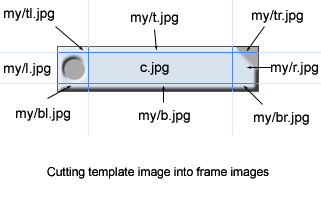
With above example images supposed to be placed under /frames/my directory.
Then one can pass parmeter /frame/my to servlet to use this frames in framer
servlet. Obviously above example image requires fixed height as rescaling of
right and ledt frame edges will distort proportions. So one must take care
to provide minimum height parameter and use this design only with single line
texts.
Installation notes
This servlet requires java 1.4.1+ and sevlet runner like Tomcat to run.
Here is step by step guide how to install it under your servlet runner.
- Download t2i.zip file
- Unpack it into your web-app home directory
-
Add the following lines to your web.xml file
<context-param>
<param-name>font_dir</param-name>
<param-value>/windows/fonts</param-value>
</context-param>
<servlet>
<servlet-name>T2I</servlet-name>
<servlet-class>com.vmax.servlet.T2IServlet</servlet-class>
</servlet>
<servlet-mapping>
<servlet-name>T2I</servlet-name>
<url-pattern>/T2I/*</url-pattern>
</servlet-mapping>
<servlet>
<servlet-name>framer</servlet-name>
<servlet-class>com.vmax.servlet.FramerServlet</servlet-class>
</servlet>
<servlet-mapping>
<servlet-name>framer</servlet-name>
<url-pattern>/framer/*</url-pattern>
</servlet-mapping>
If you do not have web.xml file in <app_dir>/WEB-INF , you can rename web.xml.T2Iexample
provided in t2i.zip package.
-
Change in above code fragment location of directory with fonts which servlet will use.
Servlet must have rights to read files in this directory.
-
Create <app_dir>/WEB-INF/tmp directory where servlet will store it's cache.
Servlet must have rights to read/write/create files and folders in this directory.
-
[optionally] If you need to restrict access from third party sites to this sevlet you can
create text file T2IServlet.hosts under <app_dir>/WEB-INF/classes directory.
Add there host names from where access to this servlet is allowed. One host name per line.
Host names are case insensitive.
-
Copy wizard.jsp into you web-app root directory.
(Note for using JSPs complete JDK required to be installed.)
You can use this wizard to test and tune required parameters.
-
For running this servlets you must run java in headless graphics mode.
This can be done with Java 1.4.x or higher by passing
-Djava.awt.headless=true parameter to JVM on JVM startup. Under Tomcat this can be done
via setting environment variable JAVA_OPTS=-Djava.awt.headless=true
-
See wizard.jsp for parameters descriptions
Developer Notes
Caching
Both servlets in suite override the same basic class which provides
basic caching functionality.
There are several parameters to control cache.
-
wtk_ttl parameter
This parameter control expiration date which servlet set in response
to browser. This parameter value consists of number and letter.
/wtk_ttl/1w stands for 1 week expiration.
One also can use the following letters h,d,w,m,y which stands for
hour,day,week,month and year respectively.
-
wtk_mode_no_cache parameter. When this parameter present
(value doesn't matter) , image will be
forced to recreated and browser will receive fresh version of image.
Updated version will be stored in cache.
Images created are stored in cache directory. By default cache directory
is located under /WEB-INF/tmp. But this location can be changed by specifing
context parameter, like this.
<context-param>
<param-name>cache_dir</param-name>
<param-value>/temp/cache</param-value>
</context-param>
Subdirectories named by servlet class name will be created in this cache
directory e.g. each servlet in suite have it's own cache directory.
Images are stored in cache with last-modified date set ahead to expiration time
of the image. So when image with last-modified date in past is found it will be
treated as obsolete image.
Common base class also provide functinality to run a "lazy" cache cleaning
thread which is activated once per hour to check for outdated images and perform
cache cleaning.
Defaults presets
Site maintaining is important thing. When servlet have too many parameters then later
it can become a real headache when you would need to change for example color for
all menus over all your pages. The solution is to define named sets of default parameters
(similar like CSS class definitions) and use this named sets by name instead of
hardcoding whole set of parameters in each image SRC attribute. This approach also
reduce length of URLs making your HTML sources readable.
Text2Image servlets suite provides ability to use named sets of default values
by simply adding
/wtk_defaults/name
Where name treated as name of .properties file in classpath. Usually
this files may be placed under WEB-INF/classes directory or anywhere else in classpath.
Using above example servlet will load default values from WEB-INF/classes/name.properties file.
So if one will path parameter /wtk_defaults/menu to servlet then default values
for omited parameters will be loaded menu.properties file.
Of course, reading properties file each time will be huge overhead, so
servlet load properties named sets on demand and then keep them in memory.
But it also takes care to check for properties file was updated on filesystem
since it was loaded and reload properties when notice newer version of .properties file.
Note to reduce overhead servlet will only check for newer version if memory
copy is more than 10 sec old from previous check or loading. So changes in properties file
may appears visible only after 10 sec.
Getting parameter values
Servlets search for required parameters values in the following order
- in query string
- in path info
- in named preset if wtk_defaults parameter specified
- in servlet-init parameters
- hardcoded defaults
This approach gives many amizing abilities to define defaults and override
default value for special cases.
Extending functionality
Of course, it's not possible to cover all issues by two even very
flexible servlets. Instead of this developers have ability to override
basic servlet and implement required painting functionality in java.
Here is an example code. All you need is to implement 3 methods
using a lot of usefull functionality defined in base class.
See API docs included in package for details.
package com.vmax.servlet;
import com.vmax.servlet.core.BasicHttpRequest;
import com.vmax.servlet.core.CachedGraphicsServlet;
import javax.imageio.ImageIO;
import javax.servlet.http.HttpServletRequest;
import java.awt.*;
import java.awt.image.BufferedImage;
import java.io.ByteArrayOutputStream;
public class T2IServlet extends CachedGraphicsServlet {
protected String[] getActualParameterNames() {
return new String[]{
"txt","font","col","bgcol","bg","w","h","fh","mw","mh","align","bgalign"
};
}
protected String getContentType(HttpServletRequest req) {
return "image/png";
}
protected void serve(BasicHttpRequest req, ByteArrayOutputStream baos) throws Exception {
String fontpath = getParam(req,"font","arial.ttf");
Color col = getColorParam(req, "col", 0x00000000);
Color bgcol = getColorParam(req, "bgcol", 0x00ffffff);
BufferedImage bgim = getImageParam(req, "bg");
String txt = getParam(req,"txt","Hello world");
int fontHeight = getParam(req,"fh",12);
if(fontHeight>400) fontHeight = 400;
int margin_width = getParam(req,"mw",2);
int margin_height = getParam(req,"mh",2);
int fitWidth = getParam(req,"w",0)-margin_width*2;
if(fitWidth > 2000) fitWidth =2000;
int fitHeight = getParam(req,"h",0)-margin_height*2;
if(fitHeight > 2000) fitHeight =2000;
int textAlign = getAlignParameter(req,"align",0);
int bgAlign = getAlignParameter(req,"bgalign",0);
Font font = loadFontFromPath(fontpath,fontHeight);
FontMetrics fm = getMetrics(font);
java.util.List lines = splitText(txt,fm,fitWidth);
Dimension requred_size = getRequiredRect(lines,fm,fitWidth,fitHeight);
int width = (int)Math.ceil(requred_size.getWidth()+2*margin_width);
int height = (int)Math.ceil(requred_size.getHeight()+2*margin_height);
BufferedImage im=new BufferedImage(
width,height,
BufferedImage.TYPE_INT_ARGB
);
Graphics2D graphics=im.createGraphics();
setRenderingHints(graphics);
graphics.setBackground(bgcol);
graphics.clearRect(0,0,im.getWidth(),im.getHeight());
tileBackground(im,graphics,bgim,bgAlign);
graphics.setFont(font);
graphics.setColor(col);
Rectangle text_rect = new Rectangle(margin_width, margin_height,width-2*margin_width,height-2*margin_height);
drawLines(graphics,lines,text_rect,fm,textAlign);
ImageIO.write(im,"png",baos);
graphics.dispose();
}
}
getActualParameterNames() method is for cache controling. This method must
return array of parameter names which are actually in use. This is important to
calculate cache key, as request may contain other parameters (by mistake)
which actually not required by servlet.
getContentType(HttpServletRequest req) method informs superclass
functionality what type of image servlet returns to output stream.
serve(BasicHttpRequest req, ByteArrayOutputStream baos) method to implement
actual painting.
Above example illustrates methods provided by superclass.
©Maxim Kollegov (aka virtual_max@oocities.com)