| Sweet Tech's GeoBuilder Home > Index > Section I > Section Ib > Create New HTML File | ||||||||||||||||||||||||||||
|
||||||||||||||||||||||||||||
| Index GeoBuilder Central GeoCities GeoBuilder Help GeoCities Help Chat GeoCities Feedback |

||||||||||||||||||||||||||||
| 1. Click on the "Create New HTML File" button | ||||||||||||||||||||||||||||
|
||||||||||||||||||||||||||||
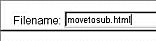
| 2. Type in the name you have selected for the new file | ||||||||||||||||||||||||||||
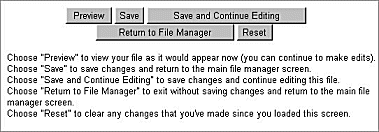
| 3. Scroll down to the buttons under the editor window | ||||||||||||||||||||||||||||
![]() |
||||||||||||||||||||||||||||
| 4. Select "Save and Continue Editing" | ||||||||||||||||||||||||||||
|
||||||||||||||||||||||||||||
![]() |
||||||||||||||||||||||||||||
|
||||||||||||||||||||||||||||
| GeoCities | ||||||||||||||||||||||||||||
| Yahoo! | ||||||||||||||||||||||||||||