
| RENAME SUBDIRECTORY |
GeoBuilder
Central
GeoCities
GeoBuilder
Help
GeoCities
Help Chat
GeoCities
Feedback



..Yahoo!
|
||||||||||||||||||||||||||
| Sweet Tech's GeoBuilder Home > Index > Section I > Section Ib > Rename Subdirectory | ||||||||||||||||||||||||||
|
||||||||||||||||||||||||||
| Index GeoBuilder Central GeoCities GeoBuilder Help GeoCities Help Chat GeoCities Feedback |
||||||||||||||||||||||||||
|
||||||||||||||||||||||||||
| 1. Click on the Rename Subdirectory button | ||||||||||||||||||||||||||
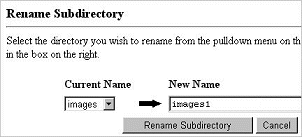
| 2. On the page that opens, locate Current Name/New Name | ||||||||||||||||||||||||||
|
||||||||||||||||||||||||||
| 3. Type in the new name | ||||||||||||||||||||||||||
|
||||||||||||||||||||||||||
| 4. Click on the Rename Subdirectory button | ||||||||||||||||||||||||||
| The transaction status will be displayed: | ||||||||||||||||||||||||||
|
||||||||||||||||||||||||||
| © 1999 | ||||||||||||||||||||||||||
| GeoCities ..Yahoo! |
||||||||||||||||||||||||||
| Judi Mills | ||||||||||||||||||||||||||