Cybertrix
The Cyber-Dominatrix


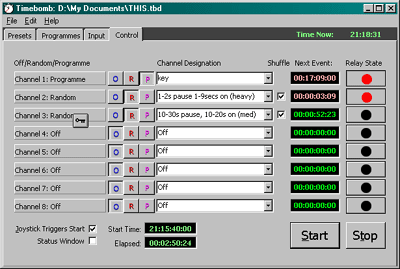
This screen-shot shows the Control page of Cybertrix

This area displays the mode of each channel, as controlled by the Off/Random/Programme buttons.This area shows which presets or programmes are currently controlling each channel. These are selected from drop-down lists.If a channel is set to shuffle, it will randomly switch between a list of user-selected presets, allowing greater randomisation.These boxes display a countdown to the next event on that channel. Red numbers indicate that the channel relay is on, green that the relay is off.These buttons both control and show the state of each relay. A red dot means the channel is on. You can manually control the relays  from these buttons at any time.This starts all programmes or presets running on active channels, unless the 'joystick triggers start' option is selected. This stops any programmes or presets from running and switches off all relays.This option requires the press of a joystick button to start any programmes or presets running. The start button must be pressed first, to go into standby.This displays a small, always-on-top readout window.Click to view the Presets pageClick to go to the Programme pageClick to go to the Input page

Point for information. Click the tabs to view different pages.


Top