location: http://somersetcountyphotoclub.bravehost.com/showandtell.htm
homepage: http://somersetcountyphotoclub.bravehost.com/index.htm
For September 2007 ("Show and Tell") each member or guest may submit approximately 8 to 18 digital images in email. Image processing is set up for receiving .JPG images. Images submitted with a long side greater than 768 pixels will be reduced for projection on a square screen.
If you are using 35mm slides bring 8 to 18 slides to the meeting.
As the presentation order is probably important, please modify the image name for alphabetical ordering and prefix your name so all your images will be together.
When you email your digital images to me please be sure to include your name, address, phone number, in your email to make sure that we have more than just your email address during the year.
I will send you back a message when I've received your images.
You may bring as many prints as you like and they can be albums, as they can be put on a table and be seen there. You will get some time to describe what you have.
If member name is not prefixed before slide number then it can be corrected as received into submissions as follows.
Using Bulk Rename Utility - Downloads can be invoked from the context menu of an image and has lots of ways to rename files. The part that will be used for this is the prefix portion. There are many rename programs available (this one works with Windows Vista and prior versions). Also available separately in the form of a Bulk Rename Utility using command lines with all information in command no configuration files so you can do exactly the same thing each time with a command file (BAT file).
Click to see Bulk Rename controls ►
Projected images will appear the same size regardless of whether the image is Landscape or Portrait. To that end the long side of images will be limited to 768 pixels. It would be best if you resize yourself from a higher resolution image so that no dimension is greater than 768 pixels.
For those with PhotoShop or PhotoShop Elements 3, the Ridgewood Camera Club has filters provided by George Garbeck on their site for PhotoShop and Photoshop Elements 3 users to resize images and includes some other suggested changes involving sharpening and colors on their Digital Competitions: Full instructions page.
Tips and Techniques, A collection of downloadable PDF files, maintained by Rockland Photography Club, that provide step by step instructions and guidance using some common software packages (Photoshop, Elements, Lightroom, etc). Topics include -- Add a Border, Add a Stroke, Remove Color Cast, Color Matching, Create a Blur Effect, Create a Grunge Effect, Lens Correction Tool, Measure Tool, Photomerge (depth of field), Setting Grey Point, and Understanding Unsharp Mask
30 Photoshop Video Tutorials - Learn from the Pros of Graphic Design : Speckyboy Design Magazine, taking the simplest elements and creating something beautiful as well as tutorials on advanced drawing and illustration techniques
Using IrfanView in full screen mode for this which will center images so is suitable for square screen (after the 768 long side limit has been applied).
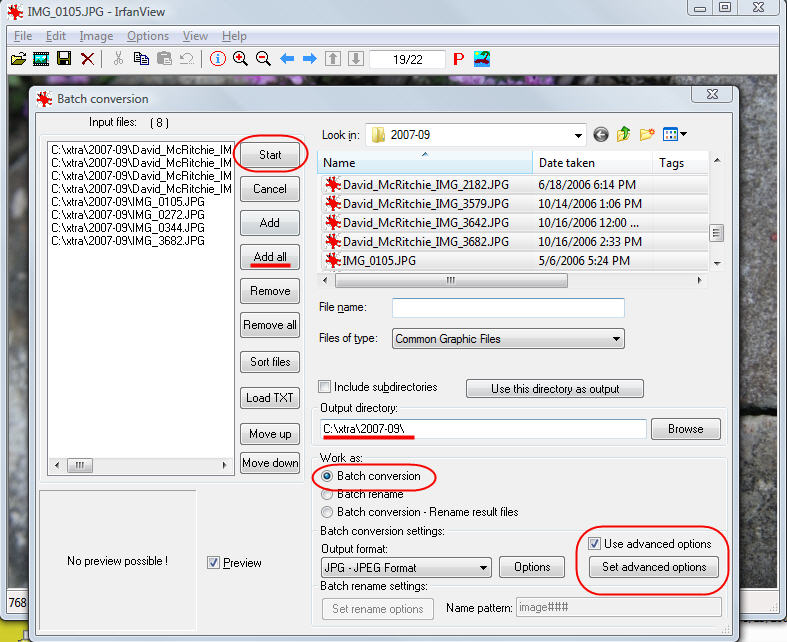
[01] Batch Conversion for Resizing via IrfanView.
The projected digital images will be .jpg files with a size of up to 768 pixels on the long size, so that horizontal and portrait images will appear the same size on a square screen. This will be handled in projection preparations described below if not already provided for.
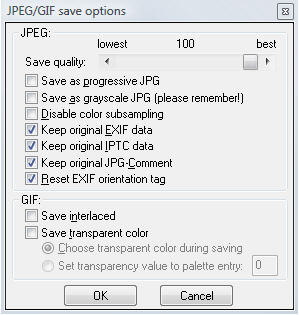
[02] JPEG save information. Not sure
about the EXIF orientation tag, this may get changed.
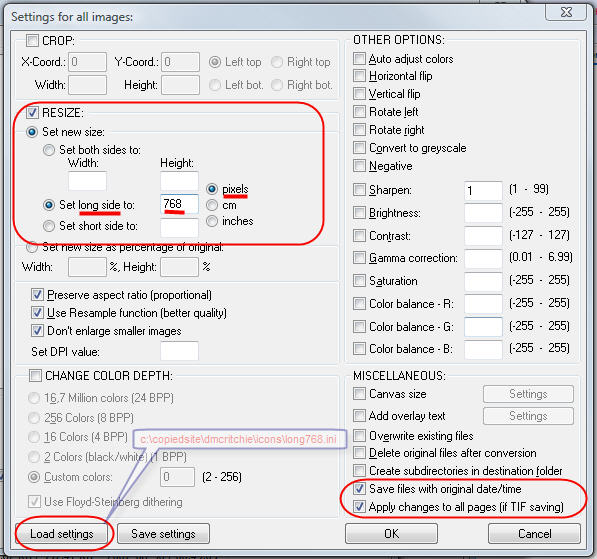
[03] Resize options used with IrfanView.
White Borders with IrfanView: Image, Canvas (3 pixels on each side)
It won't matter in this context but somewhere the internally stored Photographer owner's name is being removed, and somewhere it is being replaced by the computer name. Currently software and camera manufacturers are not including EXIF information in .RAW (/.CRW) images.
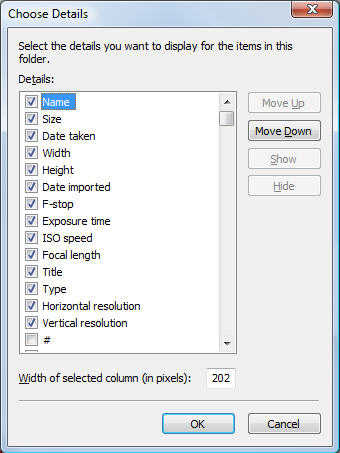 Windows Vista can show some of the Pictures information in
the directory.
Windows Vista can show some of the Pictures information in
the directory.
Will be checking for width of 768 and height of 511 or the two reversed.
Title comes from IPTC, Origin (tab), Object Name as seen and as can be modified in IrfanView.
Column layout can be done on a per directory basis in Vista. Still trying to get detail columns to come up consistently as I want them, and this is going to take more effort to get setup and to get used to. Obviously it would take to much time to do every single directory.
Column layout for picture files:
Name, Size, Date taken, Width, Height, Date imported,
F-stop, Exposure time, ISO speed, Focal length,
Title, Type, Horizontal resolution, Vertical resolution.
Column layout for normal files:
Name, Size, Date modified, Date created
(Date created date gets changed when files are copied to another drive/system)
Many new systems will be delivered with Windows Vista installed, and you might find some help in some of the information I put together as I tried to find my way around Vista.
Select an image from the directory (c:\xtra\date\...) the first image then start by right-click to bring up IrfanView of the image, Then hit Enter to get into full screen mode, then right-click to go forward, or left-click to go backwards.
Probably will have to use the "W" (Slide Show) option to sort images by image name.
IrfanView will center images so the projector screen set up as if for contest will work properly.
Large attachments:
Click tools/accounts/mail tab, click on your mail account, then on properties. Go to the advanced tab and check the option to "break apart messages larger than..." setting
a limit of perhaps 80% of your ISP's limit. Use apply/ok to get back out.
At the receving end in OE: To recombine them group the messages together using ctrl+left-click on each (or Shift-click), then right-click/combine.
AOL users sending through AOL are limited to 1MB per email and multiple pictures may get combined so typically send one picture per email, or zip them into one file, or use another means of email.
attach files:
Attach on the tool bar row (at top)
Browse to the file
OK | OK and Attach another (at top)
MSN Hotmail Help, Free With a free Hotmail account:
* Most users have up to 1 gigabyte (GB) of storage space.
* You can send and receive messages up to 10 MB each, including attachments.
Note email size of binaries (pictures) is larger than your images as data has to be transmitted so you may only get about 7 MB in your expected 10 MB.
Non Contest entries such as "Show and Tell" and "Member Critique" will be entered as if in a competition. After the deadline for submission, the adminstrator will sync to the server, and run a fake contest, assigning all pictures a low score (1), then assigning a second round score unique to each photographer this will allow the contest software to show presentation with all of a makers pictures together. If order within photographer is important then you will have to include a number at the beginning or end of each picture so that it can receive a third round score. Pictures will appear low score to high score so club will see all of a photographer's pictures together including ordering if needed.
The three shot contest in Jan 2008 had details worked out similar to the non Contest entry above to keep images together, but it is not something I would want to do again with current limitations of PhotoContest Pro. It is a fun contest with slides but not with digital projection. With no more than 8 sets it was manageable, but with normal club participation it would have been unmanageable. Done as a critique assigned subject it would be fun, but not as a competition.
Club expenses for PhotoContest Pro software is a one time club license of $75. The uploading part is an optional feature and will be a $40 yearly expense. For more information see Purchasing page at PhotoContestPro.com.
Non scored critique on contest nights will be treated as a separate contest, but the judge will not provide a score, only critique. Because there is no scoring there will be only one pass and such images are not eligible for year end. The critique only was dropped for lack of use, but can be put in place if some members want it. Without a score you don't have a real evaluation of what the judge thinks of a picture.
All other programs mentioned on this page (Bulk Renamer, and IrfanView) are freeware (as used in this context).
Return to Page you came from (BACK)
Return to home page of the Somerset County Photography Club.
