
Dante's Web TV Tune version 0.1.0
latest version always available at: http://www.laser.com/dante or http://www.oocities.org/tdanro
or
User manual
Program graphical interface design
Sample usage with the Unreal Media Server
* * * * * * * * * * * * * * * * * * * * * * * * * * * * * * * * * * * * * * * * * * * * * * * * * * * * * * * * * * * * * * * * * * * *
Overview This is very small CGI script which can be used to control the channel selection of your TV tuner using a web interface. It is extremely easy to be used, as your channels are displayed using the friendly names. It can be used only on Windows 2000/2003/XP web servers.
There is no installer for this application. Just unzip the file from the wttxxx.zip archive (where xxx is the current release, like wtt010.zip)
Copy the two files (wtt.cgi and wtt.cfg) in your web server scripts directory. For the Microsoft IIS, this is the following:
\InetPub\Scripts
You can even define a new scripts directory dedicated for the CGI scripts and name it /cgi-bin
Check the security for the Scripts (or cgi-bin) virtual directories as desired.
In order to use the script, you need to manually edit the configuration file based on your specific TV tuner settings.
The configuration file (wtt.cfg) is a text based file which can be edited using for example Notepad.
NOTE: Use a simple text editor. Do not use Microsoft Word or any other document editor. Keep a copy of the original configuration file for the situation when you will not be able to start the program with the modified configuration file.
The configuration file contain 2 sections (GENERAL, CHANNELS) plus a description at the beginning, as follows:
# Dante's Web TV Tune configuration file
# version 0.1.0
#
[GENERAL]
...
[CHANNELS]
[END]
The [GENERAL] section:
[GENERAL]
# MODE 0 = Antenna, Mode -1 = Cable
MODE=-1
# The mode in which the TV tuner operate (Cable or Antenna)
# TAPI Country
codes. Some examples:
# 49 - Germany
# 44 - Uk
# 43 - Austria
# 32 - Belgium
# 385 - Croatia
# 357 - Cipru
# 420 - Cehia
# 45 - Danemarca
# 372 - Estonia
# 358 - Finlanda
# 33 - Franta
# 30 - Grecia
# 36 - Ungaria
# 353 - Irlanda
# 972 - Israel
# 39 - Italia
# 370 - Lituania
# 356 - Malta
# 31 - Olanda
# 47 - Norvegia
# 48 - Polonia
# 351 - Portugalia
# 40 - Romania
# 421 - Slovacia
# 386 - Slovenia
# 34 - Spania
# 46 - Suedia
# 41 - Elvetia
COUNTRY=49
# The country mode in which the TV tuner operate. The TAPI country codes are used.
The [CHANNELS] section:
[CHANNELS]
11=MTV
12=National TV
13=Realitatea TV
14=National Geographic
15=Hallmark
16=TVR Cultural
17=TV K Lumea
18=TV Sport
19=TNT/Cartoon Network
20=U Channel
# The
channels name allocation for your TV tuner. Put here just the used
channels for the selected mode.
To access the script from a web browser, enter the address, for example:
http://webserver/scripts/wtt.cgi
You will get the following page:
Select the desired channel and click on Tune button.

Your channel is not selected and you get the feedback in the browser window.

<home>
This is an example on how to use this CGI script together with the web applet of the Unreal Media Server. This is a free, very fast and stable streaming server for the Microsoft Platform. You can get more details about it from the following location:
You can create a web page containing two frames. Copy the following text in a text editor and save it in your default web server directory as tv.htm
<HEAD>
<TITLE>My Home TV</TITLE>
</HEAD>
<frameset border=1 rows="*,180">
<frame src="video.htm" scrolling="auto" name="tv_screen_frame">
<frame src="/scripts/wtt.cgi" scrolling="no" name="wtt_frame">
</frameset>
</HTML>
Now create a file named video.htm containing the following text:
<!DOCTYPE HTML PUBLIC "-//W3C//DTD HTML 4.0 Transitional//EN">
<html>
<head>
<title>Unreal Media player control sample</title>
<meta name="vs_targetSchema" content="http://schemas.microsoft.com/intellisense/ie5">
<script id="clientEventHandlersVB" language="vbscript">
<!--
'''''''''''''''''''''''''''''''''''''''''''''''''''''''''''''''''''''''''''''''
' Page event handlers
'''''''''''''''''''''''''''''''''''''''''''''''''''''''''''''''''''''''''''''''
sub OnLoad()
UPlayer.UseTCP
UPlayer.UseMediaServer "192.168.33.2"
UPlayer.UseLiveAlias "TV"
'Uncomment the next lines to prohibit context menu and flow bar appearance
UPlayer.EnableContextMenu true
'UPlayer.EnableFlowControl true, false
UPlayer.Play
end sub
'''''''''''''''''''''''''''''''''''''''''''''''''''''''''''''''''''''''''''''''
' Player callbacks
'''''''''''''''''''''''''''''''''''''''''''''''''''''''''''''''''''''''''''''''
sub UPlayer_OnStart()
end sub
sub UPlayer_OnStop(PlaylistToBeCont)
if PlaylistToBeCont = false then
UPlayer_OnResize 640, 480
end if
end sub
sub UPlayer_OnResize(X, Y)
UPlayer.Width = X
UPlayer.Height = Y
end sub
//-->
</script>
</head>
<body onload="OnLoad()">
<P>
<OBJECT id="UPlayer" codeBase="http://www.umediaserver.net/bin/UMediaControl3.cab"
height="240"
width="320" data="data:application/x-oleobject;base64,yBuidwXvgUCTv5KK6JCKJRAHAAATIQAAzhgAAA=="
classid="clsid:BE964208-66F0-48fb-8F53-0C2BC35A610A" VIEWASTEXT>
</OBJECT>
</P>
</body>
</html>
Edit the yellow fields to conform with your Unreal Media Server configuration
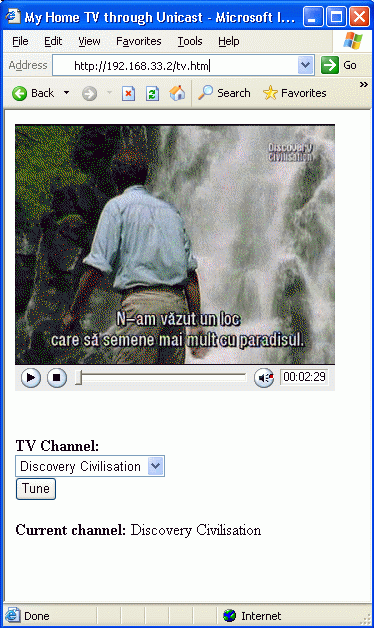
If you access now the address:
you will get a fully functional TV receiver in your browser which will look like:
<home>
6-Jun-2005: First public beta release (v0.1.0)
- this is the first released version of Web TV Tune CGI script;
<home>
This application is distributed as a freeware. You can distribute it freely if you keep the original file package, including all the copyright notice.
This program
contains CGI routines used with VB (32bit) using STDIN / STDOUT Version:
1.5 (September 1997)
Author: Kevin O'Brien <obrienk@pobox.com>
<obrienk@ix.netcom.com>
New versions of this application will be available at:
http://www.oocities.org/tdanro
Please send any comments or bugs to:
Dan Toma (visit one of the web pages to send me an e-mail)