This is a program written to stimulate the young and the matured minds by challenging their mental arithmetic ability. Repetition and the time constrained challenges may be effective in improving concentration and becoming good at mental arithmetic. No scientific studies have been done to prove the effectiveness of this software system for the potential benefits. This software received 9 Star (out of 10) rating from users at Education Channel Free and shareware download as of July 21, 2002.
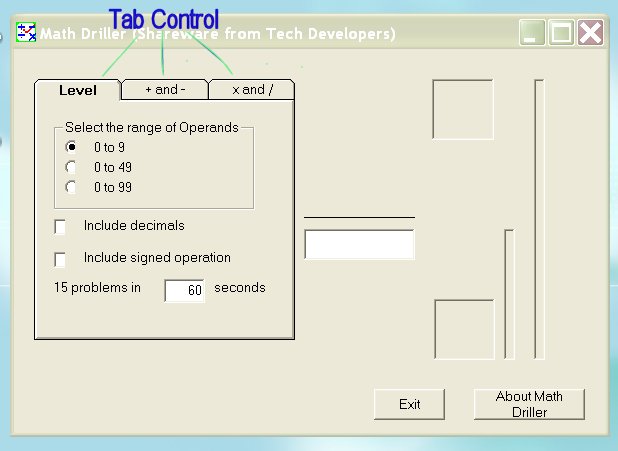
The math driller has three tab controls as shown in Figure 1. One must start with setting the appropriate skill and challenge options under the "Level" tab.
Figure 1
This drill involves various arithmetic operations with two numbers. The numbers for an operation can be in one of the three ranges (0 to 9, 0 to 49, and 0 to 99). The default setting of the numbers are 0 to 9. One can change the operands (ranges of the numbers) at any time after each set of problems. By default, the numbers are integers (whole numbers) and are not decimal numbers. To select decimal numbers, select on the "include decimals" option. To include signed (positive and negative numbers) operation, select "include signed operation". Each problem must be answered within a given time limit and any number of attempts to find the correct solution is allowed. If the correct answered is not given within the time limit, the next question is posted and the timer is reset for the next problem. Each set of problems consists of at least 15 problems and the default time for each question is 4 seconds. One can increase or decrease the total time period for the set and therefore the time for each question.
The next step is to select the operation to be practiced. We support four arithmetic operations: addition (+), subtraction (-), multiplication (X) and division (/). The operation can be selected by clicking the appropriate tab. To practice either addition or subtraction operation, first click the "+ and -" tab and the available options are shown as in Figure 2.

Figure 2
Now, one can select either one of the operations add or subtract, or both. When the options "both" is selected, the program randomly selects addition and the subtraction operation. The current operation is shown in the operation window as shown in the Figure 2. Each problem is timed and the time counter runs down to 0 from 10. The remaining time to answer a given problem is also shown in a gage with blue color (it corresponds to the counter). If a correct answer is typed in the answer window, a new problem is given and the timer for the problem is reset. When entering the answer, one must type the answer from the left most digit first. For example, to enter the answer for 12 + 31, the left most digit 4 of the answer 43 must be entered first and it is followed by the next digit 3.
The sooner you answer the given problem correctly, you can complete more problems within the time. The time available for the set of problems is shown in a gage with red color. It is a challenge to get more problems correctly answered within a set period and one can compete with oneself to improve the score. Once the problem set is completed, the score is displayed indicating how many problems are offered and how many are correctly answered.
Similarly, one can select "x and /" tab to practice either the multiplication or the division operation, or both. First select the operation as desired and then select the divisor or the multiplier.
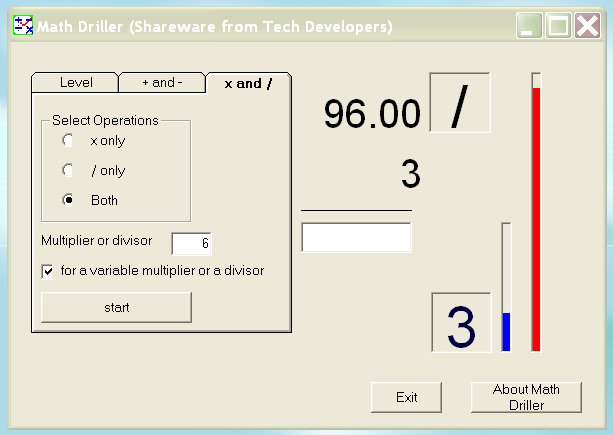
Figure 3
Suppose 6 is selected as a divisor: now one has a choice to practice all possible divisors up to 6 or the fixed divisor 6. By selecting "variable multiplier or a devisor" option, one can practice all the divisors up to 6 (inclusive). This applies to multiplication operation too.
We wish you good luck in improving mental arithmetic with Math Driller. We appreciate your feed back. eMail your comments and suggestions to us.
Contact Information
| techDevelopers@yahoo.com | |
| US mail | Tech Developers PO Box 51598 Lafayette LA 70505-51598 |