Bug in DCOM or a bad-written COM Application?
Introduction:
Recently I've been struggling with one problem in my DCOM client application. Intermittently and unpredictably in some period of time the application was losing a connection to its server without doing anything (basically just idling)! The result is that once the connection is lost any method call to the remote object fails. However, the server side seemed to be working just fine. The process where the COM object is living was up and running. All other remote clients continued working with the server without a problem. Apparently something was wrong on the client machine. First I checked the HRESULT that the methods were returning to my application. The error code was RPC_E_DISCONNECTED. This gave me an idea that something went wrong at the RPC level and it could be a common problem for all client applications running on the same machine. I decided to check if other DCOM applications are experiencing the same symptoms. So I wrote a simple DCOM server object and client application, which would be continuously calling the server. After having few instances of the program running for a while, it proved to be that all of them have experienced the described problem. Moreover the disconnection problem occurred for all applications at the same time. It was clear – all DCOM connections from the client machine to the remote server were lost.
COM’s automatic garbage collection mechanism:
COM has a built-in garbage collection mechanism. The main purpose of the garbage collection is to release the unused references to COM objects. For example, if a client application has terminated unexpectedly it did not have a chance to release references to the COM objects. This means a COM object could stay in memory even if no clients are currently connected to it. That would lead to memory leaks and unreasonable system resources usage. Thanks to the COM garbage collection mechanism it does not happen. COM tracks a live time of the client applications and COM object references the particular application has acquired. If an application quits without releasing the outstanding references COM does that for it. (Note: The developers should not rely on this while working with COM objects. The client application must always release a COM server object when it is not needed anymore). COM extends the garbage collection mechanism for object instantiated on the remote machine. COM infrastructure implements the periodic ping messages sent from each client machine to each server machine. This process is highly optimized and very efficient. The ping messages are sent basing on the machine basis rather than on the client to server object basis (See Figure 1 Ping Messages). Clients’ references to all server objects are combined in a single ping message, which is sent every 2 (two) minutes to the remote machine. The server side monitors those pings for each server object. If 3 (three) consecutive ping messages are not sent for the object, the remote clients are considered “dead”. In this case COM releases all external references to the COM object allowing it reclaim resources if all client applications have terminated.
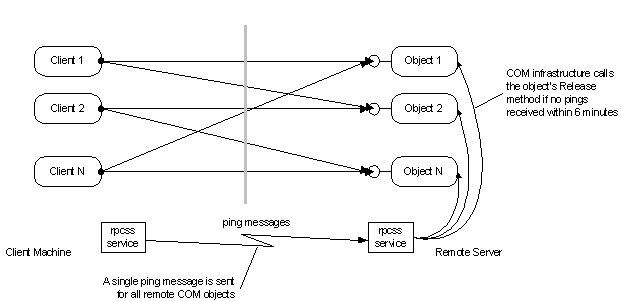
Back to the problem:
If for any reason the DCOM pinging mechanism fails to deliver messages to the remote machine the client gets disconnected from the object. That is exactly what my client application has been experiencing. But why COM fails to send ping messages? That was still a question.
The ping messages are sent and received by RPCSS service, which is running in the svchost.exe. The RPCSS service also performs many other tasks like making remote procedure calls. In fact when your application makes a COM call to an out of process COM object, this request goes through the RPCSS service. Internally, the RPCSS service is managing a dynamic thread pool to handle the incoming requests. Also a random thread is used from the same pool by the time the next ping message is to be sent (See. Figure 2 Rpcss thread pool)
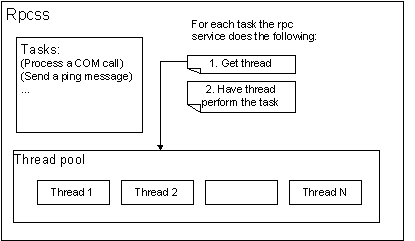
It may happen that a thread, which is going to send a scheduled ping message, is busy with another task. For example, the RPCSS service may be communicating with some COM application. The RPCSS is using the local procedure call for an interprocess communication. In particular, the NtRequestWaitReplyPort() function is used to send a request and wait for a reply to/from the server. This call is synchronous and causes the thread to block until the response is received from the client application. If the thread is blocked for more than 6 minutes the ping message won’t be sent to the remote machines. This will make all local clients be disconnected from their remote COM objects. So here our problem goes.
As I mentioned earlier the problem was appearing quite randomly. My application may have been working for a long time and the problem won’t show up, on another hand the client may get disconnected from the remote COM object in just few hours after starting the application. Now this entire odd behavior is well explained by how the RPCSS server picks up a thread for pinging. Each time the ping message needs to be sent the RPCSS gets a thread from the pool. If it happens to be a thread blocked for more than 6 minutes we got the problem.
Why the thread is blocked?
Isn’t it strange that Microsoft missed this obvious logical bug in the RPCSS service that makes the whole DCOM architecture unreliable? The answer is probably the following: the thread is not supposed to be blocked for a long time. The interprocess communication between RPCSS and application is meant to be fast. The RPCSS service should receive the result from the application very quick allowing the thread to process the next request (send a ping to the remote machine).
But what makes the thread block longer than 6 minutes? Well, we got nothing else left but a client application the RPCSS service is trying to communicate with. Assume we have an STA (single threaded apartment) COM object and another application that makes a COM call to this object. The COM call goes through the RPCSS service, which finally delivers it to the COM object process. To do that the RPCSS calls the NtRequestWaitReplyPort() function and waits for a response. However, it is a COM rule that all calls to an object owned by the STA must be made by that STA thread. COM accomplishes that by posting the call information as a message in the STA's message queue. If this message isn't processed, then no response is sent back to RPCSS. That makes the RPCSS task thread blocked in the NtRequestWaitReplyPort() call (See Figure 3 STA COM object method invocation). So here is another COM’s rule or better say a requirement to the STAs: an STA thread must be allowed to process its messages in a message queue. The STA thread is supposed to be pumping messages for the STA will not be blocked as a result of the COM call.
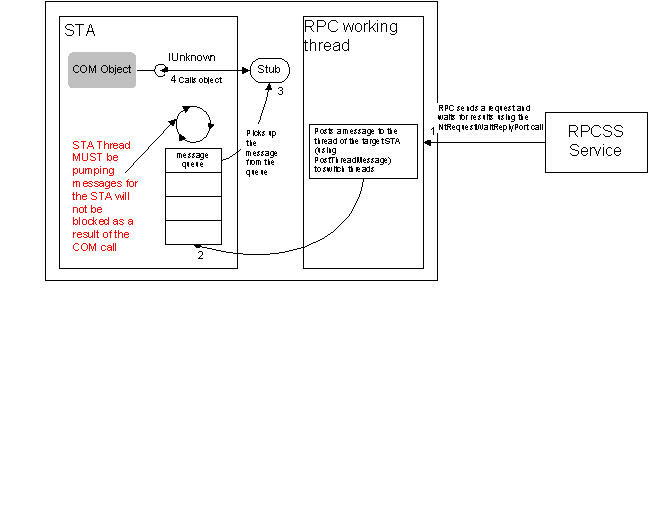
Figure 3 STA COM object method invocation
The STA’s thread can be easily blocked by a WaitForSingleObject() function. This function does not process window messages, and because of this windows created in a thread are not responsive. That means no COM calls can go through to the STA COM object until the WaitForSingleObject() function returns allowing window messages to be processed. Calling this function with the timeout greater than 6 minutes in STA may result in getting all local applications disconnected from the remote COM objects. If you need to use the synchronization functions in the threads that create windows consider using the MsgWaitForMultipleObjects() or MsgWaitForMultipleObjectsEx(), rather than WaitForSingleObject().
Tracking down an application that causes the problem
If your application experiences similar symptom chances are you’ve got some STA on the system that blocks the RPCSS service. You would need to change that STA to pump window messages all the time. But how can you figure out which application and which thread causes the problem? For that you can use the following simple technique:
In a nutshell: you need to get a dump file of RPCSS service and trace it with WinDbg or another debugger tool to find out what threads are in a blocking mode (if any). Then you have to trace down the threads to figure out what applications they are waiting for. These applications are the ones you have to check for the STA threads blocking problem.
In detail:
1. The RPCSS service is a DLL that runs in the svchost.exe executable. So first you have to find which svchost.exe is hosting the RPCSS service. You can use the “tlist” utility to do that. Just run the "tlist -s" to determine the process id of the svchost.exe that is hosting the RPCSS. The process should show " RpcSs" to the right of the correct process id.
2. Now using the UserDuMP tool we can get a dump file for the RPCSS service. The following command creates a dump file assuming the process id for the RPCSS instance of svchost.exe is 288.
USERDUMP 288 c:\rpcss288.dmp
3. Now comes the tricky part. We need to make sure we create the dump when the error occurs. To do this you need to write a simple out of process COM object and a client application that will be calling it. The COM object does not need to be sophisticated. Actually, it does not matter at all what this COM object will be doing. The main purpose of the object is to have it running on the remote server and have client application calling object methods. However, an object has to define and implement at least one method. Note: You need to make sure the client application call goes to the server. Therefore you cannot use the AddRef and Release methods as proxy handles them and the call does not go to the object. For my testing I have defined the following object:
[
object,
uuid(2D91D1EE-2D01-4FE8-B23A-48F375AE8740),
dual,
helpstring("ITimeSrv Interface"),
pointer_default(unique)
]
interface ITimeSrv : IDispatch
{
[id(1), helpstring("method GetTime")] HRESULT GetTime([out, retval] DATE* pdateServerTime);
};
It has only one method GetTime, which returns the server local time.
The implementation of this method looks like:
STDMETHODIMP CTimeSrvObj::GetTime(DATE* pdateServerTime)
{
if (pdateServerTime == NULL)
return E_INVALIDARG;
// Get local time
SYSTEMTIME sysTime;
::ZeroMemory(&sysTime, sizeof(SYSTEMTIME));
GetLocalTime(&sysTime);
SystemTimeToVariantTime(&sysTime, pdateServerTime);
return S_OK;
}
The COM object has to be instantiated on the server. You can use either the dcomcnfg tool to specify the object instantiating location or define it dynamically by using the CoCreateInstanceEx() function.
The client application is a little bit more complicated. First it has to create the remote COM object. Then it needs to set a timer and have the COM object be called every few seconds looking for a HRESULT of RPC_E_DISCONNECTED. If the DCOM call fails with this HRESULT that means we’ve got the problem, and hopefully we still have the RPCSS thread blocked. So it’s time to get the dump file of the RPCSS service by simply calling the system() function.
The following code shows the timer handle function in the client application:
// pTimeSrv is a pointer to a COM Object
ASSERT (pTimeSrv != NULL);
try
{
HRESULT hr = S_OK;
DATE dateServer = NULL;
// Make a call to a server.
hr = pTimeSrv->GetTime(&dateServer);
if (hr == RPC_E_DISCONNECTED) // DCOM connection has broken
{
// It’s time to get a dump file
system("USERDUMP.EXE 288 C:\\Rpcss288.dmp ");
}
catch(...)
{
// Unexpected error occurred.
}
4. When you got the dump file of RPCSS you need to trace it and find which application is blocking the RPCSS threads. To trace/debug a crash dump file you can use the WinDbg tool. (Note: Before opening the crash file in the debugger tool you need to make sure you have the correct system symbols installed and the correct path is specified to the symbols. For example, you can get Windows 2000 Service Pack 1 symbols from the Service Pack 1 CD or from the Internet http://www.microsoft.com/windows2000/downloads/tools/symbols/default2.asp)
In the WinDbg tool open the dump
file and issue the following command: ‘~* kb’ to list the call stack for all
threads in the RPCSS process. Look for the threads with call stacks similar to
the following:
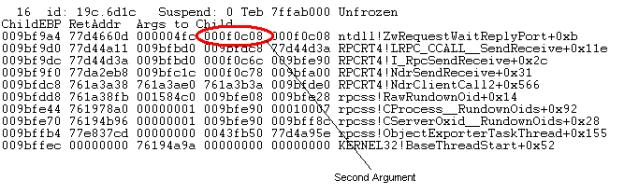
Figure 4 RPCSS Call Stack
Notice the second argument on the
stack for ntdll!ZwRequestWaitReplyPort+0xb
is 0x000f0c08. Now you need to dump the memory at this location using the
following command: ‘dd 0x000f0c08’. You should get an output similar to the following:
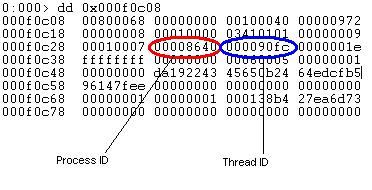
Figure 5 Memory Dump
The 10th DWORD is 0x8640 this should be pointing to the ‘bad’ process's PID. The 11th DWORD should be the thread ID in this application (in this sample it is 0x90fc). That identifies the application and the thread that may cause the blocking problem in the RPCSS Service. You have to carefully examine the application and make sure it does not block the STA threads. Note: There could be more than one thread in the RPCSS service waiting for the application to complete the call. You should check all those applications on the blocking problem.
At this point we have identified the applications and threads that cause the problem. But how can we fix the problem? Well, you have to look at the identified executables and threads. It is very likely those threads are STAs which have been blocked for some reason. You may need to change the implementation of those threads to make sure they spin the message loop all the time. As I mentioned earlier the most common mistake is using the WaitForSingleObject() function. This function does not process window messages, so you would need to change it to MsgWaitForMultipleObjects() or MsgWaitForMultipleObjectsEx().
Conclusion
Finally, we have identified the problem and found the solution to it. That sounds fine, but what if the blocking application is a third party product and you have no control over it? Then you've got the problem, since you cannot modify the code and in most cases you can do nothing about the problem in your applications. So Microsoft has to fix the problem in the RPCSS Service. Or you may want to consider giving up the DCOM as a means for thecommunication between different computers…
The described problem can be reproduced on Windows 2000 Professional and Advanced Server with Service Pack 1 installed. As of writing Microsoft has confirmed it’s a bug, but so far I have not seen any information about it on their web site. Apparently, Microsoft has changed the RPCSS service implementation since the Windows NT 4.0, as this problem does not appear on that platform. With Windows 2000 Service Pack 2 and Hot Fix for Microsoft Knowledge Base article number q294510 the described problem does not appear anymore. However, under certain circumstances there is a slight memory leak in the RPCSS Service and that is still a problem for Microsoft.