
Manuals for Windows FTP clients: "Transmit"
Fetch is the most popular FTP client for the Macintosh. There are other FTP clients, but they are not used as often as Fetch. However, we also want to provide a manual for an alternate FTP client. We selected Transmit. The user interface of Transmit looks similiar to WS-FTP. You have two windows, the first shows the directories of your hard drive, the second shows the directory of the FTP server.
Although Transmit has a very good interface, and also some features that Fetch doesn't have, it's not the best FTP client, but useful. You can get it on many places in the web, like Download.com, MacUpdate or directly at the software producer's homepage. The demo version is free available and has all features enabled. It expires after 15 days. The commercial version costs 24.95$.
Once you have obtained Transmit, you can use it to upload and download files to and from your Yahoo! GeoCities FTP directory, or to download files from other FTP servers. Here's our manual on how to use Transmit with GeoCities.
- Logging on to GeoCities FTP server
- Uploading files to your FTP directory
- Deleting files from your FTP directory
- Downloading files from any FTP server
- Creating a new subdirectory
- Looking at the Connection Transcript
- Disconnecting from GeoCities FTP server
|
I. Logging on to GeoCities FTP server |
1. Open the Transmit application by double-clicking it's icon in the Finder.

2. The following window appears on your desktop (click on the image for larger view):
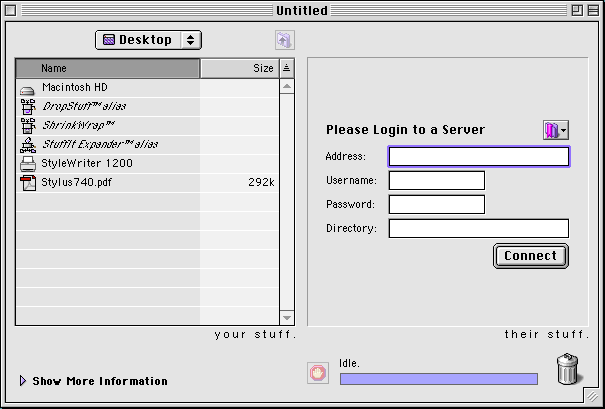
The left directory shows the files from your hard disk. After you have logged in, your GeoCities FTP directory will appear on the right.
3. To log in, type the address of the GeoCities FTP server into the address field and enter your Yahoo! ID and Yahoo! Password into the following fields. Leave the directory field blank.

4. Press the "Connect" button to log in. If you haven't already an internet connection open, you will be automatically connected by Open Transport.
 
5. After connecting to the server, you'll see your GeoCities FTP directory on the right. It lists all files and subdirectories of your GeoCities homestead.
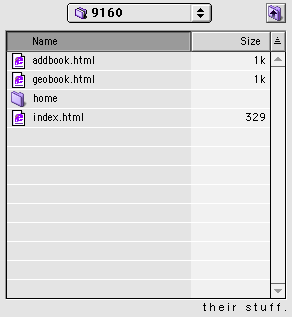
Table of Contents
|
II. Uploading files to your FTP directory |
Uploading new files to your directory is very easy with Transmit. Just drag and drop them into the "their stuff" window.
Table of Contents
|
III. Deleting files from your FTP directory |
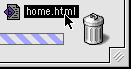
Deleting any file from your directory is also very easy. Just drag it on to the trash icon at the bottom of the Transmit window.
A confirmation box appears asking if you really want to delete the file. If so, press "Delete", if not, press "Cancel".
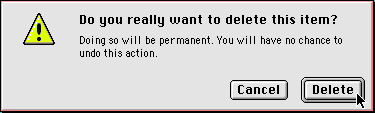
Table of Contents
|
IV. Downloading files from any FTP server |
As with every FTP client, you can use Transmit not only to upload files to any FTP server, like the GeoCities FTP server, but also to download files from any FTP server which gives you access to it (like public FTP servers with Shareware and Freeware apps). To log on to these servers just enter their address and leaver username and password fields blank. Once you can view their directory, just drag a file from the "their stuff" window into the "your stuff" window and it will be downloaded. This works, certainly, also on your GeoCities directory.
Table of Contents
|
V. Creating a new subdirectory |
1. Choose "New Folder..." from the File menu.
2. Select the option "their stuff" and enter a name for the subdirectory.
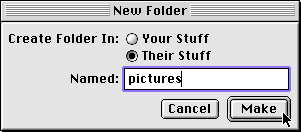
3. Just click on "Make" and the new subdirectory will be created.
Table of Contents
|
VI. Looking at the Connection Transcript |
Like Fetch, Transmit also offers you a way to take a look at the connection transcript. While Fetch shows the transcript automatically after logging on to the server, you have to select the option "Transcript" from the Windows menu in Transmit. The transcript will be displayed in a new window. Often this transcript can be of help if any error occours.

Table of Contents
|
VII. Disconnecting from GeoCities FTP server |
After working on your homestead, just choose the Disconnect command from the File menu and you'll be logged off.
Table of Contents
This manual just provided a few basic instructions for the usage of Transmit. However, it showed you everything neccesary for getting started with the program. Transmit is, like Fetch, very easy to handle and you shouldn't have any problems finding out how the other features work. A detailed manual can be found in PDF format on the software producer's website.
Table of Contents
| 






