|
|
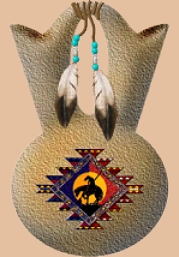
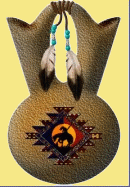
WEDDING VASE made with PI
by VickiG
|
|
|
@WEDDING VASE
by VickiG
PI VERSION: 8
LEVEL: Intermediate
MAIN TOOLS: Path Drawing Tool,
Easy Palette (for presets & texture),
Transform Tool (for sizing and rotation)
Path Edit Tool, Retouch Tool, Stamp Tool
DOWNLOAD: Feathers and design I used
were supplied by Winters Tubes
Check out Winter's site, it has some beautiful
Native American tubes and wallpapers.
INSTRUCTIONS:
- Open new white canvas 400x400. (I like lots of space.:)
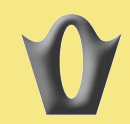
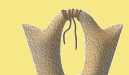
- Path Drawing Tool - 3dmode - rectangle - b-56; d-30
draw a shape approx 130x110 - color doesn't matter right now.
Click on Transform Tool - Perspective - and widen top and narrow
the bottom.
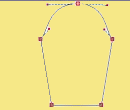
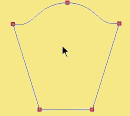
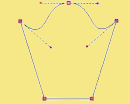
- Click on Editing - place cursor on top line, right click
and convert to curve. Click on plus sign and add one node to middle top.
Pull center up, click to get handles, then use handles on each side
and pull out as shown until you get approximately the right shape.
- Path Drawing Tool - for mode click on Continue Draw.
Select shape elipse and draw shape approx 45 x 135. Click back on
3d round - editing - align center. Click toggle to put you back.
Now right click on object and convert object type from text/path to
image - then go to your Retouch Tool - Blur - size 30 -soft edge - 50
and blur all over to get rid of all the sharp and rough edges.
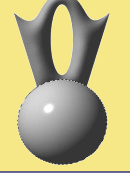
- Path Drawing Tool - 3d mode - elipse - draw a shape approx
185x175 and place as shown. Draw a smaller one approx 50x12 - border 2-
Depth - 30 - go to your Transform Tool and rotate by degree - 25 degrees
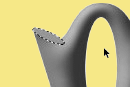
to right. Place as shown. Right click, arrange, send to back. Right click
duplicate, Transform Tool - rotate and flip - flip horizontally and place
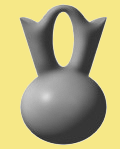
on right side. Right click and arrange - send to back. Basic shape is done.
Right click and select all objects, right click merge as single object.
Go back to your Retouch Tool - Blur - take out all sharp edges as shown.
- Paintbrush Tool - Airbrush - color of your choice -
shape 100 -soft edge 50 - lightly go over vase daubing until you
get as much coverage as you like..
- Now you can add whatever texture you like. I used a sandstone that
unfortunately PI has not seen fit to put in their defaults (too bad)
I really like it, but you will have to choose something different unless
you have Adobe's Texturizer Filter.
- Time for the decorations. I used Path Drawing Tool - Line and
Arrow - Width 2 - Depth 30 - 3dround - dark brown in color - and draw
some cords around the handle. I used spline but you can also do this
using freehand. Then I drew a couple hanging down to put on decorations
- Using feathers you downloaded from above, or any other
feathers you desire, use the transform tool to resize as desired
and place as shown on hanging cords I used the Path Drawing Tool
Shape - elipse - 3dmode - color - any you want - and drew some beads<
and placed above the feathers.
- The design I used was a stamp from Winters site and
sized accordingly and placed in center of vase..
There you go!! This is used by the Indians in their wedding
ceremonies, each person drinking from the cup to signify that<
two become as one.
HAVE FUN!!! - YOU'RE DONE!!!
|
Copyright @TG Designs
All Rights Reserved



|
|
|
|