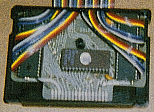
 This is the Power Pak shown with its hood off. A
standard program pak cartridge was used for the case. This pak can use a 32K or
16K Eprom, although only 15 1/2 K will be accessed . Two 6821 Peripheral
Interface Adapters are used for I /O.
This is the Power Pak shown with its hood off. A
standard program pak cartridge was used for the case. This pak can use a 32K or
16K Eprom, although only 15 1/2 K will be accessed . Two 6821 Peripheral
Interface Adapters are used for I /O.
The Program Pak port on the CoCo provides for almost limitless possibilities for expansion and interface to the real world. It was primarily used for the rom pak games, but Radio Shack also supported disk drives, RS-232 paks, Speech-Sound paks, graphics input pads, and a host of other devices with this port, not to mention all the third party devices. What follows here is a homebuilt interface that adds nearly 16K of rom, plus over 32 input/output lines.
History
Years ago before I had any multi-paks and disk drives, I did all my assembly language programming with cartridge based Edtasm. With all kinds of experiments wired up out the expansion port, it created a need to simultaneously access the cartridge rom and I/O at the same time. My first design was an expander board that contained 2 PIA's and a 40 pin connector to plug Edtasm into. This worked okay until I built my eprom programmer, as it was necessary to load in the programmer software from tape. This Power Pak solved this problem by allowing the programmer software plus the Edtasm rom to reside in the eprom. An added bonus was the compact size, as all these components fit in a game pak size case, with only a ribbon cable leading to the peripheral device.
This is the Power Pak shown with its hood off. A
standard program pak cartridge was used for the case. This pak can use a 32K or
16K Eprom, although only 15 1/2 K will be accessed . Two 6821 Peripheral
Interface Adapters are used for I /O.
Decoding
As shown in the schematic
Eprom CE (Chip Enable) to CTS, Eprom OE tied to CE
PIA 0 CS2 to SCS, CS1 to +5V, CS0 to A2
PIA1 CS2 to SCS, CS1 to +5V, CS0 to A3
This decoding will address the Eprom at 49152, PIA 0 at 65348-51, PIA 1 at 65352-65355
Parts List
1 Program Pak case
2 6821 PIA's
1 27128 or 27256
eprom
1 28 pin socket
2 40 pin sockets
3 .1 uf
capacitors
24 inch 40 conductor ribbon cable
Pin Outs
A listing of Color Computer expansion port
signals can be found here.
Pinouts for the Eprom chips and the
6821 can be found at the Chip
Directory
A simplified schematic is available, download schematic.zip
. Note that the power supply decoupling capacitors are not shown on this
schematic.
PC Board Artwork
The PC Board is double sided. I don't have the technology to plate through connecting holes, but these layouts allow you to simply solder a wire at the through hole locations. I have scanned in a photocopy of the original artwork. This artwork is missing the Pin 4 connector, add one in if you ever plan on using the interrupt input to the CPU. The artwork can be found here
Constructing the Pak
Start with obtaining a program pak case. Basically pick one of those cartridge games you never play and use it for a donor. Centered under the pak's label is a screw, remove the screw and then pry the pak apart. Remove the rom board. Cut out a piece of double sided PC board that completely fills the case. This is important to have a tight fit. You can use the old rom board as a template to layout the board where it engages the expansion connector. Again, you must be exact here, as a loose fitting, misaligned edge connector is something that you want to avoid. You will need to drill one hole to clear the standoff that fastens the case together.
Once you are satisfied the board fits the case and the expansion connector properly, the next critical step is to align the artwork with the edge connector. I simply install the cleaned up board into the CoCo several times, this will scratch the board where your connector pads should be. As a double check, they should match the old rom board pads also.
Apply your artwork, drill, etch in whatever order or method you use. Connect the through holes if not using a plated through board, install the sockets and other parts. Cut the ribbon cable to align with the pads at the outside of the pak, and route the cable out the back of your pak. Carefully check your board for any defects such as solder bridges etc. As this pak has the cartridge enable connection made, it will need an eprom with some code residing at 49152. Alternatively you can mount a small switch on the pak, routing the CoCo's pin 7 and 8 to it, which will allow you to enable or disable the jump to the pak on startup.
Programming the Eprom
You can can control the power pak using either BASIC or Assembly language. Both types of programs can be located on the pak's eprom. For more info on how to program your own rom on a pak go here .
Power Pak PC Style
I have currently started building a PC equivalent to this. It is an ISA card
that currently supports a pair of 8255 Interface adapters. I hear a lot of bad
things about PC architecture, but it did impress me that I could pull these
chips from a scrapped 1984 XT, and wire them up to my K6-2 500 Based PC with no
apparent problems. This project may take off in different directions and is
still on breadboard stage. Software is the biggest holdup as I am trying to keep
it Windows friendly and I am just a rookie in the PC world. It looks like it may
be possible to build a CoCo cartridge port emulator, but I do not want to
promise anything at this time as this is basically a learning exercise to step
up my knowledge of the PC world. Check here periodically for updates, will
post something when it is presentable to the public.
Last updated March 21, 2001