|
|
|
- Twink - |
|
|
|
... =) ... |

1. Open the Av in Ulead Animation -file open.
2. At the top of Ulead you will see where it says FRAME....click that and add banner text.
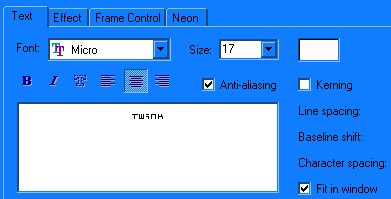
3. You will see a new window pop up with four tabs, one says font, effect, frame control, and neon. You should be on the first tab, choose a font, I used micro size 17, white. To move the text, just click on it and drag it over where you want it.
4. Click on the second tab, Effect, I applyed the settings as shown below but you can do anything you want with it.
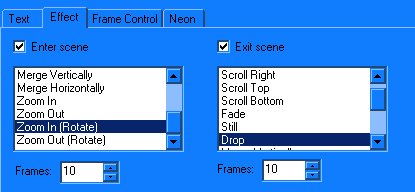
5. If you want you can press start preview towards the bottom to see if it looks ok, the two numbers towards the bottom...the lesser the number the faster the text moves, the higher the number the slower it will be.
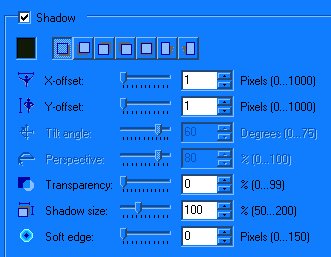
If you want the text to stand out a little more apply a shadow, the settings are as shown below. This option is under the Font tab.
6. Now you need to look towards the top of the Ulead screen, you should see three tabs, edit, optimize, and preview. Click optimize because we need to check the file size.
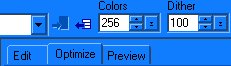
7. Once you have the optimize tab selected you need to look to the middle, where it says compressed size, this should be at 14,500 bytes or UNDER. If it is not you need to lower it, to do this look above the tabs, lower the Dither completely down to zero because it wont make it look any different, check the size again and if it is still too big lower the colors down some.
8. Once you have the size adjusted go to preview if you want to check it and if it is the way you want it, go to file save as gif file.
You're DONE!!
-Special Notes-
You need to duplicate this and keep moving the star until you get the desired effect.
Check its size by clicking on the optimize tab at the top, it should be size 14,500 or less.
If the av size is too big look to the left above the tabs, ALWAYS lower dither first because it has no effect on the av at all.
: : i n d e x : :