|
|
|
|
|
- Twink - |
|
|
|
|
|
... before ... |
... after ... |
... bg ... |


11. Open the .psp file in Ulead Gif animator 5.
12. Were going to add text to this by pressing the T on the left side of the screen, then press the av once pressed a window will come up, I used micro font size 17 and typed lil star. The color I used was white.
13. Place the text under Twinkle or whatever you chose to type..Move it just like a layer, click it then drag it to where you want it.
14. On the right side you should see small transparent images with eyes on the right in a box, click the eye on the top right and this should make the newly created text disapear...its supposed to so dont worry bout it..
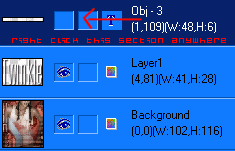
15. right click the text object on the top right and go to text, split text..ive drawn an arrow on what to right click below so theres no confusion..
Now comes the tricky part for some people but pay attention and follow it step by step n ya should be ok..
16. We have to duplicate the frames on the bottom by right clicking the av and going to duplicate frame..make sure your on the second frame
17. Click the box on the right nearest the bottom to make the eye visable..this should be object 5..It should only make the L visable..
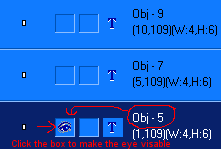
18. Now we need to duplicate the second frame by right clicking again and going to duplicate frame.
19. go back to the right and make the second eye visable -Object 7....this should only make the I visable..
20. duplicate the third frame and go back to the right side make the next object (9) visable like before....this should let you see an L...
Continue doing this until you have completed the name, on the last frame you should have the entire name done, right click this frame on the bottom go to frame properties and make the delay time 100. All other frames should be set to around 20.
TAKE A DEEP BREATH! YOURE DONE!!
-Special Notes- You need to duplicate this and keep moving the star until you get the desired effect.
Check its size by clicking on the optimize tab at the top, it should be size 14,500 or less.
If the av size is too big look to the left above the tabs, ALWAYS lower dither first because it has no effect on the av at all.
: : i n d e x : :