View And Join A Game With Web Browser
This should work now without having to use Firefox, and without doing steps 1-4.
Do step 5 and 6, and if you don't see any games listed when you know people are hosting, then you will have to do steps 1-4.
1) Download and Install Firefox (or Flock, Seamonkey)
2) Install Firefox addon: user agent swithcer (http://chrispederick.com/work/user-agent-switcher/)
3) In Firefox, open: Tools->user agent switcher->options->options->User Agents. Add a new agent, and in the "description" field type "T17Client/1.2" (without quotes).
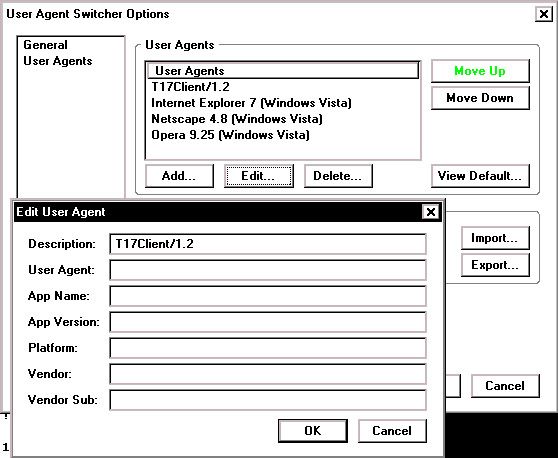
4) Activate the newly created agent (tools->user agent switcher-> Click: T17Client/1.2) It works for me without clicking it, but if it doesn't, then activate it.
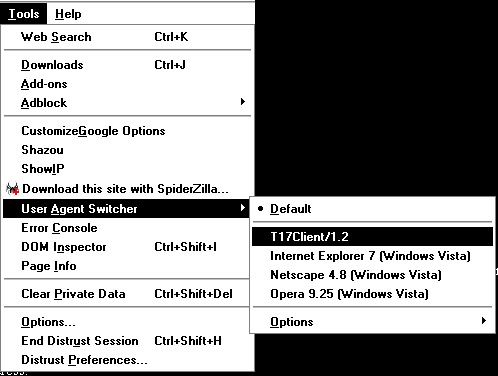
5) Try this first, it should work without the "User Agent Switcher" tool:
Visit this link: http://wormnet1.team17.com/wormageddonweb/GameList.asp?Channel=AnythingGoes
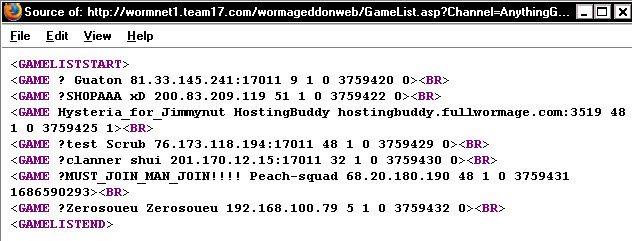
6) You will see a blank page. View Source (press CTRL+U).
You will see the GameList for #AnythingGoes between "GAMELISTSTART" and "GAMELISTEND"
Game information is: "GAME NAME" "HOST NAME" "HOST IP" "HOST FLAG" "?" "PASSWORD?" "?" "?"
The first number after the IP addy is for their flag. If you want to know which # = which flag, open: "C:\Team17\Worms Armageddon\graphics\ServerLobby\nationflags.bmp" 0=UK, 5=BRAZIL, 48=USA...
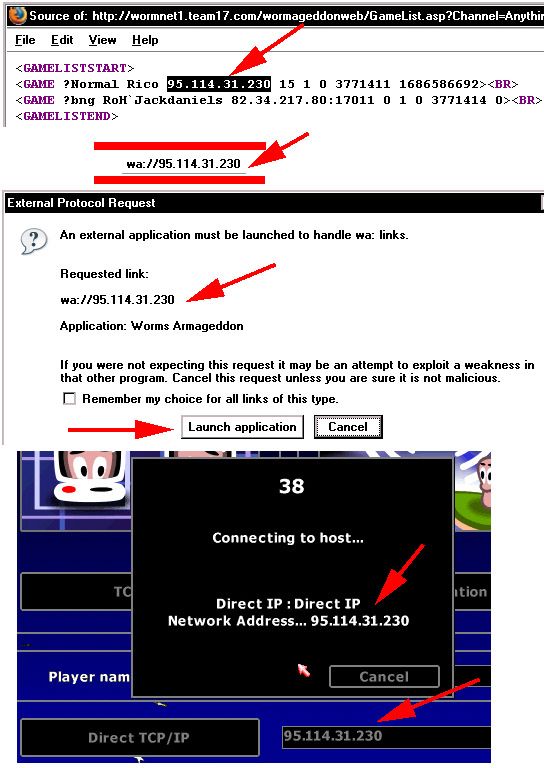
7) To join a game on the list: you simply need to copy thier IP address from the GAMELIST, and put it into your URL bar after "wa://" like it's an internet link: "wa://ip.address:port?scheme=Tf,LHorny,Pf,Wd,Be" By putting "wa://" your browser will automatically try to open WA.EXE. Once it's open, it will try to connect to the game via the Direct TCP/IP connection, and you will see the normal game countdown, team download, and then join.
The link "wa://_____?scheme=Tf,LHorny,Pf,Wd,Be" includes the basic hosting parameters for #AnythingGoes. The parameters can be found here (by viewing the page source). Without these parameters in the link, the game has a high probability of desynchronization. So far this link has worked without a desynch.
Copy the HOST's IP address exactly as is appears for best results. Some IP's show a port number too: "123.45.67.890:17011" (17011 is the default port, but some others are used as well) "wa://##.##.##.##:17011?scheme=Tf,LHorny,Pf,Wd,Be" Some IP addresses have words and letters separated by hyphens and looks really strange, just copy the whole address and use it as it appears. Also remember to refresh the GameList (F5) and make sure the games still there, and remember that some games stay listed even when they arn't there anymore.
Max Players message: I get this message a lot when I try to join like this, and is probably because when you first refresh GameList.asp, you will see games that may have been hosted a minute ago already, so the games are already full; or maybe it means the game has already started and you need to refresh your GameList window.
I don't know if this trick will work if you try to join a HostingBuddy game, but I think it will work with worms2d.info proxy games. (If you use the NickName Trick, original or alternative, you cannot join HostingBuddy games.)
For ease of use, you could just bookmark the GameList.asp link, then click it and check for games while your surfing the web, and if you see one, copy the IP-address and put it into the wa:// link, and then your off playing worms - no snooper - no wa.exe, just your browser!
With the newest patch (v.29), a host can give you his IP address by typing "/url" or "/u" into the game lobby chat, which copies the game's URL (wa:// & parameters) to the clipboard; then the host will have to give you that link and you can click it to join his game.
Here's a picture of the steps, remember to use the whole link, (wa://___?scheme=Tf,LHorny,Pf,Wd,Be):
Hosting a Direct TCP/IP game:
By typing "wa://" into your URL bar, worms will open and go straight to the Direct TCP/IP hosting screen. This is a quick way to host a Direct-IP game, but the people joining it will have to have your IP address in order to join it. The same thing can be achieved by simply typing "wa://" into your START>RUN tool. Also, you can make a shortcut to WA.EXE and then edit the path to include "/host" like this: TARGET: "C:\Team17\Worms Armageddon\wa.exe" /host Copy it exactly into the shortcut target path, and when you click that shortcut, you will instantly host a Direct-IP game. Once again, the people joining will have to have your IP address to join.
So far it doesn't seem like it's possible to host from START>RUN, or a WA.EXE shortcut, or a browser, and have the game show up in #AnythingGoes.
Chatting In #AnythingGoes With An IRC Client
1) Download and Install an IRC client, such as mIRC.
2) Open the IRC program, you will have to insert your information. If you're just using this for worms, then I recommend: Full Name: Username, Email Address: Username@no.address.for.you, Nickname: (Your nickname), Alternative: (Your nickname).
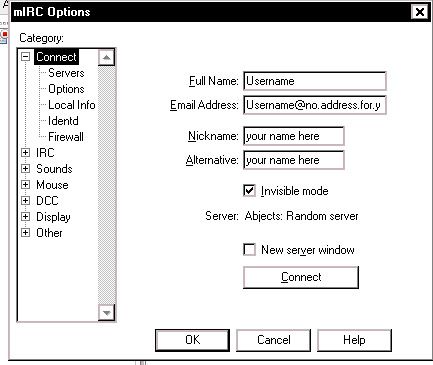
3) Click File->Select Server->Add server
4) Server Description: "WORMNET" (or whatver you want), IRC Server: wormnet1.team17.com PORTS: 6667 GROUP: (blank) PASSWORD: You need the Wormnet Password. It's easy to find, and probably easy to guess if you try hard enough. (Anyone who could abuse IRC could also find the password easily, so there's probaby no harm in the average person knowing the password...) But, you're going to have to find it for yourself!

5) Hit OK and now CONNECT to the server. A list of FAVORITES might open up, if so, add channel #AnythingGoes. Otherwise type into the window that is open: "/join #AnythingGoes"
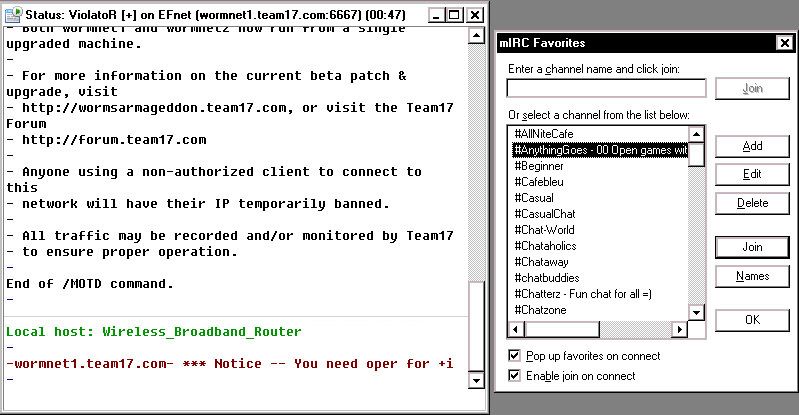
6) You can do WHOIS and whisper people, but you can't ban people or change your nickname while in the channel.
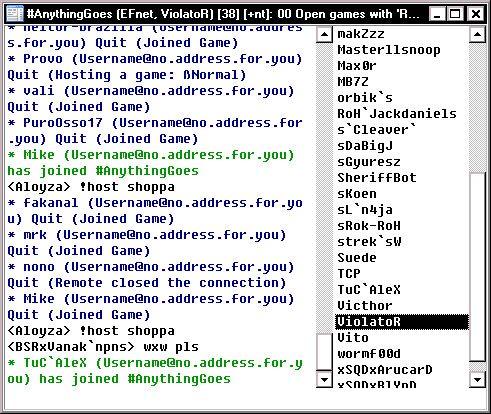
View Past Wormnet Activity
Not sure what this is all about... but if you go to this site, you can view Wormnet activity from "2005-11-04 04:56:56" to "2007-07-11 15:02:00"
HostingBuddy's Scheme Database
This wepage: http://wsdb.org/, Worms Scheme Database, allows you to upload schemes which are downloaded and used by "Hostingbuddy." You can have HostingBuddy grab a specifc scheme using the scheme command: see this page. If you click a link for a scheme, like http://wsdb.org/165.wsc, and you have the "Schemeworks" scheme editing program, then you can see what the scheme is. This one is a hysteria. Not much else to this site.
Browser Based Snooper - Web Snooper
The Web Snooper (click link), is hosted at worms2.info, and allows people to preform basic snooper functions via their web browser. You can chat and join games, but your name will be prefixed by "WebSnoop" to prevent you from cloning people, not that you can't just download a real Snooper and do that anyways. You cannot receive whispers.