Worms Armageddon Nickname Trick
I invented this trick in early 2002 after 4 days of trying to get ascii in my name (because it was easy to do in Worms2 by editing the registry). I've heard that someone who worked for Team17 used a similar trick before I started playing. Since the recent patches created by Team17 the trick is even easier to do (not needing you to edit your serverlist.htm file), so don't worry about it being hard, and just have fun with it.
Exit completely out of worms before doing this.
1) Open C:\>WINDOWS>WIN.INI
Scroll to the bottom where there is the heading "[NetSettings]"
Find "PlayerName=" where it will display your current wormnet name.
Change to whatever you want. (Max 16 characters, you can use more but it cuts it off at 16 unless you host, and it cuts it off in game too)
WARNING: Just kidding, you don't have to worry about editing the win.ini file, but you can make a backup if you're paranoid.
2) Click File>Save As>Win.ini Always do "save as" and not "save" to make sure it works. Then you might want to refresh (F5) your WINDOWS folder just to make sure.
3) Now Open WA.exe and go to the internet screen where your new name will be displayed in the "Player name (Nickname)" box.
Make sure it looks alright.
Then logon to Wormnet using the Autologin link.
(Originally you had to edit your serverlist.htm file to add this new link to it. So, you should thank you Team17 for including it in the patch, giving everyone the ability to easily add ascii to their names!)
4) Using a Snooper. If you use a snooper, then you can just edit your win.ini, and set your snooper to sign on using the Autologin link with a normal looking name (no ascii symbols). This way when you host/join, your name from the win.ini file will show up, but in Wormnet channels it looks normal. (I recommend using a snooper if you want your full name to appear on Wormnet so your friends can recognize you, but also want to have an ascii name in games)
Note: Not all symbols will work, and some that do work may prevent you from hosting or joining a game. Many symbols will be replaced with a place-holder and won't show up. (For example I don't think you can host if you have spaces in your name.) Also, if you don't have the most recent patch (Beta v.29 right now), many of the more unusual ascii symbols will look like Russian B's to you.
Important Note: If you log into Wormnet using an ascii name and the Autologin link: Any symbol that wormnet doesn't recognize will be invisible, and all letters after it will also be invisible until you get into a game where they will then be visible to everyone. So, if your name is "Wørm," in #Anythinggoes, people will only see "W," until you host or join a game. To have a normal name in Wormnet and ascii name in a game, use a Snooper.
You cannot start your name with an unrecognized/non-normal symbol (or a number) unless you use the Alternate Nickname Trick (see below)
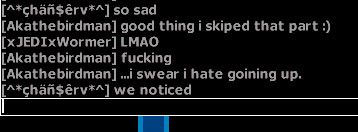
In the example below, the single quote symbol ' will not show up on wormnet, so my name is cut off after the apostrophe symbol ` which does show up. People on wormnet will only see the apostrophe (`) until I join or host, then they will see the whole name.
If you don't have a character map, then just copy and paste some of these ascii characters into your name:
À Á Â Ã Ä Å Æ Ç È É Ê Ë Ì Í Î Ï Ð Ñ Ò Ó Ô Õ Ö × Ø Ù Ú Û Ü Ý Þ ß à á â ã ä å æ ç è é ê ë ì í î ï ð ñ ò ó ô õ ö ÷ ø ù ú û ü ý þ ÿ
Here's a picture if you need a visual aid:
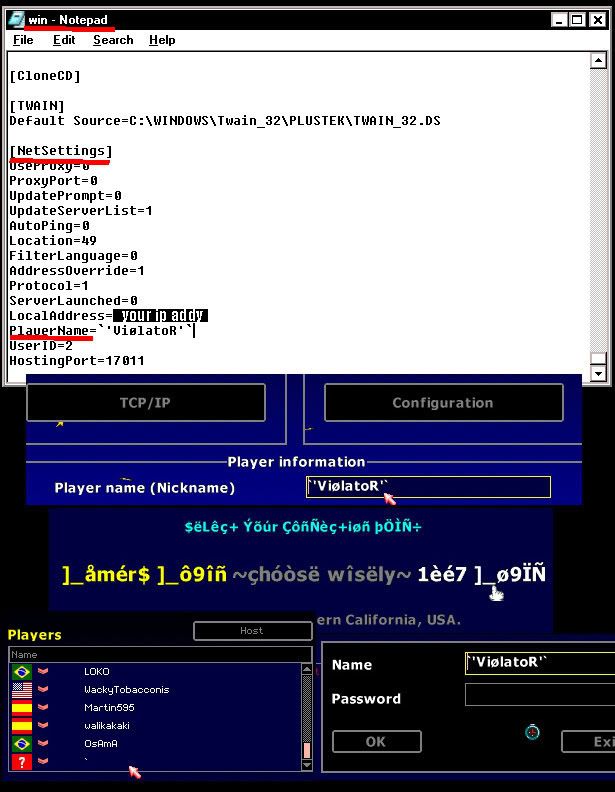
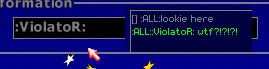
If you use a colon " : " in your name, your name will be removed from normal messages and replaced with "[] :ALL:" with your text after it. And if you do an action message, "/me", then it will show ":ALL:(Your Name)(your text)"
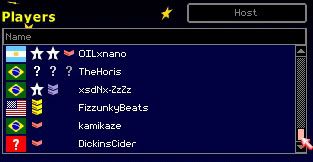
This trick will also allow you to use censored words in your name (last name on the list):
Alternate Nickname Trick
This new nickname trick will allow you to use illigal/invalid ascii characters anywhere in your name, you can even start your name with them! You have to be able to view the GameList without logging on to Wormnet, or otherwise know the IP address of the game you want to join. If you use a Snooper - it's the same as the above trick. If you do not use a Snooper, but want to join someone who does: Most Snoopers can show the full IP address when someone hosts a game, allowing others to join you and use this trick from their web browser. Some Snoopers show the full IP address of all hosts, which would allow you to join their game and use this trick if you do not have a Snooper.
1) Edit your win.ini file as explained in the above Nickname Trick.
2) Do not log onto Wormnet!
2.5) If you have a Snopper, all you have to do it edit your win.ini file with any ascii you want, even begin your name with ascii characters as well. It works the same the above trick. However if you do not have a Snooper then you will have to log into the game with your web browser:
3) Open Firefox (or other browser if it works for you), and go to the GameList.asp URL: http://wormnet1.team17.com/wormageddonweb/GameList.asp?Channel=AnythingGoes. View the Soruce to find each game's IP address. If you don't see any games, you might want to try using the full trick explained here: View And Join A Game With Web Browser.
4) Find a game's IP address by viewing the source (CTRL+U) for the GameList page, then enter it into your URL bar like so: "wa://ip.address:port?scheme=Tf,LHorny,Pf,Wd,Be" Then hit "GO!"
Replace "ip.address:port" with the full IP address of the desired game.
5) That's it! Worms will open and you will join the game with an ascii name.
By skipping the part where you log into Worment, which uses an IRC chat function, you can use any symbol in your name and jump straight to a game without Wormnet cutting your name off or kicking you out.
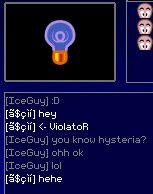
I tried a couple of different names which you can see here:
Warning: Possible desynchronization when using this trick with your web browser. I've updated the link used to join the game by including the parameters "?scheme=scheme=Tf,LHorny,Pf,Wd,Be" which works just fine, but I can't say that it will work under all circumstances: like with rubberworm, or hacked wa.exe's or cheats which change parameters, etc (I haven't tested it under these circumstances, but if the host is using different parameters, then you have to have the same parameters in your link otherwise you risk a desynch). Also, I don't know if any ascii symbols might confuse the game, like: "/" or "!" or blank spaces, sort of like how the colon, ":" causes you to message the room "[]ALL:" (see above nickname trick).
Not all ascii will be visible to other people. Players whose keyboard uses a different language with different ascii symbols might not be able to see your name exactly as you see it.
