RUP Overview
What is the Rational Unified Process
- Software Development Approach:
Iterative, architecture-centric, use-case-driven
- Software Engineering Process:
Defines roles and responsibilities, scheduling
and milestones
- Customizable Process Framework:
Supports customization with Process Configurations
which accomodates different kinds of projects
RUP Lifecycle
RUP Is Iterative and Risk Driven
RUP consists of a matrix of disciplines and phases. Each discipline is associated with:
- Roles
- Workflows (which consist of Activities)
- Artifacts
And of course these roles, worklows and artifcats are different for each phase.
RUP breaks software development into 4 phases: Inception, Elaboration, Construction
and Transition. Each phase is broken down into multiple iterations. So, for example,
there would not be just one construction effort that takes 10 months during the course
of a project. There would be, say 10 one month long construction iterations. Each iteration
would produce some working code, some functionality that is visible to the end-user
so it can be evaluated and tested. Each phase ends with a milestone review.
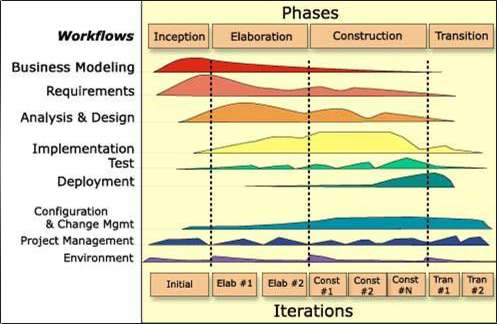
However, RUP makes the case that some disciplines, should be
emphasized more at the beginning of the project while others are best left for later.
The disciplines RUP correspond to different kinds of work that are done during software
development. They map reasonably well to the activities defined in the waterfall model.
The difference is that with waterfall, one does each kind of activity to completion, before
beginning the next one, whereas in an iterative approach like RUP, various kinds of
activities go on simultaneously throughout the iterations of the project. With the waterfall
approach, requirements analysis would precede design, which would
precede implementation. With RUP, requirements analysis, implementation, and design would continue
to go on during the construction phase, even though there would be a greater emphasis
on development at that point.
It is important to note that unlike Waterfall, RUP is is an iterative model. The goals
of iterative development are as follows:
- Accomodates changing requirements
- Integration done once at the end of the project
- Reuse is facilitated
- Defects can be found and fixed earlier
- A more integrated approach is a better use of personnel
Each iteration in RUP has the following components:
- Planning
- Requirements
- Analysis and Design
- Implementation
- Configuration and change management
- Test
- Evaluation
Inception
- Determine the key objectives of the project (the vision),
the scope of the system, and its boundaries. Identify who
wants the system and what it is worth to them.
- Identify key system functionality
- Develop an initial estimate of cost and schedule, as well
as a list of the major known risks
- Determine which tools to use, establish a process, and
standards
Elaboration
- Put the development environment in place
- Design and implement a baseline architecture
- Develop a more detailed understanding of the requirements
Construction
- Iteratively develop the product
- Deploy frequently
Transition
- Beta test to make sure user expectations are met
- Train users
- Prepare deployment site and convert operational databases
Spirit of the RUP
Attack major risks early and continuously, or they will attack you
Why?
- Dealing with high-risk areas up-front will improve estimates, thereby giving more
confidence to the major stakeholders that the project will succeed.
- If some aspect of the project is not feasable, identifying this fact
early will waste the least time and will provide the greatest opportunity
to consider alternatives
How?
- Develop your product in iterations; do not use the waterfall development life cycle.
- Tackle the most challenging tasks first
- Resist the temptation to focus on glossy, cosmetic features too early
- Separate content from presentation: Integrate the model-view-controller paradigm into the architecture.
Ensure you deliver value to your customer
Why?
- The customers are paying the bills and expect a system that meets
their vision and requirements.
- What impresses a developer may not impress a user, and vice versa.
How?
- Employ use-cases and proto-typing to link all developed code
to visible features or functionality the customer wants to use
- Avoid
developing a lot of the framework code "under water."
- Focus on understanding and elaborating the details of requirements; ask
questionst that help to identify areas that have not been fully explored.
- Suggest ways of simplifying the application to reduce time and cost.
Stay focused on executable software
Why?
- Insures you are in agreement with the users about requirements
- Using software, even a prototype, brings out problems that may not be obvious when looking at a design document; you may not realize you forgot to pack
your toothbrush for a camping trip until you reach for it to brush your teeth!
How?
- Follow the XP practice of developing code to currently known requirements
- Be willing to refactor the design of the code as the requirements become
more clear.
- Use automated testing as a way of making surethat refactoring
or changing code does not break previously working functionality.
Baseline an executabl architecture early on
Why?
- Again, providing a working architecture early will provide a hands-on proving ground
for the application and will uncover defects earlier, thereby reducing risk.
How?
- Again, keep the architecture simple and focused on user-driven requirements, not
the desire to produce the most general possible solution.
- Allow generality to
evolve as the project progresses and focus on fundamentals such as
robustness, performance, and maintainability.
Accomodate change early in the project
Why?
- There is no question that the requirements will change as the project goes on.
While keeping things simple is a good thing to focus on, it is also important
to adopt a framework and set of practices that will make it possible to change
the application without requiring a complete re-design each time.
How?
- Write automated unit tests prior to writing working code will provide a safety net to
make sure that changes made to the code do not damage previously written and tested
functionality.
- A revision control system and training on using it properly will allow multiple
developers to make changes to the same body of code at low risk. No code can be
checked in if it breaks automated tests or prevents the application from compiling.
- Automating daily builds using a tool such as CruiseControl will enfore the discipline
of proper use of the revision control system.
Build your system with components
Why?
- Components are basically pieces of software that support a standard programming model, also known as an API. Database components include ODBC and JDBC. CORBA, DCOM, and EJB are component models for distributed programming. The JTable in swing is a visual component.
- Maintaining a piece of software that uses components is easier because each component can be studied and understood on its own terms
- Using components makes changing the code easier, e.g. In theory you can switch transparently between Oracle and MS SQL Server back-ends using Java's JDBC or EJB (in practice, this may not be so trivial if you are sending straigh SQL calls across to the database!).
- While using components is a good idea, trying to develop components may not be.
How?
- Choose components as part of the baseline architecture.
- For a web-based database-oriented development project, start with a unit testing framework, an integration and build framework, a persistence framework, and a Model2 web development framework. Other kinds of projects will warrant other kinds of components. For example, a GIS mapping project may require the use of a mapping or visualization component.
Work together as one team
Why?
- Research has idenntified differences in productivity ranging from 2.5:1 to 5:1.
- The productivity of the group is more greatly influences by the performance of the team as a whole than by the performance of individuals working on their own.
How?
- Organize projects around cross-functional teams
- Shared vision or goal
- Result-driven structure
- Communication
- Commitment to the team
- Small team size
- Mutual trust
- Competent team members
Make quality a way of life, not an afterthought
Why?
- Among the trade-offs between quality, cost, and schedule, quality is the easiest to give up, but its absence leads to many problems in deployment to production and in subsequent maintenance.
- It is far less costly to enforce measures to develop a quality product early on than once the product is in production.
How?
- Use automated unit tests
- Employ established best practices
- Do the hard stuff first, focus on the customer/user, develop executable software iteratively, work with a component-based architecture, and focus on teamwork.