
Navihawk Displays and Functions
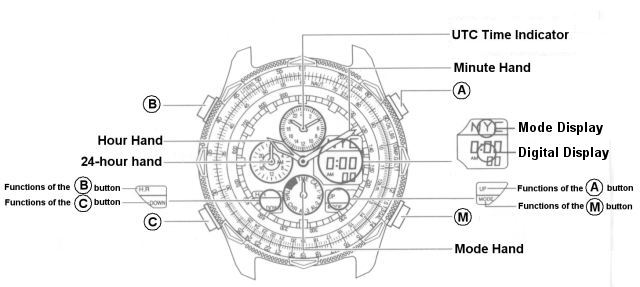
Refer to the illustration to determine the functions in the table below
| Name | Action | Time Mode | Calendar Mode | Alarm 1/2/3 Mode |
Chronograph Mode |
Timer Mode |
Zone Setting Mode |
|---|---|---|---|---|---|---|---|
| Button "A" | Press Once | Next City | Start/Stop | Start/Stop | Next City | ||
| Button "B" | Press Once | Move hands back from retracted position | |||||
| Button "B" | Press for 2 Sec. | Move hands to retracted position (12:00) | |||||
| Button "C" | Press Once | Previous City | Split/Reset | Reset | Previous City | ||
| Button "M" | Press | To <CAL> mode | To <AL1> mode | To <CHR> mode | To <TMR> mode | To <SET> mode | To <TME> mode |
| Mode Display | City Name | CHR | Hours/Minutes/Seconds | City Name | |||
| Digital Display | Hours, Minutes, Seconds | Month, Date,Day | Hours, Minutes or OFF | Minutes, Seconds and 1/100 Seconds | Remaining Time (Minutes, Seconds) | SET/DST | |
| Hour Hand | Hours display | ||||||
| Minute Hand | Minutes display | ||||||
