Welcome! This is the fourth assignment for the PSP 201 class. The fourth class is the last in the series, and it wraps everything up by teaching the “odds and ends” that weren't covered anywhere else.
One of the topics for this lesson is how to save an image with a transparent background. This is something that I figured out on my own a while back, but let me tell you it was not without a considerable amount of playing around! What I finally figured out is that JPEG's do not support transparence, but GIF's do. The lesson confirms this, and adds that PNG's also support transparence; the problem is that not all browsers will display PNG's properly right now. So, if you want a transparent background, GIF's it is!

A Picture Frame with Transparent Background
I filled in the frame with my children's names, but this could be a photo or some other image

File compression and the use of thumbnail images were also covered in this lesson. Compression isn't so much an issue with GIF's, since with Paint Shop Pro we can't really control how much a GIF will be compressed. The only thing we can do is create a graphic with the smallest number of colours necessary, and to limit the size of the graphic. The larger it is, the larger the file will be.
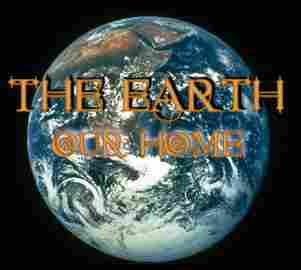
With JPEG's, however, the story is different. We can decide how much to compress a JPEG. The less we compress, the better the quality of the image. You can see this in the two images of the Earth below; the first is compressed by a factor of 20, while the second is compressed by a factor of more than 80. With all the swirling shapes and colours in the earth image it's not easy to see the distortion caused by compression, but look carefully. Around the text and the various swirls of colour in the image there are pink and green outlines, the beginnings of the discoloration that would soon distort the image if we compressed it much more. The sacrifice of the clarity brings a smaller file size, though, and means the image on the right will load faster into your browser.

|
|
|
Compression Factor: 20 File Size: 19.73KB |
Compression Factor: 85 File Size: 5.82KB |
New Addition May 18th: Just for fun, here's a jigsaw puzzle of the same image for you to play with!
Thumbnails are used when there are a lot of images on a page, or when the images are very large. They allow the viewer to see what the picture will look like before deciding whether or not to view it at full size. Here is a thumbnail of the image on the left, above.

|
| Earth - Thumbnail |
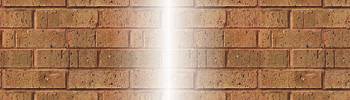
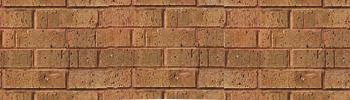
Finally, the lesson covered the use of the clone brush. This is a handy tool for touching up an image that has a flaw of some kind, as the brick graphic below. The graphic on the right is the same graphic, touched up with the clone brush. Could you tell?
|
|
| Bricks - Untouched | Bricks - Touched Up with Clone Brush |
And that, folks, is this lesson's homework! Now wish me well on my exam! If you'd like to take a Paint Shop Pro course for free, please check out WebTech University. They've got a wonderful program and great teachers. Even if you've been working with PSP or HTML for a while now, you can still learn a thing or two from these folks - and it might just save you the trouble of figuring things out by trial and error...