
1.0 HYPERTEXT TRANSFER PROTOCOL
1.1 INTRODUCTION
The hypertext transfer protocol (http) is an application level protocol used mainly to access data on the world-wide web (www). The protocol transfer data in the form of plain text, hypertext, audio, video and so on. However, it is called the http because its efficiency allows its use in a hypertext environment where they are rapid jumps from document to another document. The http is the basic underlying application-level protocol used to facilitate the transmission of data to and from a web server. Http provide a simple, fast way to specify the interaction between client and server. The protocol actually defines how a client must ask for data from the server and how the server returns it. Http does not specify how the data is actually transferred. Since http is only the application level protocol, it only specifies the discussion and negotiation between the client and server. The actual data transfer is done by low level protocol, like transmission control protocol (TCP). The default port for http is 80, but other ports can be used.
The http protocol is connectionless and stateless. This means, after the server has responded to the client's request, the connection between client and server is closed and forgotten. There is no "memory" between client and server. The pure http server treats every request as if it is brand-new.
Another feature of http is that it is flexible in the formats that it can handle. When a client issues a request to a server, it may include a prioritized list of formats that it can handle, and the server replies with the appropriate format. For example, if a browser cannot handle images, so a web server need not transmit any images on web pages. This arrangement prevents the transmission of unnecessary information and provides the basis for extending the set of formats with new standardized and proprietary specifications.
The http message are not intended to be read by humans, they are read and interpreted by the http server and http client (browser). Http uses Internet Media Types (formerly know as MIME Content-types) to provide opened and extensive data typing and type negotiation. When http server transmits back information to the client, it includes a MIME-like header to inform the client what kind of data to be follows by the header.
MIME (Multipurpose Internet Mail Extensions) is a protocol to transmit text files with headers that indicate binary data that will be returned to the client, in order to allow the communication of multimedia. Each MIME header consists of 2 parts; i.e. type and subtype. Some examples are:
Content-type: text/html or video/quicktime or image/gif
When a server delivers a file to the client, the MIME type is specified by the Content-type. The client (browser) receives this information and processes accordingly with the appropriate utility (image viewer, movie player etc). If the content-type is text/html, the browser will render it in the browser window. If the content-type is application/quicktime and regconised by the browser, the browser may look for the appropriate add-in application (movie player) to display or process it, or ask the user if he want to save it to the disk if the browser does not regconised the file type.
The idea of http is very simple. A client (the browser of the home PC user, for example) sends a request, which looks like mail, to the server in the WWW. The server send the response, which looks like a mail reply to the client. The http messages are delivered immediately. The command from the client to the server are embedded in a letter-like request message. The content of the response file or other information are embedded in a letter-like response message.
1.2 VERSION AND HISTORY
The first version of http being used is version 0.9 started on year 1990, which allows row data transfer across the www. The current version of http 1 is supported by most servers and clients. It allows transmission of hypermedia with meta-information (information of the information) about the information being transferred and modifiers on the request/response semantics. However, http 1 does has some problem e.g. does not properly handle the effects of hierarchical proxies and caching. Http 1.1 solves many of these problems and is supported by newer version of web browsers and server.
1.3 TERMINOLOGY
Protocol - A method in transferring data between client and server.
Hypertext - Text or page of text with certain specific text or "hot-spot" that in-line with other text in the browser, which once being clicked with cause the browser window to display another page. The term hypermedia should be used when the browser displays other object such as image, animation, video, audio etc.
Client - The receiver which originates the request of data or information. The hardware could be a home personal computer and the software could be the web browser.
User Agent - The client that initiates a request. These are often browsers, editor, spiders or other end-user tools.
Server - The computer/program that accept connections in order to service requests by sending back response. Which usually stores data readily to be sent or receive data from client and process it before sending to the client upon request. In the WWW, one server serves to numerous clients.
Origin server - The server on which a given resource resides or is to be created.
Message - Basic unit of http communication, consisting of a structured sequence of octets transmitted via the connection.
Connection - A transport layer virtual circuit established between two application programs for the purposes of communication.
World-wide web (www) - The www is composed of millions of parts called web sites, all of which are interconnected to form the largest electronic database in the world. Each web site is made up of at least one web page, the basic element of www. The web pages are constructed using Hypertext Markup Language (HTML) as discussed in Section 7.
Browser - A program that that interprets, renders and display the HTML code in the web page, such as Internet Explorer or Nestcape Navigator.
Catche - A program's local store of response messages and the information that controls its message storage, retrieval and deletion. A Cacheable response can reduce the response time and required network bandwidth.
2.0 HTTP TRANSACTION
Figure below shows the http transaction between the client and server. Although http uses the services of TCP, http itself is a stateless protocol. The client initialise the transaction by sending a request message. The server reply by sending a response.
Figure 1: HTTP transaction
There are 3 types of http operation:
The simplest http operation is in which a user agent established a direct connection with and origin server, as illustrated in first part of Figure 1.1. The user agent is the client that initiates the request, such as a web browser being run on behalf of an end user. The origin server is the server on which a resource of interest of interest resides, an example is a web server at which a desire web home page resides. For this case, the client opens a TCP connection that is end-to-end between the client and the server. The client then issues an http request. When the server receives the request, it attempts to perform the requested action and then returns an http response. The TCP connection is then closed.
The middle part of Figure 1.1 shows a case in which there is not an end-to-end TCP connection between the user agent and the origin server. Instead, there are one or more intermediate systems with TCP connections between logically adjacent systems. Each intermediate system acts as a relay, so that a request initiated by the client is relayed through the intermediate systems to the server, and the response from the server is relayed back to the client.
The lowest part of Figure 1.1 shows an example of a cache. A cache is a facility that may store previous requests and response for handling new requests. If a new request arrives that is the same as a stored request, then the cache can supply the stored response rather than accessing the resource indicated in the URL. The cache can operate on a client or server, or on an intermediate system other than a tunnel (as explained later). In this example, intermediary B has cached a request/response transaction, so that a corresponding new request from the client need not travel the entire chain to the origin server, but is handled by B.

Figure 1.1 : Example of HTTP Operation
There are 3 forms of intermediate systems as illustrated in Figure 1.2:
|
|
In short, a proxy is a forwarding agent, receiving a request for a URL object, modifying the request, and forwarding that request toward the server identified in the URL. |
|
|
|
|
|
|
|

Figure 1.2 : Intermediate HTTP systems
There are 2 types of http message in http operation, i.e. request message and response message as described in Section 3 and 4.
3.0 REQUEST MESSAGE
A request message consists of a request line, header (to be discussed in Section 5), a blank line and body (in certain message).
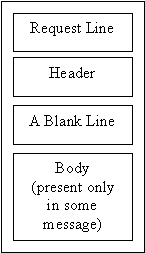
Figure 2 : Request message
The request line defines the request type, resource (URL), and http version. The request line consists of a request type, a space, a URL, a space and http version.
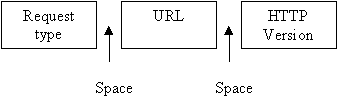
Figure 3 : Request line

Figure 4 : URL
3.3 Method
The method is the protocol used to retrieved the document. Several different protocols can retrieve a document, among them are Gopher, ftp, http, News and Telnet.
3.4 Host
The host is the computer where the information is located although the name of the computer can be an alias. Web pages are usually stored in computers, and computers are given alias name that usually begin with the character "www". This is not mandatory, however, as the host can be any name given to the computer.
3.5 Port
The URL optionally can obtain the port number of the server. If the port is included, it should be inserted between the host and the path, and it should be separated from the host by a colon. The default port for http is 80.
3.6 Path
Path is the pathname of the file where the information is located. The slash separate the directory from the subdirectory and filename.
3.7 HTTP version
The latest http version is 1.0, butl version 0.9 is still in use.
The request type field in request message defines several kinds of messages referred to as method. The request method is the actual command or request that a client issues to the server.
The table below shows some of the method and their purposes:
|
Name |
Description |
| GET | Used to retrieve and return whatever data is identified by the URL, so when the URL refers to a data-producing process, or a script which can be run by such a process, it is this data which will be returned, and not the source text of the script or process. Also used for searching. |
| OPTIONS | Returns information about the capabilities supported by a server, or the possible methods that can be applied to the specified object. |
| HEAD | Returns information about the object specified by the URL, such as last modification data, but does not return the actual object. |
| POST |
Sends information to the address indicated by the URL. Generally used to:
|
| PUT | Sends data to the server and writes it the the address specified by the URL where the existing data (if any) will be overwritten. It can be used for file upload. |
| DELETE | Requests that the server delete the information in the given URL. |
| LINK | The link method of HTTP adds meta information (Object header information) to an object, without touching the object's content. For example, it requests the creation of a link from the specified object to another object. |
| UNLINK | This method deletes meta-information about an object. The operation may be used for unlinking objects. It may also be used for removing other meta-information such as object title, expiry date, etc. |
| TRACE | Provides diagnostic information by allowing the client to see what is being received on the server. |
Table 1: Method name and description
4.0 RESPONSE MESSAGE
A response message consists of a status line, a header (to be discussed in Section 5.0), and sometimes a body.

Figure 5 : Response message
Status line:- The status line define the status of the response message. It consists of the http version, a space, a status code, a space, a status phrase.

Figure 6 : Status line
Http version:- This field is same as the field in the request line.
Status code:- The server response to the client with information about itself and the data being returned. The information about itself is given in a form of status code. Certain status code is returned corresponding to the method of request.
The status code consists of 3 digits. The codes in the 100 range (1xx) are only informational and the process will be continued, the codes in 200 range (2xx) indicate that the request is successful, understood and accepted. The codes in 300 range (3xx) redirect the client to another URL and further action must be taken in order to complete the request, the codes in 400 range (3xx) indicate an error at the client site where the request contains bad syntax or cannot be fulfilled. Lastly, the codes in 500 range (5xx) indicate an error at the server site where the server failed to fulfill an apparently valid request.
| Status Code | Reason Phrase |
Description |
| 100 | Continue | This interim response is used to inform the client that the initial part of the request has been received and has not yet been rejected by the server. The client should continue by sending the remainder of the request or, if the request has already been completed, ignore this response. The server must send a final response after the request has been completed. |
| 101 | Switching protocol | Can be returned by the server to indicate that a different protocol should be used to improve communication, if the method UPGRADE is used in the request. |
| 200 | OK | The request has succeeded. The information returned with the
response is dependent on the method used in the request, for example:
GET an entity corresponding to the requested resource is sent in the response; HEAD the entity-header fields corresponding to the requested resource are sent in the response without any message-body; POST an entity describing or containing the result of the action; |
| 201 | Created | The request has been fulfilled and resulted in a new resource being created in conjunction with the PUT method. |
| 202 | Accepted | This code indicates that the request has been accepted for processing, but the processing has not been completed and the request may or may not actually finish properly. |
| 204 | No content/response | Server has received the request but there is no new data to send back, and the client should stay in the same document view. |
| 300 | Multiple Choices | Indicates that there are many possible representations for the requested information, so the client should use the preferred representation, which may be in the form of a closer server or different data format. |
| 301 | Move permanently | Requested resource has been assigned a new permanent address and any future references to this resource should be done using one of the returned addresses. |
| 302 | Found | The data requested actually resides under a different location, however, the redirection may be altered on occasion. |
| 303 | Method | Like the found response, this suggests that the client go try another address using GET method. |
| 304 | Not Modified | Issued in response to a conditional GET; indicates to the agent to use a local copy of document from cache. |
| 400 | Bad request | The request had bad syntax or was inherently impossible to be satisfied. |
| 401 | Unauthorised | Request requires user authentication. The authorization has failed for some reason (e.g. invalid password), so this code is returned. The request can be reattempted. |
| 402 | Payment required | This code is to support commercial transaction but still not well defined yet. |
| 403 | Forbidden | Request is understood but disallowed and should not be reattempted, as compared to 401 code. |
| 404 | Not found | The server has not found anything matching the URL given. |
| 500 | Internal error | The server encountered an unexpected condition which prevented it from fulfilling the request. |
| 501 | Not implemented | The server does not support the method request, such as GET, POST or PUT on an data that for such a method is not supported. |
| 503 | Service Unavailable | Indicates the server is currently overloaded or is undergoing maintenance. |
Table 2 : Status code and status phrase
Reason phrase/status phrase:- this fields explains the status code in text form, as shown in above table.
5.0 HEADER
The header gives additional information between the client and the server. For example, the client can request that the document be sent on a specific format or the server can send extra information about the document.
The header can be one or more header lines. Each header line is made of a header name, a colon, a space, and a header value.
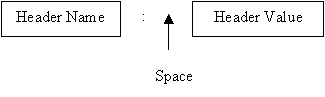
Figure 7 : Header Format
A header line belongs to one or 4 categories: general header, request header, response header and entity header. A request message can contain only general, request and entity header. A response message can contain only general, response and entity header.
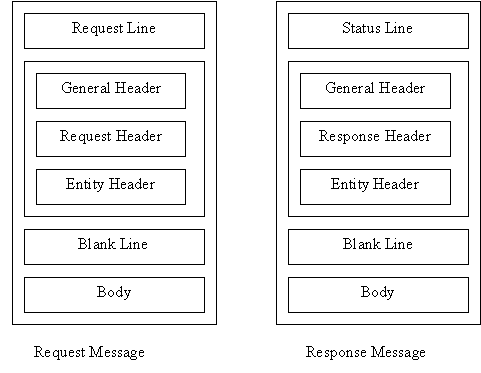
Figure 8 : Request header and response header
General header:- General header gives general information about the message and can be present in both a request and response message. It is included only when required to give additional or special information in the transaction..
| Header Field |
Description |
| Cache-control | The Cache-Control general-header field is used to specify directives that must be obeyed by all caching mechanisms along the request/response chain. The directives specify behavior intended to prevent caches from adversely interfering with the request or response. |
| Connection | The Connection general-header field allows the sender to
specify options that are desired for that particular connection. For
example :
Connection : close |
| Date | The Date general-header field represents the date and time at which the message was originated |
| MIME-version | Version of MIME |
| Upgrade | The Upgrade general-header allows the client to specify what additional communication protocols it supports and would like to use if the server finds it appropriate to switch protocols. |
| Content length | This field indicates the length in bytes of the message being sent to the server, if any. E.g. Content-length: 1805 |
| Content type | This field indicates the MIME type of a message being sent to a server, if any. E.g. Content-type: text/plain |
| Authorization | Contains a field value, referred to as credentials, used by the client to authenticate itself to the server. |
Table 3 : General header
Request header:- Request header can only be present in request message. It specifies the client's configuration and the client's preferred document format. The request header fields allow the client to pass additional information about the request, and about the client itself, to the server.
| Header Field |
Description |
| Accept | The Accept request-header field can be used to specify certain media types which are acceptable for the response. Accept headers can be used to indicate that the request is specifically limited to a small set of desired types, such as the file type. E.g. Accept: image.gif, image.jpeg |
| Accept-charset | The Accept-Charset request-header field can be used to indicate what character sets are acceptable for the response. E.g. ASCII or foreign character encoding. |
| Accept-Language | This field allow the languages preferred by the browser and could be used by the server to pass back the appropriate language. E.g. Accept-Language : en |
| If-Modified-Since | This field indicates file freshness to improve the efficiency of GET method (reduce file download time). The requested file is checked to see if it has been modified since the time specified in the field. If the file has not been modified, a "Not Modified" code 304 is sent to the client so a cached version of the file can be used. E.g. If-Modified-Since: Thursday, 15-Jan-2000 |
| Date | This field indicates the date and time in Greenwich Mean Time (GMT) that a request was made. E.g. Thursday, 15-Jan-00 01:39:39 GMT |
| Host | This field indicates the host and port of the server of the server to which the request is being made. E.g. Host: www.ftmsicl.com |
| Range | This field requests a particular range of a file such as a certain number of bytes. E.g. Range: bytes=-500 request for the last 500 bytes of a file. |
| MIME-Version | This field indicates the MIME protocol version, understood by the browser, that the server should use. E.g. MIME-Version: 1.0 |
Table 4 : Request header
Response header:- Can only be present in response message. It specifies a server's configuration and special information about the request. Some of the response headers are same as request headers, but with different interpretation. E.g. MIME-Version in request header indicates the required version should be returned by the server, while MIME-Version in response header indicates the actual version returned by the server.
| Header Field |
Description |
| Age | This header field shows the sender's estimate of the amount of time since the response was generated at the origin server. Age values are nonnegative decimal integers representing time in second. E.g. Age: 10 |
| Server | This field contains information about the web software used. E.g. Server: Netscape-Commerce/1.12 |
| Location | The Location response-header field is used to redirect the browser to a location other than the requested URL for completion of the request or identification of a new resource. |
| Content-length | This header indicates the number of bytes returned by the server. E.g. Content-length: 305 |
| Content-type | This important header indicates in the form of a MIME type what type of content is being returned by the server. E.g. Content-type: text/html |
| Expires | This header specified the date and time after which the returned data should be considered stale (not updated) and the cache should not be used. E.g. Expires: Thu, 04 Dec 1999 |
| Last Modified | This header is used to indicate the date on which the content returned was last modified. It can be used by caches to decide whether or not to keep local copies of data. |
| Retry-after | This header can be used in conjunction with a "service unavailable" (503 code) response to indicate how long the service is expected to be unavailable to the request. Its values can be either http-date or an integer number of seconds after which the client can retry. E.g. Retry-after: Fri, 31 Dec. 99 or Retry-after: 60 |
| WWW-Authentication | Included with a response that has a status code of Unauthorised. This field contains a challenge that indicates the authentication scheme and parameters required. |
| Proxy-Authentication | Included with a response that has a status code of Proxy Authentication Required. This field contains a challenge that indicates the authentication scheme and parameters required. |
Table 5 : Response header
Entity header:- It gives information about the body of document. Although it is mostly present in response message, some request message like POST or PUT methods, that contain a body also use this type of header.
| Header Field |
Description |
| Content location | The Content-Location header field may be used to supply the resource location for the entity enclosed in the message when that entity is accessible from a location differs from the requested resource's URL. |
| Expires | The Expires entity-header field gives the date/time after which the response is considered stale. |
| Last Modified | The Last-Modified entity-header field indicates the date and time at which the origin server believes the variant was last modified. |
Table 6 : Entity header
6.0 EXAMPLE OF HTTP TRANSACTION
6.1 Example 1

Figure 9 : Example illustrating http transaction using GET method
Assuming that in a web page, there is an image with file name "image" needed to be displayed. The browser hence initiates a command to ask for a image file named "image" located on URL /user/bin/image/. In the http transaction, this involves the use of GET method in the request message. The request line in this example is "GET /user/bin/image/ HTTP/1.1", meaning that the client sends a command to retrieve a file name "image" which is located on /user/bin/image/, by using the http version of 1.1. There are 2 headers in this example, i.e. "Accept: image.gif" and "Accept: image.jpeg", which gives additional information to the server that, the file could be with extension of either .gif or .jpeg. Assuming that the server could found the said file, the response message will be as shown in Figure 9 with the response status "http/1.1 200 OK", meaning that the used http version is 1.1, and status code of 200 indicates that the document requested was found and returned in this response to the client. There are 3 headers from server to give additional information to the client, i.e. "Server: Chanllenger", "MIME Version:1.0", "Content length: 3045". The body of the document is followed as per request.
6.2 Example 2
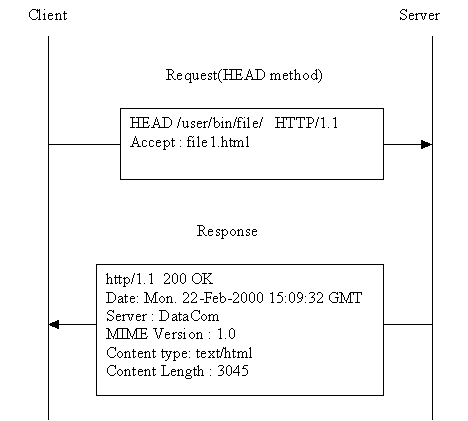
Figure 10: Example illustrating http transaction using of HEAD method
In this example, the client just wants to retrieve the information about a document named "file1.html" which is located at "/user/bin/file/". In http transaction, this involves the use of HEAD method, with a request line "HEAD /user/bin/file/ HTTP/1.1". The header specifies that only file "file1.html" can be accepted. The server responses with response status "HTTP/1.1 200 OK" indicating that the file "file1.html" is found. 4 headers are returned which give information of the file as requested. No content body is returned since the HEAD method does not actually request for the file but only the information of the file.
7.0 HYPERTEXT MARKUP LANGUAGE (HTML)
Since the http is used mainly to transfer hypertext data, it is herein worth to study more on HTML language. This article was written in HTML format and was published to http://www.oocities.org/compchew/assignment/http/http.htm. To view the HTML source code, select menu "View - Source" in Internet Explorer, or select "View - Page source" in Nestcape Navigator.
HTML is a structured markup language that is used to create web pages. A markup language such as HTML is simply a collection of codes, called elements, that are used to indicate the structure and format of a document. The web browser will interpret the meaning of these codes to figure how to structure or display a document. An HTML document is written in a plain text file with extension .html or .htm. The World Wide Web Consortium (W3C) is the organisation that standardize the formal structure and syntax of this language.
The latest version of HTML 4 allows the web page to be embedded with image, animation, video and audio object which makes the web page more interactive and attractive.
The idea of HTML is so that the code can be interpreted regardless of the operating system resides on the platform (Windows, Unix etc) and the web browser being used (Internet Explorer, Nestcape etc). This allows data transfer between different clients and servers with different operating environment, both in hardware or software. However, different browsers will render the document differently and certain browsers may not support certain HTML tags because the rules set forth by W3C are not strictly adhered to by the browsers. However, this doesn't impair the purpose of HTML as a mean which initially was developed for efficient information transmission between different platform.
The HTML code consists of numbers of element or nested elements. The syntax of the individual element is as follow:
Each element is started with a opening tag name and ended with an optional closing tag, with the same name but preceded with a "/". It can be included with one or more optional attributes that define the parameter that affect how the content will be displaced or formatted. The affected content is the actual object that will be displaced on the web page, could be some text, image or other hypermedia.
There are some basic HTML tags that let the browser know important things about the document itself rather than the content and how to display the body. These tags normally do not contain attribute:
| Opening tag/closing tag |
Description |
| <!doctype> None | Specifies the HTML specification. This is the first tag. |
| <html> ...</html> | Specifies that this should be interpreted as HTML document |
| <head>...</head> | Specifies an area to define the meta-information of the document. It requires at least the <title> tag |
| <title>...</title> | Used within the <head> element. It specifies the text that will be used for the header/title of the browser window. Also used as title in browser index or bookmark. |
| <body>...</body> | Specifies an area where all other tags that defines the information are located within. |
The followings are some tags that used inside the <body> element:
| Opening tag/closing tag |
Description |
| <p>...</p> | Indicates a new paragraph and instructs the browser to add a blank line. |
| <a href="address">...</a> | The anchor tag that specifies the "hot spot" for activating the hyperlink. The hot spot can be some text, image, etc. |
| <img scr="path/filename"> | To embedded an image to the HTML document. The scr attribute specifies the URL of the image file. |
| <center>...</center> | To horizontally align the content to center of the web page. |
| <b>...</b> | To format the included text to bold face. |
| <!--...--> | This tag is used to include text comments that will not be displayed by browser. |
Example :
<!doctype html public "-//W3C//dtd html 4.0 Transitional//EN">
<html>
<head>
<title>Example of a simple web page</title>
</head>
<body>
<!--These text is only comment and will not be displayed-->
<center>These text will be aligned at center</center>
<p><a href="http://www.home.com"><img src="MyDirectory/home.gif" width="198" height="150" ></a></p>
<p>Click the above picture will bring you to <a href="http://www.home.com">http://www.home.com</a></p>
</body>
</html>
The rendering of the above HTML file in browser will be as below:
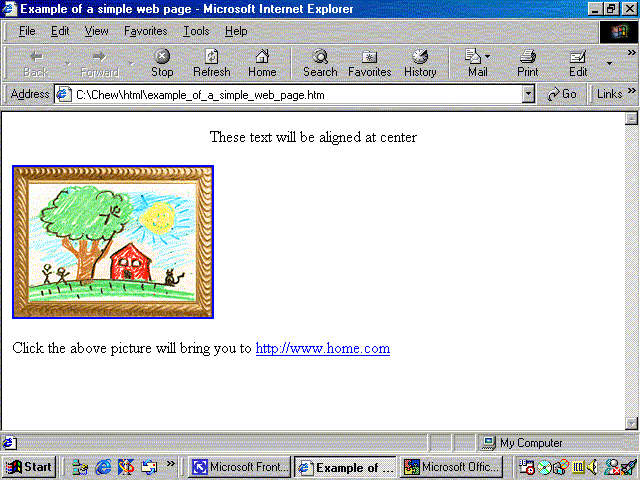
Figure 11: Rendering of a simple web page
8.0 ACCESS AUTHENTICATION
HTTP/1.1 defines a simple challenge-response technique for authentication. This definition does not restrict http clients and servers from using other forms of authentication, but the current standard only covers this simple form.
Two authentication exchanges are defined : one between a client and a server, and one between a client and a proxy. Both types of exchange use a challenge-response mechanism.
Client-server authentication - A user agent that wishes to authenticate itself with a server may do so by including an authorization field in the request header; an agent may do this when initially sending the request. An alternative, which may be more common, is that a client sends a request message without an authentication field and is then required to return an authorization by the server. Figure 12 illustrates this scenario which involves 3 steps:
If the authentication succeeds, the server returns a response with some other status code and without a WWW-Authenticate field. If authentication fails, the server can initiate a new authentication sequence by returning a response with a status of Unauthorized and a WWW-Authentication field containing the (possibly new) challenge. The entity body shuld explain the reason for the refusal.
Figure 12 : HTTP access-authentication scenario |
Proxy Authentication - A proxy may be configured so that a client must first authenticate itself to the proxy before being granted access to the origin server. The sequence is similar to that described for client-server authentication. In this case, the authentication information is carried in the Proxy-Authentication field in the request header. A client may authenticate itself when first issuing a request message. Alternatively, a scenario similar to Figure 12 occurs:
If the request is authenticated, then the proxy may forward the request to a server, but will omit the Proxy-Authentication field. The proxy could also return a cached response. |
9.0 FUTURE TREND OF HTTP
The next generation of HTTP, dubbed " HTTP-NG", will be a replacement for HTTP 1.0 with much higher performance and adding some extra features needed for use in commercial applications. It's designed to make it easy to implement the basic functionality needed by all browsers, whilst making the addition of more powerful features such as security and authentication much simpler.
The current HTTP 1.0 often causes performance problems on the server side, and on the network, since it sets up a new connection for every request. " HTTP-NG "divides up the connection (between client and server) into lots of different channels, each object is returned over its own channel." HTTP-NG " allows many different requests to be sent over a single connection. These requests are asynchronous - there's no need for the client to wait for a response before sending out a new request. The server can also respond to requests in any order it sees fit and allowing several images to be transferred in "parallel".
To make these multiple data streams easy to work with, HTTP-NG divides the connection into lots of different channels. HTTP-NG sends all control messages (GET requests, meta-information etc) over a control channel. Each object is returned over in its own channel. This also makes redirection much more powerful - for example, if the object is a video the server can return the meta-information over the same connection, together with a URL pointing to a dedicated video transfer protocol that will fetch the data for the relevant object. This becomes very important when working with multimedia aware networking technologies. The HTTP-NG protocol will permit complex data types such as video to redirect the URL to a video transfer protocol and only then will the data be fetched for the client.
10.0 SUMMARY
The http is the main protocol used to access data in world-wide web, where the data is not only limited to hypertext but also to all type of hypermedia likes image, audio, video etc. Throughout its extensive use of request method, request header, error codes and response headers, this protocol allow the data being transferred between the client and server. However, http is a stateless and generic protocol that defines the method and gives the information required for data transfer. The actual data transfer is still done by low level protocol, i.e. transmission control protocol (TCP).
The http protocol is a request/response protocol. A client sends a request to the server in the form of a request method, URL and protocol version, followed by a MIME-like message containing request modifiers, client information, and possible body content over a connection with a server. The server responds with a status line, including message's protocol version and a success or error code, followed by a MIME-like message containing server information, entity meta-information, and possible entity-body content.
There are 2 types of http message, i.e. request message and response message. A request message consists of a request line, headers, a blank line, and a body (for certain messages) as illustrated in Figure 2. The request line consists of a request type, a space, a URL, a space, and the http version (as illustrated in Figure 3). The URL consists of method, host, computer, port and path (Figure 4). The request type or method is the actual command or request that a client issues to the server. Some common methods are GET (to retrieve a document from server), HEAD (to retrieve information about a document in the server) and POST (to send a document to a server).
A response message consists of a status line, headers, a blank line, and a body (for certain messages) as illustrated in Figure 5. The status line consists of http version, a space, a status code, a space, and a status phrase (Figure 6). The status code relays general information, information related to a successful request, redirection information or error information in the form of 3 digits code. The status phrase gives description about the code status. E.g. the status phrase for status code 404 is "Not Found".
The header relays additional information between the client and server. A header consists of a header name and a header value. A general header gives general information about the request or response. A request header specifies a client's configuration and preferred document format. A response header specifies a server's configuration and special information about the request. An entity header provide information about the body of a document.
Web page written in Hypertext Markup Language (HTML) constitutes most of the data being transfer in http. The idea of HTML is to allow data transfer between different platform with different operating environment, e.g. Windows NT, Windows 2000 or Unix. Therefore HTML does not specify exactly how the data will be displayed in the browser but instead the structure of the web page. It is a machine-independent markup language that let the browser to render the web page according to the structure and information set-forth in the HTML code.
11.0 REFERENCE
Data and computer communication, Prentice Hall
TCP/IP Protocol Suit by Forouzon, McGraw Hill
The Complete Reference for HTML by Thomas A. Powell, McGraw Hill
This page was last updated on 05/19/2000
