Excel Tutor - Cyprus

Techniques / Tips for Data Entry

This lesson explains a number of techniques and tips to enter data in an easy way. The following areas are covered:
1. Using the AutoFill tool to easily enter data to many cells. An explanation is also be made on how to create Custom Lists.
2. Entering data using the Edit / Fill menu. Various options are explained such as entering a series as a linear, growth and data increment.
3. Various other Data entry tips such as specifying the move direction of the cursor after enter.
4. Using the Data / Form to enter a new record in a database.
5. Using the Form Toolbar.  This toolbar is very useful though not used widely. An explanation is made on how to enter and use the following Form controls: Option Button, Check Box, List Box, Combo Box, Spinner and Scroll Bar.

Techniques / Tips for Data Entry - Examples

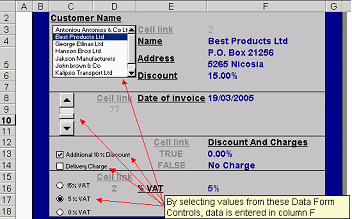
The illustration below shows how the List Box, Scroll Bar, Check Box and Option Button can be used to enter easily data. To insert these objects you have to follow the steps below:
1.Select View / Toolbars / Forms to Load the Form Toolbar.
2.Click on the specific object (eg List Box) and use standard mouse techniques to place it on the worksheet.
3.Right click on the object and select Format Control. From the control tab set the Cell link i.e. the cell that the data will go into when you make the selections in the objects. You will also need to make other settings depending on the object such as the input range for the List Box.
If you want to see an example of how these controls are used in practice you can download the file "Template" found in the Download Page

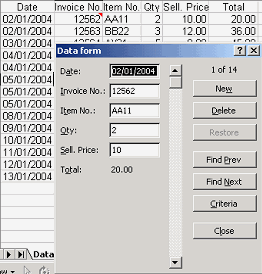
The figure below show how Data Form can be used. To display the Data Form window, just click a cell in the database and select Data / Form. With this tool you can find and enter a record easily.

Home | Who Am I? | My Training Program and Examples

| Downloads | Links | Contact