|
Help Note on the INWORDS function found in "Convertor" Add-In
Back to the Download Page
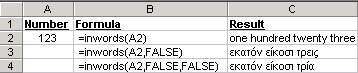
When you install the Convertor Add-In you will see that the new function INWORDS is added in the Paste function window (shown when you select Insert/Function). The INWORDS function converts the number into words either English or Greek.
Syntax
INWORDS (Number, English, Pounds)
Number is the number to be converted.
English is a logical value that specifies whether the conversion will be in English or Greek. If TRUE or omitted the conversion will be in English. If FALSE, INWORDS will convert the number into Greek words.
Pounds is a logical value that specifies whether the conversion will relate to Pounds or Euros. It is only applicable for the Greek conversion. If TRUE or omitted, INWORDS will convert the number into words that refer to Pounds. If FALSE, the conversion will relate to Euros.
Examples
|
|