|
Using Names - Examples
Cells can be named. The purpose is to make formulas more readable and less prone to errors. An example is the following formula: =Income*TaxRate where "Income" is the name of the cell containing the value of income and "TaxRate" is the name of the cell containing the Tax rate.
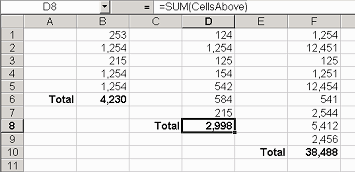
We can also name ranges to be used in functions. For example =VLOOKUP(B5,Table,2) instead of using =VLOOKUP(B5,$A$1:$D$100,2). The range referred to by the name can also be dynamic ie changes. The illustration below shows three totals that were produced by the same formula =SUM(CellsAbove). The argument "CellsAbove" is a name that refers to all the cells above the active cell. Therefore when the formula is copied to any other cell, it will not need to be adjusted if the sum range is of different size.
To create the name CellsAbove do the followings:
1. Select the range D1:D7;
2. Chose Insert / Name / Define;
3. Enter the name "CellsAbove" in the "Names in Workbook" field;
4. Enter the following formula in the Refers to field;
=D$1:D7
5. Press OK
|
|