

|
|||||||||
|
||||||||||||||||||||
|
||||||||||||||||||||
|
|
|||||||||||||||||||
|
Auditing of spreadsheets - Examples
|
||
|
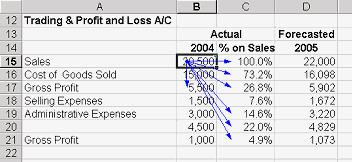
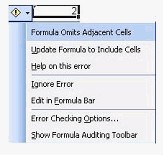
A "smart tag" introduced with Excel 2002 is a button that appears after certain actions are made which may involve errors. Users can select a command to resolve the error, ignore it, or access further Error Checking options. To see a Smart Tab Sum a column of cells, leaving out the last in the group. Hover over the cell containing the total and view error checking options. When you click on the exclamation mark button, a menu of options pop down that help you correct the error. |
||
|
Another way to audit the spreadsheet is to use auditing programs created by third parties (in the form of Add-Ins). These have advanced features that help users to identify the errors. The Links page gives information on the sites that you can download such software. |
||
|
|
||