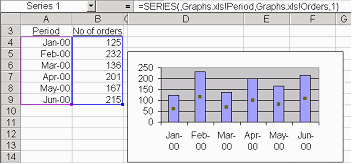
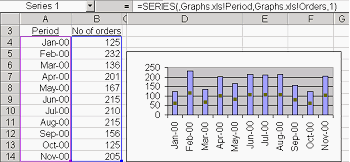
|
The followings steps should be followed to create the above dynamic graph:
1. Create the following two names: (CTR F3)
(a) Use the name "Period" in the "Names in Workbook" field and in the "Refers to" field enter:
=OFFSET($A$4,0,0,COUNTA($A:$A)-1)
(b) Use the name "Orders" in the "Names in Workbook" field and in the "Refers to" field enter:=OFFSET($B$4,0,0,COUNTA($B:$B)-1)
2. Create the chart as usual. You should select a cell in the data range and then click on the Chart Wizard Button. Select three times Next in the Wizard and then click Finish. The Chart is created.
3. Activate the chart and select the data series. In the formula bar the following will be displayed:
=SERIES(,Sheet1!$A$4:$A$9,Sheet1!$B$4:$B$9,1)
4. Replace $A$4:$A$9 with "Period" and $B$4:$B$9 with "Orders". When you press Enter the SERIES formula should now read:
=SERIES(,Book1!Period,Book1!Orders,1)
Note that the name of the sheet is automatically replaced by the name of the workbook.
You can download the above example from this link.
|
|