
PowerPointTM Font Information

Software manufacturers have made it a little easier to deal with fonts by creating software which saves a local instance of the font when the file is saved. If you have the latest version of PowerPointTM you can save your fonts exactly as you see them on the screen by selecting the Embed TrueType box in the save dialog box. This saves information within the file that will allow another computer to display and print the fonts you have used.
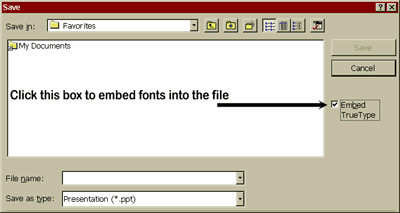
If you do not embed the fonts into the document, when the file is loaded onto another computer, it will look at its list of installed fonts and load fonts with matching names, if it can't find a font, it will substitute another and alert you (usually).
This is a great feature in PowerPointTM. It makes having slides printed by someone else much easier than any other software. Font problems are reduced to a minimum as long as you use TrueType fonts and embed them into the presentation.
But, embedding fonts is not a fool-proof way to avoid problems. If you use fonts in your presentation that are not TrueType fonts, they will not be saved, and when the next computer loads your file, it will try to find a font with the same name in its system and substitute if needed.
There are three basic types of fonts.
Screen Fonts - with filenames ending in fontname.FON
TrueType Fonts - with filenames ending in fontname.TTF
Post Script Fonts - They usually travel in pairs fontname.PFM and fontname.PFB.

Powerpoint files will travel from the presenter's computer to the digital processor's computer best if only TrueType fonts are used and embedded into the presentation when saved. The best thing to do is to start your presentation from the beginning by using only TrueType fonts and embed them. This will yield excellent results no matter whether you us a Mac or a PC.
There are times though when you might want to use a font that is not a TrueType font. In order for your font to be used on a slide, it must be imbedded or your digital processor must have that particular base font file in inventory.
Fonts are considered intellectual property and are copyrighted. It is legal to give your service bureau files with embedded fonts. However, when you can't embed a font, you may want to be aware of the following: Some font manufacturers (known as type foundries) license their font so that you can give a backup copy of it to your service bureau. Others do not. Fonts are licensed on a per computer basis. Manufacturers want a license for each computer which uses their font and offer multiple computer discounts. If you purchase specialized fonts from a type foundry inspect the license and insist that it allow a backup copy to your service bureau.
Fonts used in PowerPointTM are found in the Windows\fonts subdirectory on a Win95 machine and in the System folder on a Mac.