| How do I change the msn background on my messenger? |
| 1.Go to my computer and find your msn messenger folder |
| 2.Find a good GIF image perferible small |
| 3.Save your new GIF image as lvback (LVBACK in lowercase) |
| 4.Close messenger and open again. |
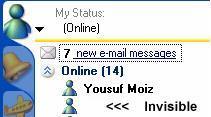
| 1. How do i make my Messenger nickname invisible? |
| Well this is a good little trick one i use my self when i can't think of a name. To |
| pull this of all u have to do is.......Hold down the alt (located on the bottom left of |
| your key board) and type the following on the number keys to the right side of |
| your key board 0160 and there you go your nickname will be blank. For |
| Messenger 5: <ALT> 255 |

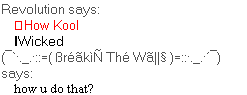
| 2. How to use 2 font colours in the same message |
| Before you type, hold ALT and push 1478 (In the Numpad), then type something |
| then hold SHIFT and push ENTER to go to the next line. Then hold ALT and |
| push 3012, and type something else, then push ENTER to send the message. You |
| won't see the 2nd color until your send the message. |
| (Little Tip! Make sure the font you start with is not Black) |

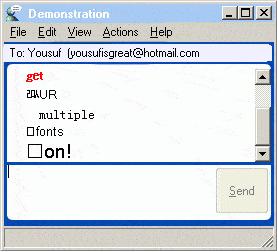
| 4. Multiple fonts & colours in a single message |
| 1) Before starting to type your message, hold ALT while typing 1478. A box should |
| appear. |
| 2) Now enter the first word or part of your message. |
| 3) Hold SHIFT and press enter to skip to the next line |
| 4) Now restart from step 1 to 3 for your other words, but USE OTHER |
| NUMBERS instead of 1478. Some of the possibilities are 25454, 4652, 3012, |
| 3692, 85421, etc. Don't forget to hold ALT while entering them. |
| 5) Finished composing your message? Press ENTER to send. |