
![[Welcome]](/Eureka/5673/welcome.gif)
Diese Seite in deutsch or go to the new Quaderno-Infoworld.
Download the German Quaderno-Manual! (Word 6.0) Complete files of the Personal Accessories (german version):pasystem.zip English version of the PA: paenglsh.zip Polish files for the quaderno: qua_code.zip Italian files for the quaderno: paita.zip New: Spanish PA-Files: pa_sp.zip Utility for switching the quaderno on and off at a time you choose: awake.zip
Bios of the quaderno (parts in german): bios.txt Some txt-files with questions and answers to common quaderno-problems: faq.zip Small program for converting .wav- into .voi-files: wav2voi.zip All the utilities mentioned above and more (omit the pa-files) as one 75kB-file: quadutil.zip A lot of Quaderno-specific software and utilities can be found here.
1. Switch off your Quaderno.
Now anyhing should be working fine!
1. Switch off your Quaderno.
Note: If you use batteries or the original Quaderno-power-pack,
Index
Download-Area
Questions and Answers (Now translated!)
Links
Wanted
Comment and Contact
![[Author]](/Eureka/5673/bahamas.gif)
Welcome at the first homepage exclusively dedicated to the Olivetti-
Quaderno subnotebook. After a long time of unsuccessful internet searches
for ressources for this great computer I decided to build this page and
summarize all the programs, tips and links I found in order to establish
a source for the interested Quaderno-user and a place for questions and hints.
This page is currently under construction. Any program files, tips, documents
or questions refering to the Olivetti Quaderno or its german version
Highscreen Laptalk will be appreciated.
Download Area
(sourcecode included!)
Back to the indexQuestions and Answers
Lost your password?
Although I suggested to open the quaderno in this case up to now, here's a much better way
(thanks to Thomas!):
2. Press and hold the hardware-reset-key (hidden key between the COM and the LPT-ports).
3. Press and hold the multi-function-key (blue-point-key) and the power-key while reset is still pressed.
4. Release the reset-key, but keep the blue-point and the power-key-pressed.
5. Wait for your Quaderno to be started.
6. Release the blue-point and the power-key.
Unable to switch on the COM-Port for serial data transfer?
To enable the serial data transfer between Quaderno and other machines,
you have to switch on your COM-port first.
In order to do so, please use the following steps:
2. Switch on your Quaderno. (Or simply press reset for steps 1+2).
3. While your Quaderno is booting, press [CTRL]+[ALT]+[DEL]+[SHIFT].
Now the Quaderno-Setup-Screen should appear.(If not, try again!)
4. Press [F6] to change to your COM-port settings.
5. Press [SPACE] to switch COM-port on ("enabled") or off ("disabled").
6. Press [ENTER]. Your Quaderno should reboot now with the changed configuration.
you can switch off the COM-port after transferring data for a longer battery life.
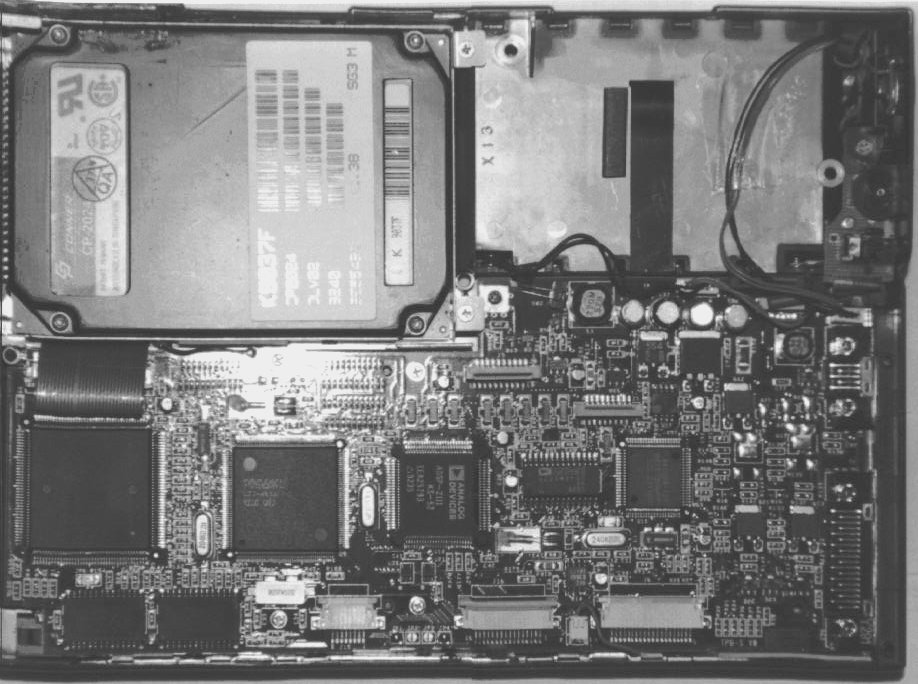
Click here to see the Quaderno-mainboard (JPEG,122kB).
Back to the index
Links
Olivetti Germany: www.olivetti-pc.de
Olivetti Italy: www.olivetti.it
GeoWorks (the great software you see running on the photo): www.Geoworks.com
The page of Hans Olav Elsebų with even more software to download. (Just older than this one, a must-see!)
A french page about little quaderno with some information.
Back to the index
Wanted
If you have any files for the quaderno, please don`t hesitate to mail it to me.
After having checked it for viruses I will upload the files I get as soon as possible.
Especially appreciated will be personal-accessory-files in any language available for
the quaderno. For public questions and answers you are welcome to use my guestbook.
Thank you for your assistance.
I will update this page regularly, so please come back if you like it.
Comment and Contact
online since: 06/05/1997
last update: 11/09/1998
You were visitor No.
copyright 1997  quaderno@usa.net





Get your own Free Home Page
Back to the index