 |
|
 |
| Let me know how you like my tutorials, and feel free to suggest corrections or new topics..... |
 |
| AIM: Aylad2001 |
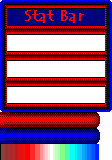
| So far, your script looks something like this: if(playerenters){ toweapons -statbar; } if(hasweapon(-statbar)){ showstats..........; showimg 0,yourimgname,screenwidth-160,64; // These are the values I'll use for my example. The frame will be in the upper-right. changeimgvis 0,4; } By now, you've probably gotten impatient and clicked "Play" and discovered three things: #1 The entire statbar image is shown, rather than just the frame. #2 Hello? It's not measuring anything. #3 When I resize my screen, the frame doesn't move with it. No problem. Let's go ahead and fix #3. Add a timeout command: if(hasweapon(-statbar)){ showstats........; showimg 0,.........; changeimgvis 0,4; timeout=.05; } This will refresh the script every .05 seconds, so when you resize the screen the frame will stay in the right place. Now for #1 (nothing like working in weird order). Put in a changeimgpart command: if(hasweapon......){ showstats............; showimg 0,........; changeimgvis 0,4; changeimgpart 0,0,0,framewidth,frameheight; // for this example, use 112,112; timeout=.05; } Now, #2. Figure out where the upper-left corner of the first blank slot is and add another showimg. For our example, let's say it's at screenwidth-153, 67. if(hasweapon......){ showstats..........; showimg 0........; changeimgvis 0,......; changeimgpart 0,..........; showimg 1,redbluestatbar.gif,screenwidth-153,67; // remember, these values are specific to this example. timeout=.05; } Note that I changed the index of the showimg. You've got to do this to keep the frame and bar displaying as two separate images. Then, add another changeimgvis to move showimg 1 up to drawingheight 4, just like you did with the frame. Add another changeimgpart line to show only the bar: changeimgpart 1,0,112,(playerhearts/playerfullhearts)*100,16; Or, to make it fancier, say you have a unique "tip" on the right end of the bar, and you'd like to show that end ALL the time rather than just when the bar is full: changeimgpart 1,100-((playerhearts/playerfullhearts)*100),112,(playerhearts/playerfullhearts)*100,16; I wouldn't recommend doing this for AP bars that have the "rainbow" of colors, because then it won't show the end of the bar as being the appropriate color. If your bar shows MP, use the following line instead: changeimgpart 1,100-playermp,112,playermp,16; // use 0 if you don't want the "fancy" tip And for AP just change the variable. Since these values are already measured in 100 units, you don't have to convert them to percentages like you do playerhearts. You may see that when the bar is trying to measure '0' (like when your playerhearts=0) the whole image displays instead of hiding the bar. This is easy to fix. Place the "...img..." lines for the bars inside a new 'if' block: if(playerhearts!=0){ showimg................; changeimgvis............; changeimgpart.............; } else{ hideimg 1; // or whatever this bar's index is } So after you've got your first bar in place, just repeat the process for the others. It's no big deal. Here, out of the generosity of my heart, is the finished script for this sample statbar: // NPC made by aylad if (playerenters) { toweapons statbar; } if(hasweapon(statbar)){ showstats 1+2+4+8+16+256+512+1024; showimg 0,redbluestatbar.gif,screenwidth-160,32; changeimgvis 0,4; changeimgpart 0,0,0,112,112; if(playerhearts>0){ showimg 1,redbluestatbar.gif,screenwidth-153,67; changeimgvis 1,4; changeimgpart 1,100-((playerhearts/playerfullhearts)*100),112,(playerhearts/playerfullhearts)*100,16; }else hideimg 1; if(playermp>0){ showimg 2,redbluestatbar.gif,screenwidth-153,93; changeimgvis 2,4; changeimgpart 2,100-playermp,128,playermp,16; }else hideimg 2; if(playerap>0){ showimg 3,redbluestatbar.gif,screenwidth-154,119; changeimgvis 3,4; changeimgpart 3,0,144,playerap,16; }else hideimg 3; timeout=.05; } You're welcome. :) |
 |
|
|