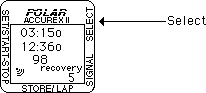
7. Walk back to room 21 along the asphalt and up the driveway. When you reach room 21.
8. Press RED STORE / LAP button
The watch will stop recording for 2 seconds. Lap 5 should appear in the lower right corner. 9. Enter the classroom and sit at a desk.
10. Press SELECT
The watch will stop and the word "recovery" will flash in the lower right hand corner. 11. After 60 seconds the watch will beep.
12. Proceed to the Viewing Data poster.Fill out the Exercise Activity Data Form below following the directions on the Viewing Data Poster.
Activity 1: walking Date: 3/10/01 TZ 00:02oo TZ 00:08oo TZ 00:10oo Average Heart Rate 125 60 30 Splits Time Heart Rate 1 03:00o 90 2 05:000 118 3 06:00o 135 4 04:00o 155 5 6
Activity 1: Date: TZ TZ TZ Average Heart Rate Splits Time Heart Rate 1 2 3 4 5 6