|
Painting animated cartoon tutorial
|
|
by David Rivera | Xsi animator | www.oocities.org/imagindreams2003 | www.imagindreams.com
|

|
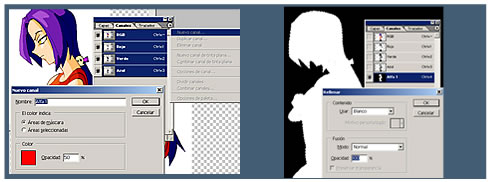
9. Finish coloring Solution: CREATE AN ALPHA CHANNEL. Set yourself on the Black line (color) layer, select the magic wand select the white area, make sure the status bar has the CONTINUOUS check box marked. Once selected hit DEL. Move over to the Light layer and hit DEL again. |
Select magic wand, select the white space, hit DEL
to clear the "white" from color layer and light layer.  |
|||
|
|
||||
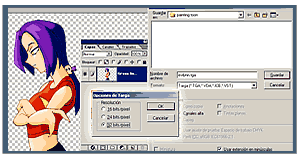
| 10. A matter of taste After presenting you this technique you´re free to go with the one you like the most. I personally like my shadows blurred, and so the lights. Select FLATTEN VISIBLE from the Layer palette SUB MENU (the little arrow). Save as TGA 32 bit. Name it accordingly. IMPORTANT: if you want to Blur your shadow layer, do it AFTER you´ve done the ALPHA CHANNEL. |
 |
|||
|
Evil Lynn is (C)1996-2003 David Rivera. ImaginDreams is (TM)&(C)1996-2003 David Rivera
|
||||