Notice:
Yes,
at on point I had "installers" for Inanequarium themes (a general theme
and then blaster icons). Lacking however, the
knowledge that it was acceptable for me to utilize them in this manner,
I decided to take them off. If it really bums you out, go
hunting
for my email
(yes, its somewhere here online) and email me about it.
Sending
you a
copy should be legal. Legal Notice: I have a tiny
knowledge
of copyright laws. If you feel I have violated your
copyright-
please don't try to sue me. Send me a nice email (go hunting) and
tell
me. I'll get ticked off if you send me letter like the music
industry has been using( you suck so bad we're gonna sue your backside
off because you wrote out the lyrics to a song so suck eggs cause we're
going to get you), so just send an email stating your name
and that you're with so and so company and that you feel that
your
copyright has been infringed. Send me a bit off proof (like,
oh
say, a page with your copyright on it) and I'll gladly remove the
offending material. That being said, the content below should
be
legal.
Theme Nav Menu
Samuria Panda
WoodCarver
Cold Day
Ice Covered Tree
Translucent
Lady on Translucent
Dragons
Oops, this isn't right! Take me to the Nav Menu
Samuria
Panda Theme

This I found on someone else's website. I liked it, and thought I'd share is on a (semi) ad free site.
Download Screenshot
Download Entire Theme
Download the Icon Package alone.
To Use:
I did not create any of the elements in the theme, I just repackaged theme with the icons. If you don't like the icons, just substitute in some others.
Themes Nav Menu
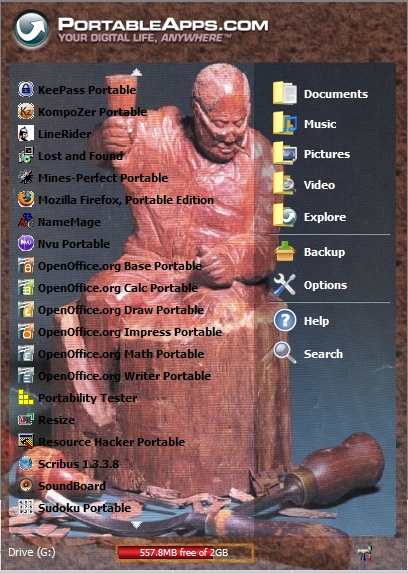
Wood Carver Theme
 I
got this as the cover of a Japan WoodWorker Magazine. I've
always liked it.
I
got this as the cover of a Japan WoodWorker Magazine. I've
always liked it.
Download Screenshot
Download Entire Theme
I'm using the original icons that came with the launcher.
To Use:
I did not create any of the elements in the theme, I just made the background, then packaged the original icons in so the installer would work.
Themes Nav Menu
Cold Day Background

This is a picture I took out the door of my house. That explains the part of the date print on the bottom. I thought it was cool (pardon the pun) and so I turned it into a theme. As you can tell, some of the names blend in a tab, so I would suggest that someone with a good feel (just know the first three icons) for their apps use this. Oh, yeah, THIS IS BLOODY WELL LEGAL CAUSE I TOOK THE FRICKIN" PICTURE!!!!
Download Screenshot
Download the Background
I suggest using the original icons that came with the launcher.
To Use:
All elements belong to myself. Rights to the trees and Sun goes to God.
Themes Nav Menu
Ice Covered Tree Background

This is a picture at my house. I thought it was cool (pardon the pun) and so I turned it into a theme. See above Copyright notice.
Download Screenshot
Download the Background
I suggest using the original icons that came with the launcher.
To Use:
All elements belong to myself. Rights to the tree goes to God.
Themes Nav Menu
Translucent Background
 This is an idea someone posted on the portable app forums. I
wanted to make a translucent background, but the jpg compression
screwed up. They said use a bmp (okay. . .).
Anyway,
somebody said to make the backgorund_top.bmp 406x573. Aha!
This is what I got.
This is an idea someone posted on the portable app forums. I
wanted to make a translucent background, but the jpg compression
screwed up. They said use a bmp (okay. . .).
Anyway,
somebody said to make the backgorund_top.bmp 406x573. Aha!
This is what I got.
Download Screenshot
Download the Background
I suggest using the original icons that came with the launcher.
To Use:
Very observant young one!
This I found on someone else's website. I liked it, and thought I'd share is on a (semi) ad free site.
Download Screenshot

Download Entire Theme
Download the Icon Package alone.
To Use:
- Download package. Extract to drive. This is a .zip package, no additional software is required.
- Open your drive. Select Portable Apps, double click or hit enter.
- Select Portable Apps Menu, double click or hit enter.
- Select App, double click or hit enter.
- Copy in the theme, starting with the "tree" starting at DefaultData.
- If
you wish to try a new theme, just rename the folder with and extra
letter or change the name. When Done, return the folder name
to DefaultData.
I did not create any of the elements in the theme, I just repackaged theme with the icons. If you don't like the icons, just substitute in some others.
Themes Nav Menu
Wood Carver Theme
I
got this as the cover of a Japan WoodWorker Magazine. I've
always liked it.Download Screenshot
Download Entire Theme
I'm using the original icons that came with the launcher.
To Use:
- Download package. Extract to drive. This is a .zip package, no additional software is required. Extract to drive or desktop, depending on your location.
- Open your drive. Select Portable Apps, double click or hit enter.
- Select Portable Apps Menu, double click or hit enter.
- Select App, double click or hit enter.
- Copy in the theme, starting with the "tree" starting at DefaultData.
- You'll just have to drag 'n drop, or copy paste in the folder
that was extracted.
- If you wish to try a new theme, just rename the folder with and extra letter or change the name. When Done, return the folder name to DefuultData.
I did not create any of the elements in the theme, I just made the background, then packaged the original icons in so the installer would work.
Themes Nav Menu
Cold Day Background

This is a picture I took out the door of my house. That explains the part of the date print on the bottom. I thought it was cool (pardon the pun) and so I turned it into a theme. As you can tell, some of the names blend in a tab, so I would suggest that someone with a good feel (just know the first three icons) for their apps use this. Oh, yeah, THIS IS BLOODY WELL LEGAL CAUSE I TOOK THE FRICKIN" PICTURE!!!!
Download Screenshot
Download the Background
I suggest using the original icons that came with the launcher.
To Use:
- Download the background. What your browser will probably do is put the blank theme in a new web page.
- Right click on the picture, then click "Save Picture As . . . "
- Save to the following Directory: (Your Drive name)\PortableApps\PortableAppsMenu\App\DefaultData\Theme.
- Save as "background". If you don't wish to over write the current background that you have, just throw on an extra letter or rename the other background before you save this one.
All elements belong to myself. Rights to the trees and Sun goes to God.
Themes Nav Menu
Ice Covered Tree Background

This is a picture at my house. I thought it was cool (pardon the pun) and so I turned it into a theme. See above Copyright notice.
Download Screenshot
Download the Background
I suggest using the original icons that came with the launcher.
To Use:
- Download the background. What your browser will probably do is put the blank theme in a new web page.
- Right click on the picture, then click "Save Picture As . . . "
- Save to the following Directory: (Your Drive name)\PortableApps\PortableAppsMenu\App\DefaultData\Theme.
- Save as "background". If you don't wish to over write the current background that you have, just throw on an extra letter or rename the other background before you save this one.
All elements belong to myself. Rights to the tree goes to God.
Themes Nav Menu
Translucent Background
This is an idea someone posted on the portable app forums. I
wanted to make a translucent background, but the jpg compression
screwed up. They said use a bmp (okay. . .).
Anyway,
somebody said to make the backgorund_top.bmp 406x573. Aha!
This is what I got. Download Screenshot
Download the Background
I suggest using the original icons that came with the launcher.
To Use:
- Download the background.
- Opens up a zip folder. Save to your flash drive or where ever.
- Extract to the following Directory: (Your Drive name)\PortableApps\PortableAppsMenu\App\DefaultData\Theme.
- Boot
up the PortableApps Menu.
If you wish to use any
of these themes, you must have theming capabilities.
Follow this link
to learn how to do it.
| Portable Apps Navigation Menu | |||
| Hompage | Themes Page | Get the Easy-to -Install Menu | Some Software |
| Why all my links are internal and don't go anywhere else. | |||
| Navigation Menu | |||
| Hompage | Blowgunning | Portable Apps | Downloads |
| Why all my links are internal and don't go anywhere else. | |||
Very observant young one!