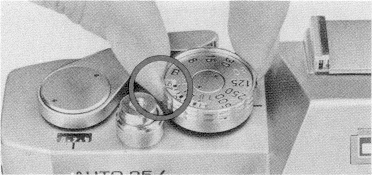
Because every type of film has its own sensitivity or speed (ASA Film
Speed), your camera's electric eye must be set for the film you are using.
Film speeds will be found on the film's instruction sheet.
1.
To set the speed, pull up the outer ring of the Shutter Speed Dial
and turn it until the ASA rating of your film is opposite the 1.8 index
(when using the normal f/1.8 lens) or the 3.5 index (when using
an accessory lens). It is important that you set the speed opposite the index
for the lens you are using. Here are the intermediate speeds on the scale.
2.
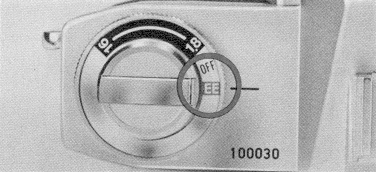
Once the film speed is set, turn the Lens Opening Control Ring to "EE"
for electric-eye pictures. Turn this ring to OFF when the camera is not
being used.
 Software and eBooks for your Palm-powered PDA.