PROJECT
SECME
Project Management Plan
EEL5881 SOFTWARE ENGINEERING FALL 2002
Modification history:
|
Version |
Date |
Who |
Comment |
|
V0.0 |
08/15/00 |
G. H. Walton |
Template |
|
V1.0 |
09/29/02 |
Santhosh Kumar J.Grandai |
Initial Version |
|
V2.0 |
09/30/02 |
|
|
Team Name: TEAM SECME
Team Members:
- Carthik Anand Sharma appcash@yahoo.com www.oocities.org/secmep/carthik.htm
- Juan Carlos Vivanco juan@cs.ucf.edu www.oocities.org/secmep/juan.htm
- Majid Khan majid_kk@hotmail.com www.oocities.org/secmep/majid.htm
- Santhosh Kumar J.Grandai santhu79@hotmail.com www.oocities.org/secmep/santhosh.htm
Contents
of this Document
Tools and Computing Environment
Table of Work Packages, Time Estimates, and Assignments
Plan for tracking, control, and reporting of progress
The
Office of Success Program for Academic Careers in Minority
Engineering and Computer Science Program (MECSP), established in 1986,at UCF
provides support services designed to prepare, recruit and retain ethnic
minority engineering students. The program offers Academic, personal and
Professional development before, during and after their time at UCF. In
conjunction with a variety of governmental agencies, industries and school
systems; the SPACE/MECSP office develop and implement pre-college programs to
assist ethnic minority elementary, middle and high school students to become
academically prepared and aware of career opportunities in engineering, science
and other math based fields by Assisting in the planning, organizing, and implementing
of activities for the Southeastern Consortium for Minorities in Engineering
(SECME) and the Florida Georgia Alliance for Minority Participation
Providing Summer Internship opportunities for Teacher and Student Development
Offering Summer Residential Programs for middle and high school students.
The main task of your
project is to provide a user-friendly and flexible online information system to
help schools to register for the Saturday workshops and annual competition
organized by MESCP. It will also allow the MESCP Organizers to view the updated
data.
- Coding Standard http://java.sun.com/docs/codeconv/html/CodeConvTOC.doc.html
- Document Standard Dr.Walton’s Templates
- Artifact Size Metric Standard http://www.oocities.org/secmep/pages/artifact.html
Our team consists of four persons, viz., Carthik
A.Sharma, Juan Carlos Vivanco, Majid Ali Khan and Santhosh Kumar J.Grandai.
Carthik A.Sharma has taken the responsibility to be the team leader. The other
three persons in the group will work as team members. The team will work in a
democratic manner where every team member will present his ideas for
discussion. However, once a decision has been made, the team leader has the responsibility
to assign tasks to individual team members. All members in the team will be
responsible for updating the group website while team leader will have the
additional responsibility for managing overall hierarchy of the website, and
hence will be webmaster of the project development web page. We decided not to
have separate managers for each artifact or functional chunks. Although the
team leader might assign preparation of some of the artifacts to a particular
team member, each team member will review it, before it being finalized. This
review process will also cover the testing part of the artifact.
Communication will be
handled by scheduled face-to-face meetings, and emails regarding the meetings
and particular duties/responsibilities. We believe that online meetings are not
as efficient and productive as face-to-face meetings.
|
Artifact |
Due Dates |
|
Meeting Minutes |
10/01/02 |
|
Individual Logs |
10/01/02 |
|
Group Project Management Reports |
10/01/02 |
|
ConOps |
10/01/02 |
|
Project Plan |
10/01/02 |
|
SRS |
10/01/02 |
|
High-Level Design |
10/22/02 |
|
Detailed Design |
10/22/02 |
|
Test Plan |
10/22/02 |
|
User's Manual |
11/19/02 |
|
Final Test Results |
11/19/02 |
|
Source, Executable, Build Instructions |
11/19/02 |
|
Project Legacy |
11/19/02 |
We will use Object
Oriented Software development process as we are going to use the
object-oriented paradigm. It includes a Fountain Software Model and tools like
UML to model use cases, class diagrams etc. The process will have following
phases:
- Requirements Phase
- Object Oriented Analysis Phase
- Object Oriented Design Phase
-
Implementation Phase
- Implementation and Integration Phase
- Maintenance
We
will use this process because it supports incremental development and also
allows overlap between different activities. In order to avoid CABTAB (Code a
Bit Test a Bit), we will cover each phase in detail before moving on to the
next phase. We will go back to a previous phase only to enhance or modify some
of the existing functionality.

FIG 1. FOUNTAIN MODEL
The
figure.1 shows he fountain model. You can see the circles representing the
various phases overlap, explicitly reflecting an overlap between activities.
The arrows within a phase represent iteration within that phase. The
maintenance circle is smaller, to symbolize reduced maintenance effort when
object-oriented paradigm is used. So fountain model’s strength is it supports
iteration within phases and parallelism between phases.
Tools and Computing
Environment
Our project involves working in the creation of the database to store the information filled online through a formatted web page and to view the filled information in the format required by the organizer of MESCP. For this process we have planned to use MSAccess as a backend database to store information. We will use Java Server Pages (JSP) and Java Beans for the creation of dynamic WebPages. This will require a Java Development Kit (JDK). We will use JBuilder 4 as development environment. We will use Tomcat 4.0 as our web server.
Configuration Management
We will use Microsoft Visual
Source Safe for version control of all the artifacts and source code. The team
leader (webmaster) will have the responsibility to upload the latest artifacts
to the website.
QA activities will occur
during each phase. Each team member will be taking part in QA activity via the
review process. We will have a thorough
product testing after completion of our product. Each team member will take
part in this procedure by reviewing other member's source code and executing
test cases. All the results obtained from the QA activity will be documented
for future reference. The results of the tests will be maintained in the form
of an individual error log, which will be available online for the reference of
the other team members. During the team meetings, the problems will be open for
analysis and solving.
During the integration
and implementation phase the client will be involved in extensively testing the
user interface, until such time as the requirements for ease of use and access
are met. All modifications that need to be made to the interface will have to
be made before delivery. After delivery, the client (MECSP) will perform
acceptance testing.
The first main potential
risk of the project in the beginning stage is not extracting what the client
really needs. Having 2 or 3 group meetings with the client and changing the
requirements until the client is satisfied with it 100% and approves it manages
this potential risk.
Another
potential risk is the possibility of the system crashing at a critical time.
The only way to manage this risk is to do the registration through fax or
phone, as an alternative in times of network access problems. The MECSP
Organizers should extract and store the up to date information offline to avoid
problems arising from server/network unavailability.
A
potential risk is the unwillingness of the users (school coordinators) to learn
to use the new system. This will have to be addressed by the client, through
proper support and dissemination of information regarding the new system.
Table of Work
Packages, Time Estimates, and Assignments
The project consists of the following steps:
Analysis:
1.
Elaborate the use cases1.
Design:
2. Architectural Design
a.
Design the ER (Entity Relationship)
model (Logical) (10 man hours)
b. Construct high-level class diagrams. (30 man hours)
3. Detailed Design
a. Design Graphical User Interface (GUI) (40
man hours)
b. Design ER Model (Physical) (75 man hours)
c.
Design detailed class
diagrams (Physical) (see use cases)
4. Implementation and
Integration
a. Implement functionality of particular use
cases. (30 man hours)
b. Integrate and test all the modules. (30 man hours)
1 The below are the use cases for, I. The school coordinator a. Registering for annual competition. (3 man hours) b. Registering for workshops. (3 man hours) c. Modifying registration information with respect to: 1. workshop. (3 man hours) 2. competition. (3 man hours) d. Viewing registration information with respect to : 1. workshop. (3 man hours) 2. competition. (3 man hours) e. Sending inquiry to organizer. (3 man hours) II. Signing in a. Organizer. (3 man hours)
b. Coordinator. (3 man hours)
III. MECSP usera. Define annual competition. (3 man hours)
b. Define workshop. (3 man hours)
c. View registered schools’ information. (5 man hours)
d. View summary by Math level. (5 man hours)
e. Whole summary by 1competition. (5 man hours)
f. Summary by School type. (5 man hours)
g. Notify school coordinators about changes/developments in events.
The responsibilities are divided among the team members as follows: Carthik – Use Cases I.d, III.c, III.d, III.e, III.f; Step 4 Juan – Use Cases III.a, III.b, III.g Majid – Use Cases II, I.e; Steps 2.a, 4 Santhosh – Use Cases I.a, I.b, I.c, Step 2.a
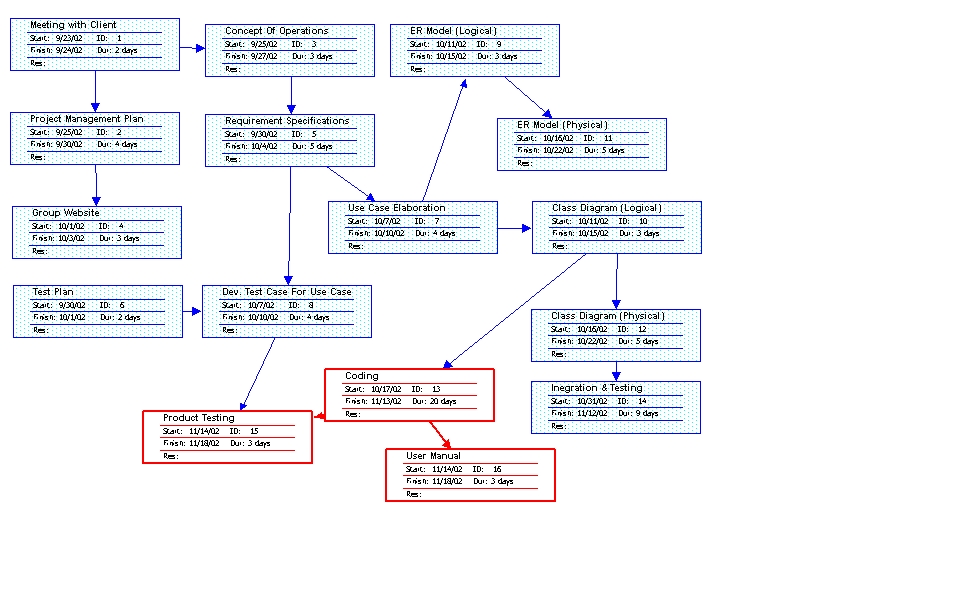
The PERT CHART is shown below.The critical path is shown by red arrows.
Requirements phase :
-
The
total number of requirements is 16.
-
Number
of Requirements changes is 4.
OO analysis and design :
-
Number
of Use cases completed.
Detailed Design :
-
Number
of classes.
-
Number
of methods.
Plan for tracking, control, and reporting of progress
At a minimum, each team member will post the following information weekly: individual time and activity log, individual status information, individual issues and problems, and individual defect log.
Each week, the project manager will: read and analyze the logs; examine the technical content of the work done to date; examine the technical progress metrics; consider the QA results; reassess the potential project risks; and take corrective action if necessary.
The project manager will issue a Project Management Report on the schedule as indicated in the deliverables section above. At a minimum, the Project Management Report will be generated every two weeks and will include the following information: 1 sentence description of overall status, 1 or 2 sentence of any planned changes to the project plan, graph of planned vs actual time, updated PERT chart.
Template created by G. Walton (GWalton@mail.ucf.edu) on March 28, 1999 and last modified on August 15, 2000.
This page last modified by Santhosh Grandai(santhu79@hotmail.com )on October 14, 2002