Contest Entries for Digital Projection
Prepared for Somerset County Photography Club
this page: http://somersetcountyphotoclub.bravehost.com/contests.htm
homepage: http://somersetcountyphotoclub.bravehost.com/index.htm
Introduction (#intro)
Digital entry submissions is covered in detail on this page. Digital entries must be submitted several days before the contest night
to insure that your entries have been received and are ready.
If you have a problem phone me.
Prints are judged separately and you can have four prints, they are brought in
on competition night and must have titles clearly marked along with your name.
Prints should not be the same or similar to the projected contest images.
The following are not provided for directly in the contest software and have to be modified by the administrator so that each members images are together: Show-and-tell, critique, and
our "Three shots" competition. The administrator will assign scores to make
the image arrangement come out as needed. May be in more detail on another page. For such situations, members submit
in the normal manner, but include a number to indicate the order to be shown.
Image Upload - Login (#login)
Digital uploads
The projected image will be 768 pixels on the long side. The contest software
starts with you logging in with your email address and club name. If you
put "Som" into the club box that should fill in "Somerset County Camera Club"
without having to use the drop down.
The upload program has wide latitude in resizing, anything uploaded with a long size
between 700 and 2000 pixels should work fine, but it would be better if you
resized first to 768 pixels on the long size before submitting.
Images must be submitted in JPEG (.jpg, jpeg) format.
If you have not used this software before or want a refresher on
logging in please expand the following (JavaScript must be turned
on in your browser).
Click to see information required to login ►
NOTE: All users must be preregistered, if your login fails
see Registration Contact below).
"Image Upload" is an optional additional feature of PhotoContest Pro and
is licensed on a yearly basis, we
have subscribed for it's use during the 2007-2008 season.
Most club members and inquiries from the summer have been preregistered
so try logging in using the email address that you use
to receive club email from Somerset County Photography Club.
All users will have to request password when using first time
with SCPC, even if you already use this software with another club.
Your email address and club (Somerset County Photo Club) are used to
identify yourself to the software. Once logged on you will see your name
as verification that you are logged in. (Some users may have to use F5 to Reload/Refresh
the screen upon returning to the home page)
Returning users should see their email filled in by the browser,
but will have to select their club each time.
Logging In (#login)
Start at http://www.photocontestpro.com/
where you will see "Login" in the upper right corner.
Once on the login page select "Somerset County Photography Club"
from the dropdown, and your email address.
Browser incompatibility:
Firefox workaround
after use of Login/Logout
use F5 (Reload)
(problem with .NET usage)
|

If you see a message indicating "Password Required" and
"Please enter the master password for the Software Security Device", that
is your browser asking for password you use for your collection
of passwords stored by your browser, and would indicate that you
have already obtained a password, and that password would be filled
in automatically after your email and club have been entered.
Browser incompatibility:
Firefox workaround
after use of Login/Logout
use F5 (Reload)
(problem with .NET usage)
|
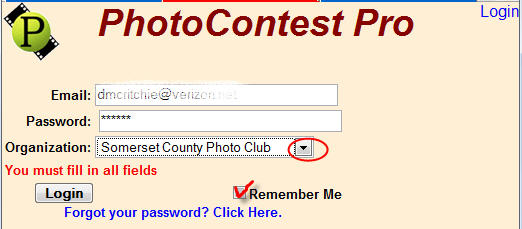
- Enter you email address, which is the one that you
supplied to receive SCPC email.
- Use the Drop down to fill in "Somerset County Photography Club"
- Use the forgot or first time user link
- When you receive your password in your email, enter it
into the dialog, along with your name and club.
- After pressing login button, you should see
your name in upper right corner as shown at right.
- You can now change password to your preference, and you
can enter pictures into competition.
| |
After logging in, the upper-right corner
should show your name and club
as verification of being logged in.
Firefox users will probably have to
use F5 (Reload) until problem is fixed.
Welcome John Winters
Somerset County Photo Club
|
| Set Password
| Logout |
|
|
If you forgot your password, use the "Forgot your password, click here"
wording at the
bottom of the dialog, with your email filled in as well
as "Somerset County Photography Club" using the drop-down.
An automated response
would send your password to your email address (see example on right).
| |
Your PhotoContest Pro website credentials:
Name: John Winters
Email: club_user@example.com
Organization: Somerset County Photo Club
Password: xxxxxxx
You can log into the PhotoContest Pro website at:
http://www.PhotoContestPro.com.
Once you log in, you can change your password to
something you'll remember by clicking on the
"Set Password" link on the top right of the page.
|
All users must be preregistered.
If you get the following message send request with THIS LINK to register for
use with the Somerset County Photography Club.
Unregistered Email. Please contact your organizations PhotoContestPro contact person.
Once logged in you can enter your pictures (#entry)
Once logged in you can enter your pictures.
◄hide most of the login information
|
Firefox usage problems (#problems)
additional information for
users of the Firefox browser ►
This may not affect many Firefox users, but it certainly affected
my use, so this is what I have (D.McRitchie)
Bypasses for Firefox when problem occurs:
Use F5 if after logging in you don't see the dialog for entering images, or if after
logging out it doesn't look like you've logged out.
The second bookmark should get you directly to password entry when that gets stuck.
As a Firefox user you can use a Keyword shortcut to quickly reference a bookmark directly from the location bar.
Keyword: Url:
contest: http://www.photocontestpro.com/
contest:1 http://www.photocontestpro.com/login.aspx?ReturnUrl=%2f1%2fBounce.aspx
◄hide additional information for
users of the Firefox browser
Image Upload Service (#upload)
The Somerset County Photography Club has subscribed to the Image Upload Service
at an additional charge to allow individual members of our club to upload their own images into a contest. This removes all the tedium that the contest coordinator has to go through collecting the images and entering them and the image information into PhotoContest Pro, and because we can't waste time at the meeting to load digital images.
Image Upload Service for Photographers
(#uploadimages)
This procedure is available to all members of a club who have been entered on the website by the contest coordinator.
More complete login instructions can be expanded in the login section
above and should be read at least once by all members.
The first thing you will need to do is go to the PhotoContest Pro website at http://www.PhotoContestPro.com. Log in by clicking on Login on the upper right corner of the screen. You will be asked for your email and password. If you don’t know your password (this is your first time or you forgot it), click on the appropriate link to get it. Once you have your password, you should reset it to something that you’ll remember. Click on Set Password on the upper right corner of the screen to set your password.
Once you are logged in, you will be presented with a screen listing all the open contests for your club.

(Sorry about the changes in topics and photographer between these examples,
hope it is clear how to work through the panels)

Click Browse on the Right-hand side of the screen to open your Image Explorer and locate your image. Note that images must be jpeg format and should be sized as per the instructions given by your contest coordinator.
768 on Long Side The upload program has wide latitude in resizing, anything uploaded with a long size between 700 and 2000 pixels should work fine, but it would be better if you resized first to 768 pixels on the long size before submitting. Images must be submitted in JPEG (.jpg, jpeg) format.
Fill in the Title of your image. Your name and Organization will be automatically filled in. If you are entering images for another person, you can change the name and/or organization. Be careful to get this information correct as title will be displayed along with your image during the contest, and the photographer's name
will be used in reporting winners.
Click the Upload button and wait for the upload to complete. This may take a few minutes depending on the speed of your internet connection.
Once you’ve uploaded one or more images, you will see that they are listed on the screen. You can get a small preview of the image by clicking on the Show link.
Delete an image by clicking the Delete link.
To change the Photographer or Title, delete the image and upload it again.
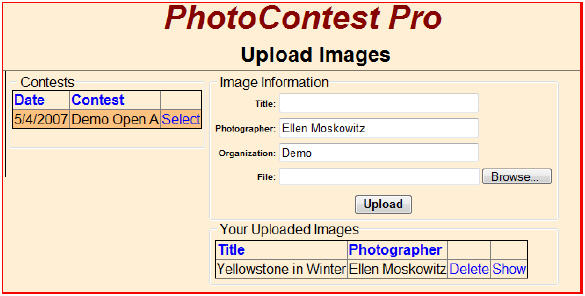
Note that only images that you have uploaded will be displayed here. You will not see images that others have uploaded, even if they are yours or images that you have given directly to the contest coordinator.
Information on this page was extracted from the User Document portion (page 30-31)
of
PhotoContestPro Documention (PDF file). What you need to load images for contests has been included on the page you are already looking at.
notes for future ►
(click once more to rehide)
Cheat Sheet during contest (#cheatsheet)
| Computer In (on projector) c:\contest |
| Key | Function |
| Esc | Cancel |
| H | Show this help |
| Numbers 4-9 | Score image (single digit score 0-9) |
| A | Assign award to the image |
| D | Disqualify image |
| Backspace | Backspace to fix score |
| T (toggles title) |
Show/Hide Image Title, photographer, score |
| Enter, Spacebar | Next image |
| Arrow keys | Previous/Next image |
| V | Show/Hide image thumbnails |
| (10% of Total Number of Slides get HM) |
Notes for possible inclusions (#notes)
http://www.photocontestpro.com
 $75 per club (one time license charge)
 $40 per year for updating service

My files for this are in
 xtra                folder for stuff that might be shared
   photocontestpro   folder with program
   scpc                folder for packaged contests (results)
    contests
     scpc2007-07-15.pcp   simulated contest (file, save contest as package)
    exhibits

   samp_pics           folder for testing contest

contest is stored in
 C:\Documents and Settings\Administrator\My Documents\PhotoContestPro
   XXXXXXXX-XXXX-XXXX-XXXX-XXXXXXXXXXXX
     pictures
       pictures with hash names and corresponding xml file with descriptions
   AppSettings.xml


Create a  contest.bat   comprised of
  c:\xtra\photocontestpro\PhotoContestPro.exe


//////////////////////////////////////////////////////////////

The following will not be on the website but will give you an idea about
competition/presentation and/or scoring.

The only problem I see is the
first meeting where pictures should be for the same maker all together.
and in Jan for the 4 sets of  "Three shot" competition where the three shots
must be projected in sequence not all mixed with all other entries.
For the critiques no sorting would be preferred.


Each contest has it's own awards so for us it would be
1st, 2nd, 3rd, HM,  8pts
cutoff date  Sunday before contest.
Critique only would be a separate contest with no scoring

each submitter can only see their own slides when submitting online.

At meeting:
Program has review (slide show), and scoring mode
Scoring unlimited rounds for additional judging on a slide  like  8pts first time, 1 for IN next time
winners are arranged in order,   at any point a slide an be given an award (this one will be first),

Title stays on screen for specified time (5 seconds)
after scoring,  winners are shown in reverse scoring order
Title, maker, other fields available  like club name if it were Federation
Scoring sheets can be shown,  printed,  formatted as text, Excel.

Slides will fit into a square so that landscape will have
same dimensions on screen as portrait.

The title can be recalled "T"  as a toggle during presentation.


--
David McRitchie  732-469-8481
◄hide Add Settings controls